What to check before buying
Establish the required software platform first, then assess local workload capacity and how the laptop will behave at a shared desk.
| Concern | Buying checks | Who this matters to |
|---|
| Local workload capacity |
Check configured memory and SSD capacity against concurrent applications, local data and retained traces; establish whether the bottleneck is actually local. |
When the script, development tools and trace viewer run together, I need room to keep working during analysis. Around 38% of consumers put local workload capacity first. |
| Operating system and profiler |
Confirm the runtime, native dependencies, profiler and any container or virtual-machine requirements. Microsoft Learn describes WPR and WPA as Windows tools. |
If a required tracing tool or dependency will not run, more hardware capacity cannot rescue the workflow. For around 37% of consumers, compatibility is the primary concern. |
| Shared-office use |
Assess the desk setup and check fan behaviour with a representative sustained run on the intended configuration. |
Working near colleagues, I need to analyse traces without an unsuitable desk position or unexpected fan disruption. Shared-office usability comes first for around 25% of consumers. |
Joybuy product choices
These Windows and Mac laptop configurations offer different starting points for local profiling. Check your software requirements first, then compare the listed memory and storage with your workload; none should be selected on an assumption of quiet operation.
 No image available
ASUS ProArt P16 H7606WW-SE006W, 64GB RAM, 2TB SSD
Consider this configuration for local traces and concurrent development tools if your workflow runs on Windows 11 Home.
The product name specifies a Ryzen AI 9 HX 370, 64GB RAM, a 2TB SSD and a 16-inch 4K OLED touchscreen.
Confirm profiler and dependency compatibility, and check fan behaviour during a sustained run.
View on Joybuy
 No image available
Lenovo Legion Pro 7 16IAX10H 83F5000UUK, 64GB RAM, 2TB SSD
Consider this Windows configuration when local profiling involves several applications or substantial stored traces.
The product name specifies an Intel Core Ultra 9 processor, 64GB RAM, a 2TB SSD, a 16-inch display and Windows 11 Home.
Check that your profiler and dependencies run on this operating system, and assess fan behaviour under your workload.
View on Joybuy
 No image available
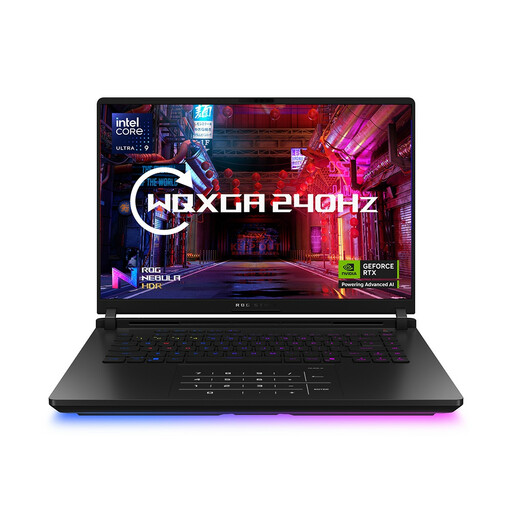
ASUS ROG Strix SCAR 16 G635LW, 64GB RAM, 2TB SSD
This is another Windows option to assess if memory for concurrent tools and local trace storage are priorities.
The product name specifies an Intel Core Ultra 9 processor, 64GB RAM, a 2TB SSD, a 16-inch WQXGA display and Windows 11 Home.
Confirm the exact configuration, required software compatibility and fan behaviour. Do not base a profiling decision on the graphics specification without confirming it.
View on Joybuy
 No image available
Apple MacBook Pro 16.2-inch M5 Max, 48GB unified memory, 2TB SSD
Consider this model only for a profiling workflow confirmed to support macOS and Apple silicon.
The product name specifies an 18-core CPU, 48GB unified memory, a 2TB SSD and a 16.2-inch display.
Check runtime, native dependencies and profiler support, as well as fan behaviour during sustained profiling.
View on Joybuy
 No image available
Apple MacBook Pro 14.2-inch M5 Pro, 24GB unified memory, 2TB SSD
This smaller-screen Mac configuration is worth assessing if the complete profiling workflow supports macOS and Apple silicon.
The product name specifies 24GB unified memory, a 2TB SSD and a 14.2-inch display; check whether that memory capacity suits your concurrent workload.
Confirm what power adapter is included, and assess screen setup and fan behaviour for longer sessions.
View on Joybuy
Frequently asked questions
Do I need a workstation GPU to profile a slow script?
Choose a discrete GPU for profiling only if your script or tracing workflow uses GPU compute or graphics acceleration. The Python Software Foundation’s documentation describes standard deterministic profiling in terms of program execution frequency and duration; it does not establish a GPU requirement for that task.
Which operating system should I choose for Windows Performance Recorder?
Choose Windows if Windows Performance Recorder and Windows Performance Analyzer are required. Microsoft Learn describes that Windows recording and analysis workflow; for any other profiler, confirm its operating-system and dependency requirements before choosing a laptop.
How can I limit disruption during profiling in a shared office?
Check fan behaviour during a representative sustained profiling run on the intended configuration. Lenovo Support notes that high CPU use can make a ThinkPad fan run faster and produce noise, so a specification sheet alone is not a quietness test.
Does desk setup matter if I use a laptop for trace analysis?
Yes: assess the whole workstation when long sessions make the laptop-only position unsuitable. The UK Health and Safety Executive’s display-screen guidance covers fixed, mobile and hot-desk work; screen position and separate input devices may need attention.
What should I check before using a replacement laptop charger?
Check compatibility with the laptop and that the charger is suitable for the intended UK use. A UK Office for Product Safety and Standards report dated 15 September 2026 identified a specific 45W charger with dangerous plug-pin dimensions; it does not establish that all replacement chargers have that fault.


