What should you check before buying?
Confirm your analysis software and file workflow first, then decide how much built-in screen and keyboard space your desk allows. Finally, check connections and any rules for handling respondent data.
| Concern |
What to check |
Who this matters to |
| Software and working capacity |
Confirm the operating system, required add-ins and licence; assess RAM and free SSD space for your combined workload. IBM notes that SPSS temporary-file needs vary with file size and procedure. |
If I use statistical software alongside spreadsheets, I need the whole workflow to run and enough room for working files. Around 36% of consumers put software compatibility and analysis capacity first. |
| Desk space and keyboard |
Compare the laptop’s actual width and depth, screen size and keyboard layout; check whether a detachable keyboard is included. |
On a crowded desk, I want a compact machine without making sustained data entry awkward. Roughly 29% of consumers make that balance their primary concern. |
| Monitor and peripherals |
Check the exact laptop’s display-output capability and the connections needed for your monitor, storage and input devices. |
I can keep the laptop compact if it connects to the larger display and devices I use at my desk. For around 21% of consumers, that expansion is the first priority. |
| Questionnaire data protection |
If responses contain personal data, check your organisation’s local-storage policy, secure sign-in and suitable encryption and backup arrangements. |
When identifiable responses are on my laptop, I need its setup to fit the rules for handling them. Roughly 14% of consumers place that protection first. |
Joybuy laptops for these workflows
These laptops include compact Windows and macOS models for small desks, plus a larger-screen Windows option. Choose by the software and connections your analysis requires, not screen size alone; the 15.6-inch model needs especially careful consideration of desk space.
 No image available
ASUS Vivobook 14 X1407QA-LY003W Copilot+ PC, Snapdragon X, 16GB, 512GB SSD, Quiet Blue
Consider this 14-inch laptop for a compact desk if your required analysis applications, add-ins and institutional tools work with its Snapdragon X processor. The listed configuration has 16GB RAM and a 512GB SSD.
Joybuy
 No image available
Apple 13-inch MacBook Air (2026), M5 10-core CPU and 10-core GPU, 16GB, 1TB SSD, Sky Blue
This 13-inch model is a compact option if your analysis software, spreadsheet add-ins and institutional licensing work on macOS. Its listed configuration has 16GB unified memory and a 1TB SSD.
Joybuy
 No image available
Apple 13-inch MacBook Air (2026), M5 10-core CPU and 8-core GPU, 16GB, 512GB SSD, Midnight
This 13-inch configuration suits a small-desk macOS workflow once every required application, add-in and licence has been checked. It pairs 16GB unified memory with a 512GB SSD; confirm that capacity covers your working files.
Joybuy
 No image available
ASUS ZenBook UX3404VC-M3130W, 14.5-inch OLED touchscreen, Core i9, RTX 3050, 16GB, 1TB SSD
Consider the 14.5-inch touchscreen if you want more built-in screen area for questionnaire work and have space for its footprint. The title lists 16GB RAM and a 1TB SSD; confirm the ports and external-display capability against your desk setup.
Joybuy
 No image available
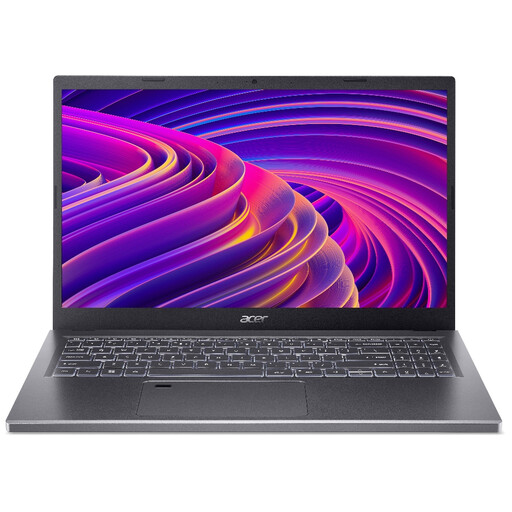
Acer Aspire 5 A515-48M, 15.6-inch Full HD, Ryzen 5 7530U, 16GB, 512GB SSD, Silver
The 15.6-inch screen is worth considering if built-in display size matters more to you than minimising the laptop’s footprint. The title lists 16GB RAM and a 512GB SSD; confirm that the model and configuration are A515-48M before buying, as the accompanying description also names A515-45.
Joybuy
Common questions
Is 8GB RAM enough to analyse questionnaire results?
It may be enough for a lighter workflow, but check everything you will run at once rather than choosing by one application’s minimum. Microsoft lists 4GB RAM as a Microsoft 365 minimum for Windows and Mac; if you also use large spreadsheets, browser tabs or statistical software, 16GB is a practical purchasing target, not a universal requirement.
Should I choose Windows or macOS for questionnaire analysis?
Choose the operating system supported by your complete software and institutional workflow. Microsoft publishes Microsoft 365 requirements for both Windows and Mac, and IBM includes Mac desktop-client requirements for SPSS, but you still need to confirm your particular add-ins, templates, licences and other analysis tools.
Does a laptop holding questionnaire responses need encryption?
Encryption is not automatically required for every file. The Information Commissioner’s Office says UK GDPR requires security appropriate to the risk and identifies encryption as a possible measure; if responses contain personal data, follow your organisation’s policy on local storage, access, backups and encryption.
What should I do with an old laptop used for questionnaire data?
Remove stored questionnaire data in line with your organisation’s disposal policy, then use an appropriate electrical-waste collection or retailer take-back service where offered. GOV.UK identifies the UK Waste Electrical and Electronic Equipment Regulations 2013, as amended, as the legislation underpinning electrical-waste handling.


