For estimates, schedules, documents and video calls, start with a portable laptop that suits the team’s connections and security arrangements. If the work regularly involves substantial CAD, SketchUp or Revit models, choose against the exact software requirements instead; Autodesk specifies Windows for Revit 2026, while it documents AutoCAD for Mac separately.
Who is this for?
3D renovation planners
If you create or repeatedly review CAD, SketchUp or Revit models, establish the application, version and typical model complexity before choosing a laptop. Operating-system, graphics and memory requirements matter more here than the general description “renovation planning”.
Shared-project coordinators
If you manage quotes, schedules, plans and meetings from a shared workspace, check the laptop’s call and display connections alongside account controls. Where the project involves personal data, the Information Commissioner’s Office advises security measures appropriate to the circumstances and risk.
Mobile site-to-desk planners
If you carry documents and visual references between locations, compare the weight, display and connections of the exact configuration. Confirm design-software requirements before letting portability decide the purchase.
What matters when choosing?
Portable Windows laptop
Choose when: Most work involves documents, estimates, browser tools, PDFs and calls.
Trade-off: Do not assume an everyday configuration meets desktop SketchUp’s recommended graphics specification or a future CAD workload.
Windows mobile workstation
Choose when: Regular CAD or BIM work makes professional-application requirements central, particularly if you must run Revit directly.
Trade-off: A workstation family name does not establish what a particular configuration can run; compare it with the software vendor’s requirements.
Mac laptop
Choose when: Every required application and plug-in has a confirmed macOS workflow, such as Autodesk’s separately documented AutoCAD for Mac.
Trade-off: Autodesk lists Windows in Revit 2026’s entry-level requirements, so confirm the team’s Revit workflow before choosing macOS.
Start with the software the team will actually use, then assess information security, meetings and carrying needs for the selected configuration.
| Concern |
Buying checks |
Who this matters to |
| Software and 3D models |
Check each application, version and plug-in against the exact operating system, graphics and memory configuration. SketchUp recommends discrete graphics; Autodesk specifies Windows for Revit 2026. |
If I will edit or repeatedly review CAD or BIM models, an otherwise convenient laptop is little use unless it runs the required tools. Around 33% of consumers put software and 3D-model capability first. |
| Privacy and continuity |
For locally stored project information, check encryption availability, separate accounts and recovery-key ownership. Microsoft says Device Encryption availability depends on the Windows device and configuration. |
When project information moves through a shared workspace, I need controlled access and a way to recover my files if the device is lost. Protecting information and continuity comes first for around 27% of consumers. |
| Meetings and plan reviews |
Confirm the camera, microphone, external-display connections and network options on the chosen configuration. |
If I regularly discuss drawings on calls or show them to colleagues, I need a setup that works for those meetings. Collaboration is the primary concern for around 20% of consumers. |
| Portable everyday planning |
Compare the actual weight, display and ports after deciding whether the work is document-led or requires design software. |
If my day is mostly estimates, schedules and documents across locations, I would rather assess carrying and everyday use than buy specialist capability without a defined task. Around 20% of consumers prioritise portable planning. |
Buying pitfalls
-
Buying for “renovation” rather than the software
A laptop suited to PDFs and spreadsheets may not meet a design application’s operating-system or graphics requirements. Autodesk’s Revit 2026 requirements and SketchUp’s graphics recommendations illustrate why the tasks need separating.
List the applications, versions and plug-ins the team will use, then compare their published requirements with the exact laptop configuration.
-
Treating a workstation range as one specification
Graphics, memory and other components can differ between configurations in the same range. A family name alone cannot establish suitability for a particular model or application.
Use the full configuration details to check the components your workflow requires, rather than relying on the range name or product image.
-
Assuming encryption and recovery are already arranged
Microsoft says Windows Device Encryption depends on device prerequisites and account setup. Encryption also does not replace decisions about who can access shared project files or hold a recovery key.
Check support on the chosen device, establish recovery-key ownership and follow the organisation’s account and device-management process.
-
Choosing macOS before checking design tools
Autodesk documents AutoCAD for Mac, but lists Windows in Revit 2026’s entry-level requirements. Those are different application routes, not interchangeable versions of one workflow.
Confirm the required applications, plug-ins and file-sharing arrangements before committing the team to an operating system.
Brands to consider for workstation workflows
Lenovo
Lenovo positions its ThinkPad P Series as mobile workstations for professional applications. Consider the range if a confirmed CAD or BIM workflow calls for workstation features away from a fixed desk.
- Lenovo UK describes the P Series as having independent software vendor certification for major applications.
- Certification and hardware must be checked for the exact model, configuration and application; the range description is not a guarantee for every workflow.
Dell
Dell positions Pro Precision mobile workstations for professional applications. They are a range to examine when the team has identified a specific CAD or design workload.
- Dell describes the range as optimised for professional applications.
- Compare the selected configuration with the current requirements of the application you intend to run; a range-level claim does not establish compatibility.
HP
HP describes different ZBook tiers for work ranging from architectural layouts and design reviews to more demanding 3D and BIM tasks.
- HP positions ZBook 8 G2i for light 3D modelling, design reviews and architectural layouts.
- These are HP’s descriptions of intended use, not independent performance results. Check the exact graphics, memory, operating system and connections against the planned work.
Joybuy laptops for renovation planning
These laptops cover document-led planning and Windows options with dedicated graphics. A dedicated GPU alone does not make a gaming or everyday laptop a certified mobile workstation: check your application’s requirements before choosing one for CAD or BIM work.
 No image available
Lenovo LOQ Essential 15ARP11 gaming laptop, Ryzen 7 170, RTX 5050
Consider this Windows laptop if renovation planning includes graphics-led work, but check the exact application requirements and any professional certification needed.
The listed configuration has 16GB RAM, a 1TB SSD and a 15.6-inch 144Hz FHD display. Its gaming-laptop identity should not be mistaken for mobile-workstation certification.
Joybuy
 No image available
ASUS Vivobook 15 X1504VA, Core 5 120U, 24GB RAM, Cool Silver
Consider this model for document-led planning, estimates and schedules; check separately before relying on it for desktop 3D software.
The listed configuration includes a 15.6-inch display and 1TB SSD.
Joybuy
 No image available
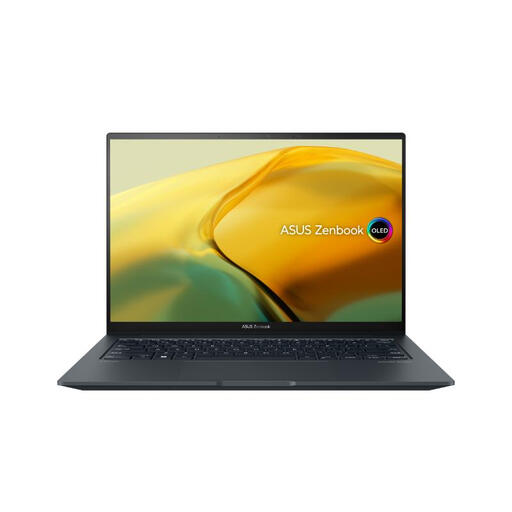
ASUS ZenBook UX3404VC-M3130W, 14.5-inch OLED, RTX 3050
Consider this Windows model if you want a touchscreen alongside a dedicated GPU for planning work, but confirm the RTX 3050 configuration against each design application’s requirements.
The listed variant has an Intel Core i9, 16GB RAM, a 1TB SSD and Windows 11 Home. These details do not establish professional-application certification.
Joybuy
 No image available
Lenovo IdeaPad 1, Ryzen 3 7320U, 15-inch, Cloud Grey
Consider this model for documents and web-based renovation planning, provided the team’s required applications can be used with its stated Windows 11 Home in S Mode configuration.
It is listed with 8GB RAM, a 128GB SSD and a Full HD display. Check whether that storage capacity suits the files you plan to keep locally.
Joybuy
 No image available
Acer Aspire Lite AL15-36P-C29Z, Intel N150, Silver
Consider this model for document-led planning and calls rather than assuming it meets the requirements of 3D design software.
The listed configuration has a 15.6-inch Full HD display, 8GB DDR4 RAM, a 128GB SSD and Windows 11 Home. Check local storage needs and the installation requirements of any planned applications.
Joybuy
Frequently asked questions
Do I need Windows to plan a renovation?
Not for documents and coordination alone, but choose a supported Windows configuration if you must run Revit 2026 directly. Autodesk lists 64-bit Windows 10 v1809 or later, or Windows 11, in its entry-level Revit requirements and documents AutoCAD for Mac separately. Check the exact program and version your team uses.
What graphics should I look for if I use SketchUp?
Compare the laptop with SketchUp’s requirements for the version you intend to use. SketchUp recommends a discrete graphics card and a modern GPU with at least 8GB of graphics memory; those recommendations should not be treated as requirements for renovation work that never uses desktop SketchUp.
How should we handle encryption in a shared workspace?
Check the chosen device’s encryption support and decide who controls its recovery key and user accounts. Microsoft says Windows Device Encryption depends on the device and configuration; where personal data is processed, the Information Commissioner’s Office says security measures should suit the circumstances and risk. Encryption alone does not settle the organisation’s security obligations.
Does a workstation name guarantee CAD compatibility?
No. Lenovo, Dell and HP describe workstation ranges, while compatibility depends on the selected configuration and the application and version you will run. Check the operating system, graphics, memory and any required application certification for that exact combination.


