What matters when choosing?
Start with the laptop format that fits where you work, then check the software and everyday workspace you will actually use.
Compact everyday laptop
Consider it when: you update the budget at home but also carry it to meetings or the renovation property.
Trade-off: a smaller screen leaves less room for a quote beside a spreadsheet.
Larger everyday laptop
Consider it when: you regularly compare PDFs and spreadsheets at a desk or table.
Trade-off: the larger format may be less convenient to carry; check the exact dimensions and weight.
Convertible 2-in-1
Consider it when: you have a use for reviewing documents in tablet or stand mode away from a desk.
Trade-off: flexible modes do not replace a comfortable keyboard for sustained budget entry. Lenovo and ASUS describe convertible models in their ranges.
| Concern | What to check | Who this matters to |
|---|
| Spreadsheet comfort |
Compatibility with your spreadsheet application; keyboard comfort and usable screen space. |
If I keep revising costs as quotations arrive, I need a setup that makes repeated entries manageable. Around 42% of consumers put comfortable budget work first. |
| PDF workspace |
Screen size and resolution; whether your chosen PDF software covers the tasks you need. |
When plans and invoices need checking against a budget, I want enough room to read both without constantly switching views. Roughly 33% of consumers prioritise document handling. |
| Portability |
Exact weight and dimensions; charging arrangements and connections for your peripherals. |
If I take updated figures to the property or appointments, I need a laptop I am willing to carry. About 25% of consumers make portability their primary concern. |
Brands to consider
These ranges offer formats relevant to renovation paperwork; features vary by model and configuration.
Lenovo
The IdeaPad range includes conventional laptops and convertible formats relevant to spreadsheet and PDF work.
- Lenovo describes IdeaPad Slim models as thin and light, and its 2-in-1 models as usable in laptop, tablet, stand or display modes.
- Check the chosen model’s operating system, ports and upgrade access; Lenovo says storage and memory upgrades apply to some configurations, not the entire range.
ASUS
Vivobook includes conventional everyday laptops and Vivobook Flip convertible models.
- The range offers different screen-size and format choices for desk-based or mobile paperwork.
- Check display, battery and performance details for the exact Vivobook variant rather than applying range-wide descriptions to it.
Acer
Aspire includes everyday laptop families such as Aspire Go and convertible Aspire Spin models.
- Acer lists conventional, larger-screen and convertible configurations within the Aspire range.
- Ports, battery and other features need checking on the particular Aspire configuration you are considering.
Joybuy laptop choices
These larger-screen laptops are options for managing renovation spreadsheets and documents, particularly when you work at a desk. Check each configuration against your software, storage and carrying needs.
 Image unavailable
ASUS Vivobook 15 X1504VA, 15.6-inch, Core 5 120U, 24 GB, 1 TB SSD, Cool Silver
Consider this configuration if you expect to keep a substantial collection of renovation files locally and work mainly on a larger screen.
The product name specifies an Intel Core 5 120U processor, 24 GB memory and a 1 TB SSD. If you enter costs for long periods, check the keyboard layout and feel; confirm working battery runtime if you will use it away from a desk.
Joybuy
 Image unavailable
Lenovo IdeaPad Slim 3 15IAH8, 83ER00G4UK, 15.6-inch, Core i5, 8 GB, 512 GB SSD
Consider this larger-screen format if you usually review quotes and update the budget at a desk.
The product name specifies an Intel Core i5 processor, 8 GB memory and a 512 GB SSD. Check keyboard comfort for extended entries, and confirm working battery runtime before relying on it during visits away from a power socket.
Joybuy
 Image unavailable
Lenovo IdeaPad Slim 3 83K7009MUK, 15.3-inch WUXGA, Ryzen 5 7535HS, 24 GB, 512 GB SSD
This configuration is worth considering if you want a larger display for budget entries and document review.
The product name specifies an AMD Ryzen 5 7535HS processor, 24 GB DDR5 memory, a 512 GB PCIe SSD and Windows 11 Home. Check the connections required by your peripherals and the expected battery runtime before choosing it for work away from a desk.
Joybuy
 Image unavailable
Acer Aspire Lite AL15-36P-C29Z, 15.6-inch Full HD, Intel N150, 8 GB, 128 GB SSD
Consider this format if you want a larger screen but expect to keep a modest amount of renovation paperwork on the laptop itself.
The product name specifies an Intel N150 processor, 8 GB DDR4 memory and a 128 GB SSD. Check whether that storage capacity suits your files and whether your intended spreadsheet and PDF applications work with this model’s stated Windows 11 Home in S Mode configuration.
Joybuy
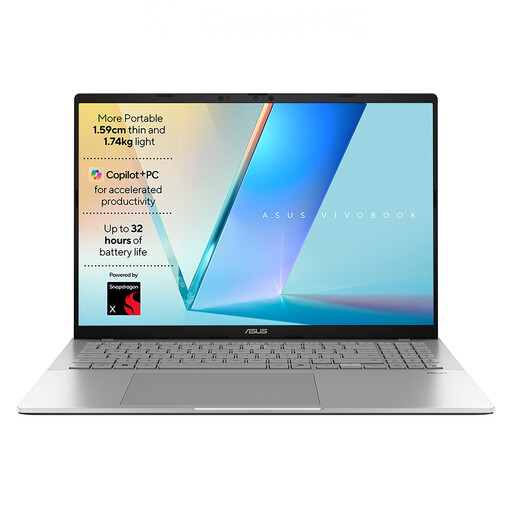 Image unavailable
ASUS Vivobook S3607QA-PL004W, 16-inch WUXGA, Snapdragon X1-26-100, 16 GB, 512 GB SSD
Consider this larger-screen option if you expect to compare renovation documents at a desk.
The product name specifies a Qualcomm Snapdragon X1-26-100 processor, 16 GB LPDDR5x memory, a 512 GB SSD and Windows 11 Home. Confirm compatibility with your intended software and peripherals, and check weight, keyboard comfort and working battery runtime if you will carry it regularly.
Joybuy
Common questions
Do renovation budgets and PDFs require a high-performance laptop?
Ordinary spreadsheet and PDF work alone is not a reason to choose specialist gaming or creative-work hardware. Microsoft lists 4 GB RAM for 64-bit Windows Excel, while Adobe lists 2 GB RAM for 64-bit Windows Acrobat Reader; these are software minimums, not a measure of comfortable multitasking. Check the exact laptop’s screen, keyboard and storage for your workload.
Will a new laptop include spreadsheet software?
Do not assume Excel is included. Microsoft offers a separately sold Excel Home edition for non-commercial use on one PC or Mac, as well as Excel for the web. Check which version meets your needs and what, if any, software comes with the laptop.
Is a Windows 10 laptop a sensible choice for this job?
Check its support and upgrade options before buying it for ongoing renovation paperwork. Microsoft says Windows 10 support ended on 14 October 2025, so a device that still runs it should not be mistaken for one receiving standard support.
Can the laptop tell me which renovation approvals I need?
No; it can help organise the budget and documents, but approval requirements depend on the work and its location. Planning Portal provides project-specific guidance on planning permission, permitted development and building regulations; check the relevant guidance and local authority requirements before committing to work.


