Campus-to-library writer
If you carry a laptop between study locations, balance screen comfort with carrying ease. Heriot-Watt University advises considering both when choosing a student computer.


Choose the operating system and purchase route only after checking your reference manager, writing software and course-specific requirements; Zotero and LibreOffice publish their own software requirements, while institutional support can differ. A refurbished business laptop can suit a value-focused buyer if the exact unit’s battery, charger, condition, software support and seller terms meet daily travel needs; a new entry-level model gives you a specified new configuration, but its display, ports and battery claims still need checking. Linux can run Zotero and LibreOffice, but Loughborough University says it does not support Linux devices, so check your own institution’s position.
If you carry a laptop between study locations, balance screen comfort with carrying ease. Heriot-Watt University advises considering both when choosing a student computer.
If you use Zotero with a word processor, check the software requirements as well as your course’s technology guidance. Zotero lists requirements for its LibreOffice integration.
If you are considering an older business laptop, check the exact unit’s battery, charger, software support and seller terms. GOV.UK also advises checking second-hand products for safety recalls.
Check course and software requirements first, then weigh everyday carrying and writing comfort against the condition and terms of a refurbished unit.
| Concern | What to check when buying | Who this matters to |
|---|---|---|
| Writing and reference-software compatibility | Confirm course requirements with your institution and check the operating-system and version requirements for Zotero and LibreOffice. Zotero lists LibreOffice 5.2 or later for its word-processor plugin, with Java requirements that vary by platform. | If my course depends on a working citation workflow, I want both applications and any required institutional software to be supported. Consumers who put software compatibility first account for around 30% of this decision. |
| Portability and time away from power | Compare the exact model’s weight and screen size, and check the test basis for any battery-life claim. Acer’s Aspire Go AG14-72P-54QG, for example, lists figures from different named tests. | When I move between study spaces, manageable carry weight and charging access matter more than a headline runtime. Consumers prioritising portability and time away from power make up around 30% of this decision. |
| Refurbished condition and support | Ask for the individual unit’s battery details, included charger and condition; check Windows support and Windows 11 eligibility with Microsoft Support, and use GOV.UK guidance to check for safety recalls. | If I am considering an older business laptop, I want to know its condition and support position before treating it as good value. Consumers who prioritise refurbished-unit assurance account for around 20% of this decision. |
| Comfortable writing workspace | Assess the actual display size and resolution, keyboard and connections you need. Heriot-Watt University advises balancing screen comfort with ease of carrying. | For long reading and drafting sessions, I want a screen and keyboard that suit my work without making the laptop awkward to carry. Consumers putting writing workspace first represent around 20% of this decision. |
Microsoft says standard Windows 10 support ended on 14 October 2025. Microsoft describes a Consumer Extended Security Updates option, so the Windows 10 label alone does not tell you the device’s current support arrangement.
For an older Windows laptop, check its specific support position and whether its hardware meets Windows 11 requirements before buying.
Battery condition and included accessories can vary by unit and seller. A laptop that needs a replacement battery or charger may take extra time to prepare and add to the overall cost.
Ask about the specific unit’s battery, charger, physical condition, warranty and returns terms before comparing it with a new model.
Battery figures depend on the named test. Acer lists different results for video playback, web browsing and MobileMark testing on one Aspire Go 14 configuration.
Read the test basis for the exact configuration and consider where you can charge during a study day.
Microsoft says Windows 11 in S mode permits apps from the Microsoft Store. Switching out of S mode to install other apps is free but one-way.
If an application you need is outside the Store, check whether leaving S mode is possible and acceptable for your device before buying.
The ThinkPad X13 line illustrates a compact business-laptop option for people who travel between study locations.
Dell’s UK Outlet provides a manufacturer-run route to refurbished laptops.
The UK ProBook 440 line illustrates a business-laptop option for a writer considering a new configuration.
The Aspire Go 14 line illustrates a new everyday-laptop route, with specifications that vary by configuration.
These laptop choices relate to portable study, writing and research computing. Compare each configuration with your carrying, screen and software requirements.
 No image available
The stated 1.49 kg weight and 14-inch display are relevant if you carry a laptop between study locations.
Snapdragon X; Windows 11 Home; 16 GB RAM; 512 GB SSD; 14-inch 1920 × 1200 anti-glare display.
 No image available
The listed 15.3-inch display and full-size keyboard may suit readers who want a larger writing area; consider the 1.59 kg stated weight when carrying it regularly.
AMD Ryzen 5 7535HS; 24 GB DDR5 RAM; 512 GB PCIe SSD; Windows 11 Home; Wi-Fi 6.
 No image available
This configuration has a 15.6-inch display and a stated weight of 1.70 kg, so compare its screen size with how often you will carry it.
Intel Core 5 120U; 24 GB RAM; 1 TB SSD; Windows 11 Home; 15.6-inch Full HD IPS anti-glare display; HDMI and USB ports.
 No image available
The description gives a 1.53 kg weight and a 15.6-inch anti-glare display; check whether that screen size fits your daily carry.
Intel N150; 8 GB DDR4 RAM; 128 GB SSD; Windows 11 Home; 15.6-inch Full HD display.
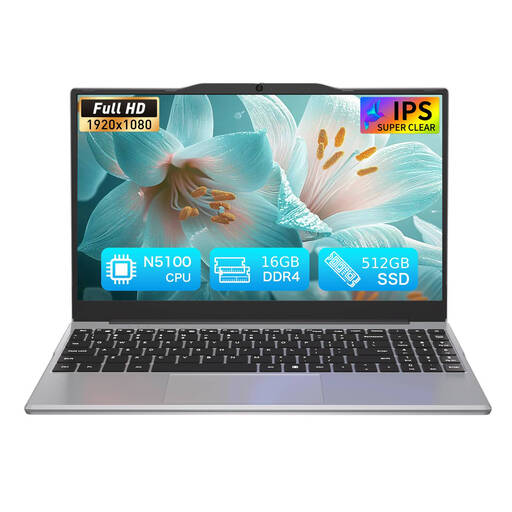 No image available
The description gives an approximate weight of 1.214 kg, which may be relevant for frequent travel; check the operating system against your required applications before buying.
Intel N5100; 16 GB DDR4 RAM; 512 GB SSD; 14.1-inch 1920 × 1080 display.
Zotero lists a LibreOffice word-processor plugin for LibreOffice 5.2 or later and specifies Java requirements that vary by platform. Check the versions and platform requirements for the laptop you plan to use.
Linux is a software option for this workflow because Zotero and LibreOffice publish Linux requirements. Institutional support is separate: Loughborough University says it does not support Linux devices, so check your own institution’s requirements before choosing.
Check the exact unit’s battery information, included charger, physical condition and operating-system support. GOV.UK advises checking second-hand products for safety recalls, and Microsoft’s PC Health Check can report battery capacity on eligible devices and check Windows 11 eligibility.
No. A seller’s warranty is separate from statutory rights, and cancellation rules depend on the transaction. GOV.UK says online, mail and telephone customers generally have 14 days after receiving goods to notify a trader that they wish to cancel, followed by another 14 days to return them, subject to applicable rules and exceptions. Check who the seller is and the terms for the specific order.
Course requirements can differ, particularly where specialist software is involved. The University of Hertfordshire advises checking course software requirements, while Loughborough University sets out its own position on Linux support. Check the current requirements for your own programme rather than treating another institution’s guidance as universal.