What to check before buying
For regular home laptop work, identify the main obstacle before choosing equipment: screen and input placement, display area, connections or desk fit.
| Concern |
What to check |
Who this matters to |
| Screen and input positioning |
Check that a riser can place the laptop screen suitably while a separate keyboard and mouse fit where you will use them. |
If I can work on the laptop display but need to raise it, I want the screen and controls positioned independently; about 33% of consumers put this need first. |
| Visible workspace |
Check the monitor’s size against the desk and identify a supported video connection from the laptop. |
When several windows compete for room on one screen, I want more display area without losing a workable desk layout; for about 25% of consumers, visible workspace is the primary need. |
| Display and charging compatibility |
Check the exact laptop’s video output and external-display limit, then compare its charging requirement with the proposed dock or monitor. |
If I regularly reconnect screens and peripherals, I need the intended connection and charging arrangement to work with my laptop; about 25% of consumers prioritise that compatibility. |
| Desk space and adjustment |
For an arm, match the monitor’s VESA pattern, weight and size to the arm, and check its mounting method against the desk. |
On a constrained desk, I want to position the display without giving up space needed for other work; desk fit and adjustment come first for about 17% of consumers. |
Joybuy products for different setup needs
These selections cover external displays, a separate keyboard-and-mouse set and a dock for home laptop work. Choose the type of equipment that addresses your workstation need, then check the individual device and desk requirements.
 Image unavailable
ASUS ProArt PA278CV IPS WQHD Monitor
Consider this separate display if the laptop screen does not provide enough room for your work.
The product name specifies an IPS WQHD monitor. Before relying on a particular laptop connection or charging arrangement, check the exact monitor and laptop specifications; also measure the available desk space.
Joybuy
 Image unavailable
iiyama ProLite XUB2792UHSU-B6 27-inch 4K UHD Monitor
This is another external-display option when you need a separately positioned screen for daily work.
The product name specifies a 27-inch, 4K UHD, 16:9 monitor. Check its dimensions against the desk and confirm the connection you intend to use with your laptop, particularly if you expect video or charging through USB-C.
Joybuy
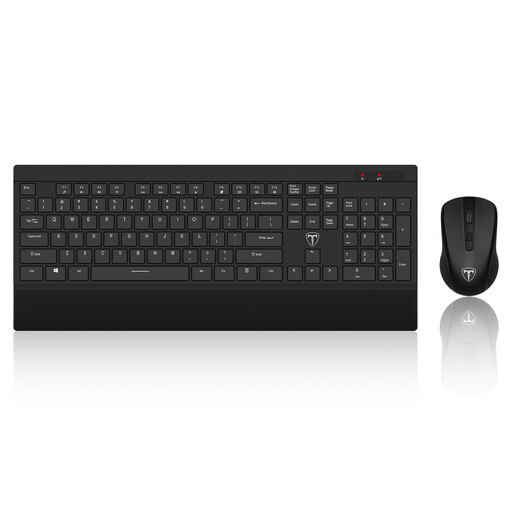 Image unavailable
ET Silent Wireless Keyboard and Mouse, US Layout
A separate keyboard and mouse let you position the controls away from a laptop raised on a riser.
The product name identifies a 2.4GHz wireless set with a US keyboard layout. Check that the physical layout and connection method suit your laptop and typing needs.
Joybuy
 Image unavailable
Dahua 32-inch 4K 165Hz Curved OLED Monitor
Consider this larger separate display only if its size suits the viewing position and space available on your desk.
The product name specifies 3840 × 2160 resolution and a Type-C 65W feature. Confirm the exact Type-C video and charging functions, and whether your laptop supports the intended connection and resolution.
Joybuy
 Image unavailable
Targus USB-C Universal Dual HDMI 4K Dock, 100W PD Pass-Thru
A dock is worth considering if you repeatedly connect a laptop to external displays and other desk equipment.
The product name specifies dual HDMI 4K connections and 100W power-delivery pass-through. Confirm the laptop’s supported display count, video output and charging requirements, and check what power adapter the dock requires and whether it is included.
Joybuy
Frequently asked questions
Do I need an external monitor for daily laptop work at home?
Not automatically. If the laptop display has enough room for your tasks, assess its position first; for prolonged use with the screen raised on a riser, the Health and Safety Executive advises a separate keyboard and mouse. Choose an external monitor when additional display area or independent screen placement addresses a need in your workstation.
What should I check before buying a USB-C dock or hub monitor?
Check your exact laptop’s video-output capability, supported external-display count and charging requirements against the proposed connection. Kensington notes that USB-C describes the connector, not a guarantee of video or power-delivery functions; Apple says MacBook Pro display capacity also depends on the model, resolution and refresh rate.
Will a monitor arm fit any monitor and desk?
No. Check the arm’s VESA mounting pattern, screen-size and weight limits against the exact monitor, then confirm that its clamp or grommet method suits the desk. The specifications of one Kensington arm, for example, must not be assumed to apply to other arms.
Should I buy equipment myself after a work DSE assessment?
Ask your employer about its provision process before purchasing. In Great Britain, the Health and Safety Executive says workers cannot be charged where a display screen equipment workstation assessment indicates action such as providing equipment is needed; the route for approving or obtaining it depends on the employer.


