Browser tester with limited sockets
You mainly check a search filter in a browser and want to avoid occupying a wall socket throughout the session. Charging options and battery endurance matter more to you than a permanent desk connection.


Start with a laptop that runs the browsers and testing tools you need, then check how it will charge when sockets are scarce. Direct USB-C charging and battery endurance may suit testing away from a fixed desk; if you also use a monitor and several peripherals, a compatible dock can connect them through one laptop cable, but its charging and display functions depend on the exact laptop and dock.
You mainly check a search filter in a browser and want to avoid occupying a wall socket throughout the session. Charging options and battery endurance matter more to you than a permanent desk connection.
You use a display, input devices, wired network or other peripherals and want to connect them to your laptop through one compatible dock cable.
Your laptop setup shares a lead with other equipment, so you need to check the combined electrical load rather than assume that an unused outlet makes another device safe to add.
Set out the browsers and tools your filter test requires before choosing a laptop. Then decide whether your main constraint is occupied sockets, connections at a fixed desk or time spent working away from a socket.
| Concern | What to check | Who this matters to |
|---|---|---|
| Occupied wall sockets | Confirm whether the exact laptop accepts USB-C charging, what power input it requires and which charger is supplied. Count the mains-powered devices in the intended setup. | If several devices already share my limited outlets, I want a charging arrangement that does not occupy more sockets than necessary. Around 42% of consumers put reducing occupied sockets first. |
| Desk connections | Check the laptop port and dock documentation for charging power, USB-C Alt Mode or Thunderbolt support, and the displays and peripherals you intend to connect. | When I test at a fixed desk, I want to reconnect my display and other equipment without plugging each item into the laptop separately. For around 33% of consumers, that docked connection is the primary need. |
| Unplugged testing | Compare the exact model's battery-test conditions with your intended browser and tool use, then confirm its charging method and software compatibility. | I move between places where a socket may not be free, so I need to continue browser checks between charging opportunities. Keeping testing portable comes first for around 25% of consumers. |
A USB-C connector alone does not establish that a laptop accepts charging or sends video to a dock. Lenovo says its USB-C and Thunderbolt docks need a host port supporting USB-C Alt Mode or Thunderbolt, while actual video output depends on the host system.
Check the exact laptop configuration for charging input and the protocol needed by your chosen dock and display.
Charging requirements vary by model. Apple specifies a minimum 30 W charging input for the MacBook Air family described in its UK specifications; Dell lists different maximum power delivery for Dell and non-Dell systems using its WD25 dock. Neither figure establishes what a different laptop requires.
Match the power delivered by the charger or dock to the requirement documented for the exact laptop.
Rhondda Cynon Taf County Borough Council's home-working electrical-safety guidance says the combined demand of connected devices must not exceed the lead's wattage rating. An empty outlet does not change that limit.
Read the marked rating and check the combined load before adding equipment. Do not daisy-chain extension leads.
Charging features cannot tell you whether a laptop runs the operating system, browsers, automation tools or local development environment required for your search-filter test.
List those requirements, along with any monitor and network connections, before settling on a configuration.
Relevant to a ThinkPad charging setup or a desk built around a USB-C dock.
Relevant when a compatible laptop and dock would keep a fixed testing desk connected through one host cable.
Relevant to buyers comparing USB-C charging and a compact docked desk setup.
Relevant if macOS runs the required testing tools and you favour portable browser work over a permanent desk setup.
These laptops offer configurations to consider for portable browser checks or a desk that may use a compatible dock. Match the exact model to your testing software, charging arrangement and required connections before choosing.
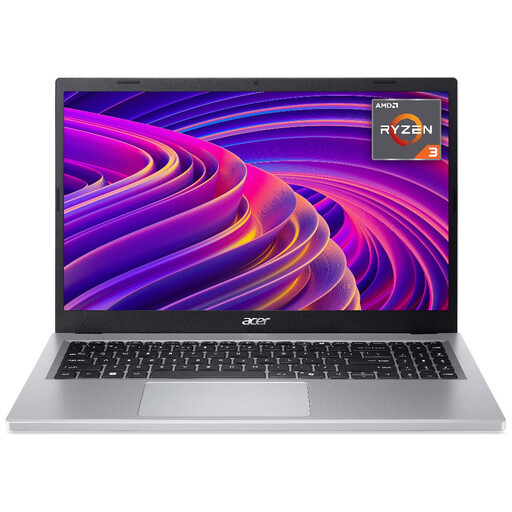 No image available
Consider this 15.6-inch laptop for browser-based checks if the supplied AG15-21P configuration supports your required tools.
The product name specifies a Full HD (1920 × 1080) display. Confirm the exact model's charging input and dock display support before planning a shared USB-C or docked setup.
 No image available
Consider this 14-inch laptop for a portable testing setup only after checking that your browsers and development tools run on its intended configuration.
The product name identifies a Snapdragon X processor. Confirm charging requirements and compatibility with any dock you plan to use; MacBook Air battery or charging specifications do not apply to this ASUS model.
 No image available
Its 2-in-1 configuration may interest you if the laptop will move between portable checks and a fixed testing desk.
The product name specifies Windows 11 Home. If you intend to add a dock, check the exact laptop's charging and display documentation against that dock and your monitor requirements.
 No image available
Consider this 13-inch model for browser checks if your required browsers and tools are compatible with it.
The product name specifies a 6-core CPU, 5-core GPU and Touch ID. Confirm its battery endurance, charging requirements and display-port capabilities for your intended setup; MacBook Air specifications do not establish those details for the MacBook Neo.
No: check the exact laptop's charging-input and port specifications. Lenovo says its USB-C and Thunderbolt docks require a host port supporting USB-C Alt Mode or Thunderbolt; the connector's shape alone does not establish charging or display compatibility.
A compatible dock can power a laptop and connect peripherals through one host cable, but the dock itself still needs mains power. Dell specifies up to 100 W power delivery for Dell systems and 96 W for non-Dell systems on its WD25; check that the power and display functions meet your exact laptop's requirements.
Only if the combined demand of the connected equipment stays within the lead's marked rating. Rhondda Cynon Taf County Borough Council's home-working safety guidance calls for that combined-load check; spare outlets do not increase the lead's rating, and extension leads should not be daisy-chained.
Check the product documentation for compatibility with your laptop and keep enough product identification to check relevant safety alerts. The Office for Product Safety & Standards states that the Electrical Equipment (Safety) Regulations 2016 set requirements for electrical equipment placed on the Great Britain market; GOV.UK also publishes product-safety alerts and recalls for plugs, adaptors and sockets. Those general requirements do not, by themselves, establish the status of a particular charger or dock.