Fixed-desk laptop workers and students
If your laptop usually stays at one desk, an additional display gives you a way to arrange documents, calls and other windows. Check the full screen and stand dimensions so the setup still fits your workspace.


For regular work or study at one desk, start with a conventional monitor that fits the space and connects to your laptop. Choose a portable monitor if the screen needs to move or be put away; an existing TV may suit occasional shared viewing. A dock or adapter can help with a compatible connection, but it cannot give a laptop display capabilities it does not support.
If your laptop usually stays at one desk, an additional display gives you a way to arrange documents, calls and other windows. Check the full screen and stand dimensions so the setup still fits your workspace.
If you share a desk, move between workspaces or regularly clear the surface, the screen's footprint and placement options may matter more than its diagonal size. Which? discusses smaller monitors for limited spaces; a portable display is another route when the screen must move with you.
If you are unsure which port carries video or whether you can extend rather than mirror your desktop, identify the exact laptop model before choosing a screen or accessory. Apple Support says external-display support varies by Mac model, while Microsoft distinguishes an extended display from a splitter that duplicates a signal.
Choose the type of screen for where it will be used, then check the complete connection from laptop to display. A dock or adapter addresses a compatible port arrangement; it is not a separate type of screen.
Consider it when: The laptop normally stays at one desk and you want a screen positioned there for documents, meetings or detailed work.
Trade-off: The panel and stand need permanent room, and a single-cable USB-C arrangement requires matching laptop video support and adequate monitor power delivery.
Consider it when: The second screen needs to move between locations or be cleared from a temporary desk.
Trade-off: Check how the particular display stands and connects; Lenovo specifies DisplayPort Alt Mode and Power Delivery requirements for the one-cable setup of its ThinkVision M14.
Consider it when: A suitably placed TV is available for occasional shared viewing or a temporary large-screen setup.
Trade-off: Check the laptop, TV and any adapter for the display mode you intend to use. Apple Support notes that supported HDMI modes vary by Mac model and adapter.
| Concern | What to check | Who this matters to |
|---|---|---|
| A permanent desk screen | Compare full dimensions, stand movement and inputs with your desk and laptop; check USB-C power delivery if you want the monitor to charge the laptop. | I work at the same desk most days and want room for documents and calls without crowding it; around 36% of consumers would put a permanent desk workspace first. |
| Limited or shared space | Check the stand footprint or portable screen placement, plus any clamp or divider requirements. | My desk is shared or needs clearing, so I need somewhere practical to put the extra screen; roughly 21% of consumers would make space and flexibility their primary concern. |
| Connection and extension | Confirm the exact laptop's video-capable ports, supported display count and whether the cable, adapter or dock supports your intended mode. | I need separate windows across screens, not a duplicate image, and must know the connection will work; around 29% of consumers would prioritise compatibility. |
| Creative detail | Compare the exact monitor's resolution and stated colour specifications, then check the laptop and connection support the intended display mode. | My photo, video or other detailed work makes screen specifications central to the choice; approximately 14% of consumers would put creative detail first. |
A USB-C connector does not establish what the port can do. Lenovo specifies DisplayPort Alt Mode and Power Delivery prerequisites for the stated one-cable operation of its ThinkVision M14.
Check the exact laptop port specification against the portable monitor's video and power requirements before choosing a cable or display.
Microsoft Support says a display splitter duplicates one signal rather than creating two independent extended displays.
If you need different windows on each screen, confirm the laptop's supported display count and the capabilities of any dock or display hardware.
The stand, screen dimensions and any mounting hardware determine where a monitor can actually sit. Clamp and hook arrangements also need a suitable desk edge or divider.
Measure usable desk width, depth and mounting clearance, then compare them with the manufacturer's dimensions and installation requirements.
If the supplied stand does not fit your intended position, you may need a compatible alternative stand or mounting arrangement.
Electrical Safety First warns that connecting extension leads to one another can create overheating and fire risks.
Do not chain extension leads to power the laptop and display setup. Check the ratings and condition of the electrical equipment you use.
Selected Dell Pro monitors offer a fixed-desk route for shoppers considering USB-C connectivity and stand adjustment.
The ThinkVision M14 illustrates a compact display route when the screen needs to move between workspaces.
ZenScreen includes displays with placement options worth considering for temporary or space-constrained desks.
The LG 32UN880K-B is an example of a larger fixed-desk monitor with a clamp-mounted stand.
These displays cover fixed-desk monitors and one portable screen for a laptop workspace. Choose by available space and intended work, then confirm the connection and supported display mode for your exact laptop.
 No image available
Consider this fixed-desk model if WQHD resolution is relevant to your document or creative work. Check its full dimensions and the laptop's supported connection and display mode; if you want USB-C charging, confirm the monitor's power-delivery rating against the laptop's requirement.
 No image available
This portable-screen option is worth considering when the extra display must move or be put away. Confirm its connection and power requirements against the exact laptop rather than assuming a USB-C connector provides video.
 No image available
A 22-inch Full HD option to assess for a fixed desk where a larger panel may be difficult to place. Compare the complete monitor and stand dimensions with your space, and confirm the required connection to your laptop.
 No image available
Consider this larger fixed-desk option if its 4K panel suits your intended work and available space. Its stated 165Hz capability should not be assumed achievable with every laptop: check the laptop, cable and connection for the resolution and refresh rate you want.
 No image available
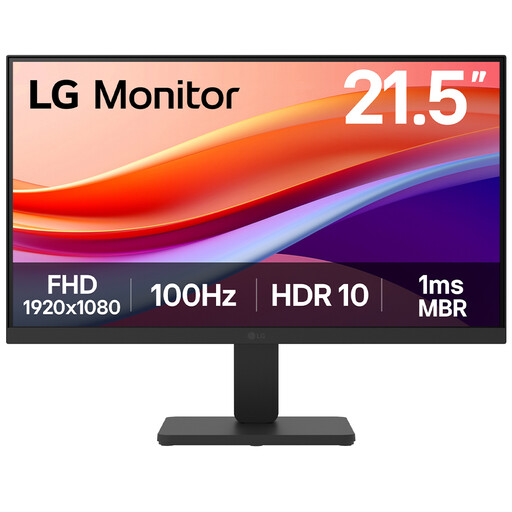
This 22-inch Full HD model is another fixed-desk option to consider when screen size is a constraint. It is listed with HDMI; confirm your laptop's video output and the complete monitor and stand dimensions before choosing it.
Check the display specifications for your exact laptop model, then match its video output to the monitor input and cable. Apple Support says the number of external displays and supported modes depend on the Mac model; for a Windows laptop, check its display hardware specifications when planning multiple screens.
No: the connector shape alone does not confirm video output. For example, Lenovo specifies DisplayPort 1.2 Alt Mode and Power Delivery 2.0 for the ThinkVision M14's stated one-cable setup. Compare your laptop port specifications with the requirements of the exact monitor.
Choose an adapter for a compatible video connection whose plugs do not match, or a compatible dock if you also need desk peripherals or charging. If you need independent extended screens, do not rely on a basic splitter: Microsoft Support says it duplicates a signal instead of creating two separate extended displays.
Yes, if the laptop and TV support a suitable connection and the TV's placement works for your intended use. Apple Support confirms that Macs can connect to HDMI TVs, while noting that supported modes depend on the particular Mac and any adapter; check the corresponding specifications for your own laptop and TV.