What to check before buying
Set up the screen, keyboard and mouse position first, then check laptop connectivity and any features that support your particular desk workflow.
| Priority |
What to check |
Your needs |
| Independent positioning |
Check that the screen can sit directly in front of you with its top around eye level. For a raised laptop, use a separate keyboard and mouse. Consider an adjustable monitor stand or a confirmed compatible VESA mount for a fixed desk. |
I need to raise the display without leaving the keyboard too high or forcing an awkward mouse position. |
| Assessment-led equipment |
Consider whether you use DSE daily as normal work for an hour or more continuously. Ask what an individual workstation assessment identifies for the workstation, task and your requirements. |
If an assessment identifies extra DSE equipment as needed, I need to treat it as an employer-provided risk-control measure rather than a discretionary upgrade. |
| Dock and display compatibility |
Confirm the laptop’s USB-C, USB4 or Thunderbolt capability, operating system and external-display limit. Compare the dock’s power delivery with the laptop’s charging requirement. |
I want one desk connection for displays and peripherals, but only if my laptop can deliver the planned video, data and charging arrangement. |
| Sustainable screen work |
Check screen placement and lighting, and plan changes of activity or short regular breaks. If you request an eye test as a DSE user, ask your employer about the applicable process. |
I need the desk arrangement to support regular work over time, rather than relying on an accessory alone. |
Joybuy product options
Joybuy product options for fixed-desk displays and separate keyboard-and-mouse arrangements for long-term home or hybrid computer work.
 No image available
BenQ MA320UP 32-inch 4K USB-C Mac Monitor
For a settled desk setup where the laptop supports the required USB-C connection.
Stated 32-inch 4K display with height, pivot, swivel and tilt adjustment; USB-C, HDMI, downstream USB and 90 W power delivery are listed. Check laptop and cable compatibility, and confirm whether Mac-specific features suit your operating system.
Joybuy
 No image available
CRUA 49-inch Curved Ultrawide DQHD Monitor
For a permanent, spacious desk where keeping multiple work windows visible is the priority.
Stated 49-inch 32:9 5120 x 1440 display with HDMI 2.1, DisplayPort 1.4 and VESA 75 x 75 support. Check desk depth, structural support or VESA-arm rating, and confirm that the computer can output the required resolution.
Joybuy
 No image available
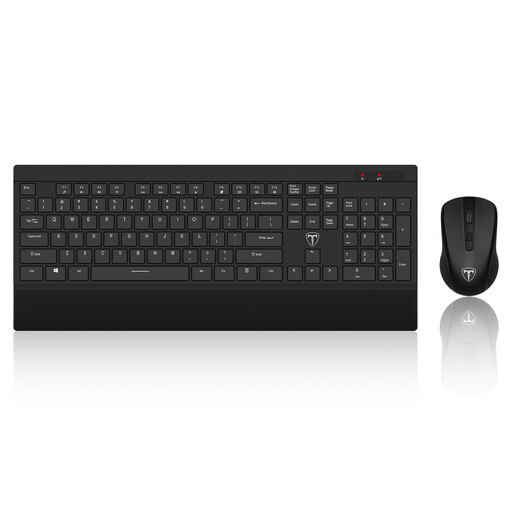
ET Silent Wireless Keyboard and Mouse Combo, US Layout
For a raised-laptop setup that needs keyboard and mouse placement separate from the screen.
Stated 104-key US layout, 2.4 GHz wireless connection, single receiver, 10-metre range and adjustable mouse resolution. Check the key layout and whether the receiving device has a suitable USB-A port or adapter.
Joybuy
Frequently asked questions
Does a UK employer have to provide a home-working monitor, keyboard or other DSE equipment?
Not automatically for every home worker. Where DSE regulations apply, the employer must assess the workstation and reduce identified risks. The Health and Safety Executive states that if an assessment shows extra DSE equipment is needed, the employer cannot charge the worker for it.
Is a laptop stand enough for prolonged laptop work?
Not on its own if you need to type and use a mouse for prolonged work. The Health and Safety Executive advises using a separate keyboard and mouse when elevating a laptop screen on a riser or similar support; a separate display is another option.
Do I need a Thunderbolt dock for two external monitors?
Only if the laptop and intended displays support the connection arrangement you need. Check the laptop interface and model-specific display support: Kensington states that USB-C Alt Mode laptops and some MacBook configurations can support only one external display through its SD5760T dock.
Are there legally fixed DSE break intervals in the UK?
No. The Health and Safety Executive says there is no legal guidance setting a fixed break duration or frequency, and advises short, frequent breaks rather than longer breaks taken less often.
Can a DSE user ask their employer for an eye test?
Yes. The Health and Safety Executive states that an employer must arrange and pay for an eye test when a DSE user requests one. Glasses are only employer-funded where the test shows that special glasses are needed specifically for DSE viewing distance.


