For prolonged laptop work, start with the part of your setup that limits you: a riser needs a separate keyboard and mouse, while an external monitor suits a mostly fixed desk when you need more screen space. If you move between locations, consider what you can carry and reconnect; buy a dock only after checking the laptop’s video and charging capabilities. For work equipment, check whether an employer’s display screen equipment assessment should come before a personal purchase.
Who is this setup for?
Fixed-desk laptop workers
If you use a laptop for prolonged periods at one desk, you may need to position the screen separately from the keyboard and mouse. The Health and Safety Executive recommends separate input devices when elevating a laptop screen for prolonged use.
Hybrid workers moving between locations
If the same laptop travels between home and work, consider which equipment must travel with it and which connections you will need at each desk. A portable screen or hub still has to work with the laptop and the displays you use.
Users connecting several devices
If your desk has displays, USB accessories or a wired network connection, a dock may simplify reconnection. Its useful functions depend on the laptop’s ports, operating system and charging support, as Kensington’s USB-C guidance makes clear.
What should you check first?
For work use, check the employer’s workstation-assessment process where it applies. Then decide whether screen position, screen space, portability or connections will determine your first equipment choice.
| Concern |
What to check |
Who this matters to |
| Screen and input position |
Check the riser’s stability and height, and leave desk depth for a separate keyboard and mouse. |
If I raise my laptop for prolonged work, I need to keep typing and pointing devices within comfortable reach. Around 33% of consumers would put this compact-setup need first. |
| Visual workspace |
Check desk space, monitor adjustment and whether its input matches the laptop’s video output. |
At a mostly fixed desk, I need room on screen for documents or side-by-side tasks without relying only on the laptop display. Roughly 27% of consumers would make extra visual workspace their primary concern. |
| Portability |
Check what you must carry, the connections available at each location and whether a hub needs a separate charger. |
When I move between desks, I need equipment I can carry and reconnect without rebuilding the whole setup. For around 20% of consumers, portability would come first. |
| Connection compatibility |
Match the exact laptop model to the required video mode, USB Power Delivery, operating system and display count. |
If I connect displays and peripherals through one dock, I need those functions to work with my laptop rather than judging by the USB-C connector alone. Connection expansion would be the main concern for roughly 20% of consumers. |
Purchasing mistakes to avoid
-
Raising the laptop but continuing to use its keyboard
Elevating the screen also raises the built-in keyboard and touchpad. For prolonged laptop use, the Health and Safety Executive pairs screen elevation with a separate keyboard and mouse.
Plan space for the input devices in front of the riser before choosing its size and position.
-
Assuming any USB-C port can drive a monitor and charge a laptop
USB-C connections do not all provide the same video and power functions. Kensington specifies DisplayPort Alt Mode for video and host USB Power Delivery support for charging pass-through on its UH1400P mobile dock.
Check the exact laptop model, the display connection and the dock’s charging requirements together.
An incompatible connection may mean using a different hub, cable or charging arrangement.
-
Choosing a dock by its advertised display count alone
A dock’s display specification does not establish what every laptop and operating system can run. Monitor connections, host capabilities and power arrangements also matter.
Match the dock to your required number of displays, their connections and resolutions, and your laptop’s supported video mode. Check whether the intended setup needs drivers or a separate power supply.
-
Buying work equipment before checking the assessment process
The Health and Safety Executive says that, where a display screen equipment assessment identifies action such as providing equipment, workers cannot be charged for that equipment.
If the purchase is intended to address a work-related workstation need, ask your employer about the applicable assessment and approval process before paying personally.
Brands to consider by equipment type
Dell
A reference point for fixed-desk monitors, including models that combine a display with USB-C connections.
- Dell describes its Pro P P2726HE as a 27-inch Full HD USB-C hub monitor with an adjustable stand and power delivery rated up to 100W.
- Check the exact monitor’s inputs and whether its charging output meets your laptop’s requirements; those P2726HE specifications do not apply to every Dell monitor.
Logitech
A reference point for keyboards and mice that can be positioned separately from a laptop screen.
- Logitech’s own work-from-home guidance discusses using a separate screen, keyboard and mouse with a laptop.
- Choose input devices by their layout, connection method and fit for your desk rather than treating the brand’s guidance as a finding about every user.
Kensington
A reference point for portable hubs and desktop docks when a laptop needs display and peripheral connections.
- Kensington documents both a mobile USB-C hub and a desktop dock with dual-display capability on compatible systems.
- Check the exact model and host laptop: video modes, charging support and display arrangements differ between devices.
Joybuy products for laptop workspaces
These products cover separate screens, display and connection accessories, and a keyboard-and-mouse set. Choose the equipment type that addresses your desk or travel setup, then check its fit with your laptop.
 No image available
BenQ MA320UP 32-inch 4K USB-C monitor
Consider this for a fixed desk where the laptop screen leaves too little room for your work. The product name specifies a height-adjustable stand; check your desk space, laptop video output and USB-C charging requirements before choosing it.
Joybuy
 No image available
Targus USB-C Universal Dual HDMI 4K Docking Station, 100W Power Delivery pass-through
Consider this when a compatible laptop needs connections for two external displays. Its named configuration includes dual HDMI and 100W Power Delivery pass-through; check the laptop’s video and operating-system support, and whether the required external power adapter is included.
Joybuy
 No image available
ASUS ZenScreen MB166C 15.6-inch portable Full HD USB-C monitor
Consider a portable second screen if you need more display space at different desks. This model’s name specifies an IPS display and USB Type-C connection; confirm that your laptop provides the video and power functions it needs.
Joybuy
 No image available
V7 V7UC-U3CRJ45HDVG-BLK USB-C adapter
Consider this adapter when you need display and wired-network connections from a compatible laptop. Its named ports include 4K HDMI, VGA, Gigabit Ethernet and dual USB 3.0, with 100W Power Delivery; the stated display operation is single-display only, and the laptop needs a compatible USB-C video mode.
Joybuy
 No image available
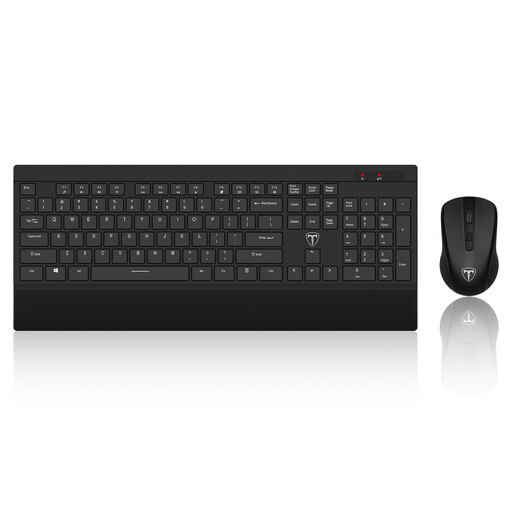
ET 2.4GHz wireless keyboard and mouse set, US layout
Consider separate input devices if you plan to raise your laptop screen or use a separate monitor. This set has a full-size keyboard with a US layout; check that the key arrangement and desk space suit you.
Joybuy
Frequently asked questions
Should I check my employer’s DSE assessment before buying equipment?
Yes, if you are buying equipment to address a work-related workstation need, check the applicable employer process first. The Health and Safety Executive says employers must assess qualifying display screen equipment users’ workstations and that workers cannot be charged for equipment an assessment identifies as necessary.
Does every home worker need to buy a monitor or laptop stand?
No general requirement in the Health and Safety Executive’s home-working guidance makes either purchase necessary for every worker. The appropriate equipment depends on the individual workstation and its assessment; a separate keyboard and mouse matter when a laptop screen is raised for prolonged use.
Will any USB-C dock run my monitor and charge my laptop?
No. Kensington explains that USB-C devices differ in their video and power capabilities. Check your exact laptop and dock: its UH1400P mobile dock, for instance, requires DisplayPort Alt Mode over USB-C for video and host USB Power Delivery support for charging pass-through.
Are DSE rules identical throughout the United Kingdom?
Do not assume that one regulator’s guidance applies unchanged everywhere in the UK. Great Britain and Northern Ireland have separate display screen equipment regulators and frameworks; check the guidance for your work location and your employer’s arrangements when a specific duty or provision of equipment is in question.


