What to decide before buying
For long laptop sessions at home and in the office, identify the main problem you need the setup to address, then check the equipment and work-device rules that affect that choice.
| Concern |
What to check |
Who this matters to |
| Screen position |
Check whether a riser and separate input devices give you a workable screen position, or whether you need space and a compatible connection for a separate monitor. |
If I spend long stretches looking at the laptop screen, I need to position it without putting the keyboard out of reach. About 36% of consumers put screen position first. |
| Portable input setup |
Decide whether a separate keyboard and mouse will travel with you or stay at each desk; check their fit and the work laptop's connection rules. |
Moving between desks, I need input devices I can use consistently without relying on the raised laptop's keyboard. Portable input is the main concern for about 29% of consumers. |
| Connection compatibility |
Match the laptop's documented video protocol, monitor or dock requirements and charging needs; ask IT about managed-device restrictions. |
If reconnecting displays and peripherals takes effort each time, I want a simpler connection that actually works with my work laptop. Around 21% of consumers prioritise that need. |
| Assessment and approval |
Use the employer's assessment process for both work locations and agree equipment provision and IT approval before buying. |
When an assessment identifies a specific issue, I need to know which change is appropriate and who will arrange it. That is the primary concern for about 14% of consumers. |
Joybuy monitor and mouse options
These options address two parts of a hybrid laptop setup: a separate display and a mouse for use alongside separate input and screen-positioning equipment. Choose any additional components in line with your workstation assessment and work-device requirements.
 Image unavailable
Dell P2425H 24-inch FHD monitor
Consider this separate display if your desk has room for a monitor and your work laptop can connect to it. The listed P2425H has a 24-inch, 1920 × 1080 IPS display and HDMI, DisplayPort, VGA and USB-C connections. Confirm the connection you intend to use, particularly whether its USB-C connection meets your video or charging needs, and obtain employer approval where required.
View on Joybuy
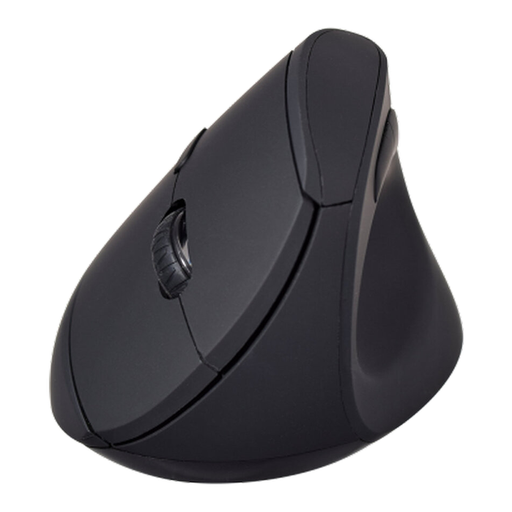 Image unavailable
V7 MW500BT dual-mode vertical mouse
Consider this as a separate pointing device if your workstation arrangement calls for one; it does not raise the laptop screen or provide a keyboard. The MW500BT lists Bluetooth and 2.4 GHz wireless modes, six buttons and an adjustable 1600 DPI sensor. Check the shape for personal fit and confirm your employer permits the intended wireless connection on a managed laptop.
View on Joybuy
Frequently asked questions
Does my employer have to provide a home-working monitor, dock or stand?
Not every requested item must be provided. For UK workers to whom display screen equipment rules apply, the Health and Safety Executive says the employer should assess the individual workstation and reduce identified risks so far as reasonably practicable. If the assessment indicates action such as providing display screen equipment, the worker cannot be charged for it; agree the action and equipment arrangements before purchasing personally.
Do display screen equipment rules cover hybrid laptop work?
They can cover permanent or long-term home workers and hybrid workers who use display screen equipment daily for continuous periods of an hour or more as part of their normal work. The Health and Safety Executive says that, where the rules apply, the assessment should cover both the home and office workstations.
Will any USB-C monitor or dock work with my laptop?
No: check the laptop's documented display capability against the monitor or dock's requirements rather than relying on the socket shape. Lenovo says its USB-C and Thunderbolt docks require USB-C Alt Mode, DisplayLink or Thunderbolt support through the laptop's Type-C port. Check charging requirements separately.
Should I ask IT before connecting a dock or wireless mouse?
Yes, if the laptop is managed by your employer, confirm its rules for accessories, drivers, Bluetooth or USB receivers and network connections before choosing a device. Acas advises employers and staff to agree equipment and technical-support arrangements for home working.


