Small-desk web editors
If your laptop, mouse and notes must share a narrow surface while you arrange contact-form fields, check the laptop’s full width and depth before choosing by screen size.


Choose a compact 13-inch laptop when fitting the computer alongside a mouse and other desk items is the main constraint, provided its operating system and processor support your form-editing tools. Consider a 14-inch 16:10 model if keeping the editor and browser preview visible matters more; measure the exact chassis before giving up desk space for the larger screen.
If your laptop, mouse and notes must share a narrow surface while you arrange contact-form fields, check the laptop’s full width and depth before choosing by screen size.
If you keep a form editor, preview and reference material open together, compare the available screen space with the room the laptop will occupy on your desk. An external display is another option if your setup has space for one.
If publishing the form depends on a particular application, extension or workplace security tool, confirm support for the exact operating system and processor before comparing displays.
Start with the space you can actually use and the software you must run. Then decide how much built-in screen room you need for editing and previewing the form.
| Concern | Buying checks | Who this matters to |
|---|---|---|
| Desk footprint | Measure clear desk width and depth, allowing room for your mouse and other items. Compare those measurements with the exact laptop’s chassis dimensions. | I need the laptop to fit without crowding out the mouse I use to position form fields; around 36% of consumers put physical desk fit first. |
| Software compatibility | Check required applications, browser extensions and workplace tools against the exact operating system and processor platform. | My form editor may work in a browser, but I also need my organisation’s tools to run; roughly 29% of consumers make compatibility their primary concern. |
| Layout workspace | Compare the selected display’s size, aspect ratio and resolution. Check external-display support if you plan to use a monitor. | I want to inspect field spacing while keeping a preview in view; for about 21% of consumers, visible editing space takes priority. |
| Portable use and desk setup | Check the laptop’s weight if you move it regularly, and whether the desk can accommodate a separate keyboard, mouse or stand for longer sessions. | I move between work locations but still need a workable setup when I sit down to edit; around 14% of consumers put portability and session comfort first. |
A 13-inch or 14-inch label does not tell you how much room remains for a mouse and notes. Microsoft, for instance, gives its 13-inch Surface Laptop for Business chassis as 285.65 mm by 214.14 mm.
Measure the clear desk surface, then compare it with the dimensions of the exact model you intend to buy.
The compact options include different operating systems, and Microsoft’s cited 13-inch Surface configuration uses Snapdragon X Plus. A required application or workplace tool may determine the platform before screen size does.
List the software, extensions and peripherals essential to publishing your forms, then confirm support for the exact operating system and processor.
Apple documents two Thunderbolt 4/USB-C ports on the 13-inch M5 MacBook Air, while Microsoft lists USB-A alongside two USB-C ports on its cited 13-inch Surface. That distinction matters if your current devices use different connectors.
Check every device you intend to connect and the selected laptop’s ports before choosing an adapter or dock.
Connecting existing equipment may call for an adapter, dock or suitable display cable.
A compact footprint does not settle how you will position the screen and keyboard during regular, prolonged work. The Health and Safety Executive includes laptops in its display-screen-equipment guidance.
Check whether your desk has room to position a separate pointing device, keyboard or screen as needed, and plan breaks during extended sessions.
The documented 13-inch Surface Laptop for Business is a compact Windows option when desk footprint and connections are priorities.
The 13-inch M5 line is a compact macOS route if your contact-form workflow and workplace requirements support macOS.
The cited 14-inch Yoga Slim 7i Aura Edition configuration is worth comparing when screen room for editing and previewing matters more than the smallest possible footprint.
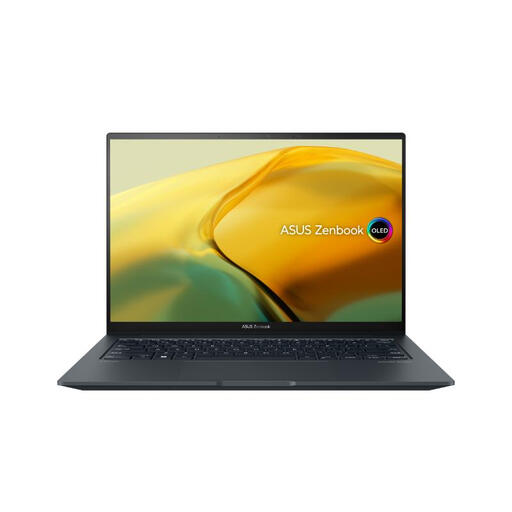
The Zenbook S 14 line offers 14-inch display variants to compare if reviewing form layout on the built-in screen is a priority.
These laptops span compact 13-inch use and larger-screen work, with Windows, ChromeOS and macOS options. Match the operating system to your required tools, then compare the exact chassis with your usable desk space; a screen-size label alone cannot establish fit.
 No image available
Consider this 14-inch Windows option if you want to edit and preview forms on the laptop itself. The named configuration has a Snapdragon X processor, 16GB RAM and a 512GB SSD.
Confirm that essential applications and workplace tools support this processor, and compare the exact chassis dimensions with your desk.
 No image available
This Chromebook is an option when your contact-form tools work in ChromeOS-compatible environments. Its named configuration has a 14-inch WUXGA (1920 × 1200) display, Intel Core 5 120U, 8GB RAM and a 512GB SSD.
Check your required extensions and workplace applications, as well as the chassis dimensions, before choosing it for a small desk.
 No image available
Consider the 14.5-inch touchscreen if built-in display space is a priority and your desk can accommodate the laptop. The named Windows 11 Home configuration includes an Intel Core i9, 16GB RAM, a 1TB SSD and RTX 3050 graphics.
Measure the available surface and check the exact chassis dimensions before assuming there will also be room for a mouse.
 No image available
This 13-inch option suits a compact-desk plan if your form-editing and workplace tools support macOS. The named variant has an M5 chip with a 10-core CPU and 10-core GPU, 16GB memory and a 1TB SSD.
Check the dimensions and connections of this exact configuration against your desk and existing devices.
 No image available
This 14-inch Chromebook is worth considering for a form workflow that fits ChromeOS. Its named configuration includes an Intel Core i3 N305, 8GB RAM and 256GB eMMC storage.
Confirm that the form editor, extensions and workplace tools you need will run, then check the exact chassis dimensions against your desk.
Choose a 13-inch model if preserving room for a mouse is the deciding factor; consider a 14-inch display if you can spare the surface area for editing and previewing. Check chassis dimensions rather than assuming that every laptop with the same screen diagonal occupies the same space.
Choose neither in isolation: establish that your required tools run on the operating system, then assess memory for the applications you keep open and screen space for your editor and preview. A larger display cannot resolve a software incompatibility, while a compact display may still suit a workflow that uses fewer simultaneous windows.
Yes, if you can arrange the workstation to suit the length of the session rather than relying on the laptop’s footprint alone. The Health and Safety Executive’s display-screen-equipment guidance covers laptops; check whether your desk can accommodate the screen position, pointing device and any separate keyboard you need, and take breaks during prolonged work.