QLab cue writers sharing a quiet space
If QLab 5 is essential, Figure 53’s Mac-only requirement determines the operating system. Apple’s fanless M5 MacBook Air design also addresses the distraction of cooling-fan noise.


Choose the operating system around your cue software before comparing laptop specifications: Figure 53 says QLab 5 runs only on Macs, while a Windows laptop can suit a workflow built around Windows-compatible applications and hardware. If fan noise is a primary distraction, Apple describes the M5 MacBook Air as silent and fanless. For a Windows model, check the exact configuration’s acoustic performance as well as support for your plug-ins and audio-interface driver.
If QLab 5 is essential, Figure 53’s Mac-only requirement determines the operating system. Apple’s fanless M5 MacBook Air design also addresses the distraction of cooling-fan noise.
Existing cue applications, plug-ins or audio-interface drivers may make Windows continuity more important than a particular laptop design. Check support for the exact software and hardware versions before switching platforms.
For cue lists and documents alongside occasional audio work, consider the screen, carrying weight, storage and connections needed between the study, rehearsal space and venue.
Settle the macOS-versus-Windows question first, then assess quiet operation and the demands of your actual projects.
Choose this route: Figure 53 requires a Mac for QLab 5, and Apple describes the M5 MacBook Air as silent and fanless.
Accept the trade-off: Check each required plug-in and audio device for macOS and Apple Silicon support; several wired devices may also call for a hub or dock.
Choose this route: Keep Windows when a required cue application, workplace setup or audio driver depends on it.
Accept the trade-off: A slim chassis does not establish how quiet it will be; seek acoustic evidence for the exact model and configuration.
| Concern | What to check | Who this matters to |
|---|---|---|
| Quiet operation and cue-software fit | Identify your cue application’s supported operating system and processor platform; assess noise claims for the exact laptop. | I need to concentrate beside other people without giving up the cue program I use. Around 36% of consumers put quiet operation and software fit first. |
| Existing audio workflow | Check the exact plug-in versions and audio-interface driver against the intended operating system and processor. | My existing projects depend on particular software and connected audio gear, so preserving that workflow comes first. Roughly 29% of consumers make compatibility their primary concern. |
| Project capacity | Use a representative project to assess tracks, plug-ins, sample storage and latency needs rather than relying solely on minimum requirements. | If my cue sessions include many tracks or plug-ins, I need a configuration that can handle that workload. Around 21% of consumers prioritise project capacity. |
| Portable writing setup | Compare screen size, carrying weight and the ports needed for headphones, an interface or a display. | I carry my laptop between writing and rehearsal, but still need room to work through cue lists and connect my equipment. For about 14% of consumers, portable writing comfort comes first. |
Figure 53 states that QLab 5 is Mac-only, so a Windows laptop cannot serve as its primary machine.
List your required cue application, plug-ins and audio-interface driver before choosing an operating system. If QLab 5 is essential, compare compatible Macs.
Changing platforms later can mean migration work or needing a separate Mac for cue playback.
Thinness and low carrying weight do not establish cooling-fan noise. Apple describes the M5 MacBook Air as fanless; the cited ASUS and Lenovo configurations should not be treated as acoustically equivalent on that basis.
For a quiet study, look for an explicit fanless design or an acoustic test of the exact model and configuration you intend to buy.
According to Ableton, larger projects with multiple tracks and plug-ins can benefit from a more powerful system than a basic workload needs.
Assess a representative session and its sample storage, plug-ins and latency requirements before selecting a configuration.
Headphones, an audio interface, external storage and a display may need connections at the same time. Apple lists two Thunderbolt 4/USB-C ports and a headphone jack for the MacBook Air.
Count the devices you will use together and check the chosen laptop’s ports before deciding whether a suitable hub, dock or adapter is needed.
MacBook Air is a macOS option for cue writers who need QLab 5 and want a fanless laptop.
ThinkPad X1 Carbon Gen 13 Aura Edition offers a lightweight 14-inch Windows format.
Zenbook S 14 UX5406 is a 14-inch Windows line with OLED display variants.
Surface Laptop is another Windows route for portable writing where its particular connections suit the desk setup.
These M5 MacBook Air configurations suit a macOS cue-writing route where Apple’s fanless design matters. Choose between screen size and the listed storage configurations after checking your software and connected audio equipment.
 Image unavailable
Consider this 13-inch model if you need a macOS cue-writing laptop and want Apple’s stated silent, fanless M5 design. The listing specifies a 10-core CPU, 10-core GPU, 16GB memory and a 1TB SSD. Before buying, confirm the installed macOS version, support for your plug-ins and audio-interface driver, and the connections needed for your setup.
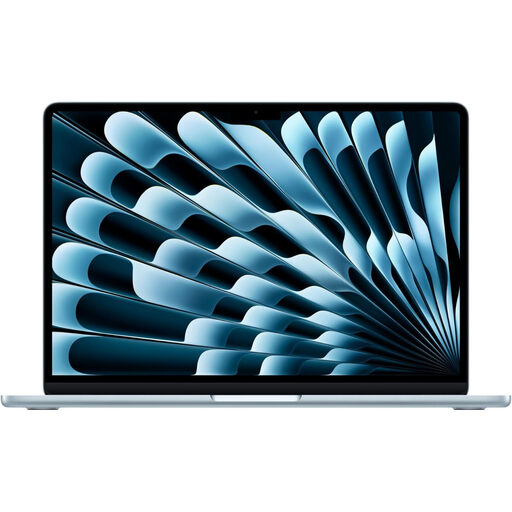 Image unavailable
Consider the 15-inch format if you want more screen area for cue lists while retaining Apple’s stated fanless M5 design. The title specifies a 10-core CPU, 10-core GPU, 16GB memory and a 1TB SSD; confirm that the delivered configuration matches it. Also check the installed macOS version, your audio workflow’s compatibility and the ports needed at your desk.
 Image unavailable
This 15-inch option is worth considering if its listed 512GB SSD suits the space your projects and samples need. The title also specifies a 10-core CPU, 10-core GPU and 16GB memory, while Apple describes the M5 MacBook Air as fanless. Confirm the delivered configuration, installed macOS version, plug-in and driver support, and required connections.
Yes. Figure 53 says QLab 5 is Mac-only, requires macOS 11 or later and runs natively on both Apple Silicon and Intel Macs. If QLab 5 is essential to your cue workflow, choose a compatible Mac rather than a Windows laptop.
Thinness alone cannot tell you how much noise a Windows laptop will make. For the Lenovo ThinkPad X1 Carbon Gen 13 or ASUS Zenbook S 14 UX5406, look for an acoustic test covering the exact configuration you intend to use.
Choose capacity around a representative project rather than a universal specification. Ableton notes that large, low-latency projects with multiple tracks and plug-ins benefit from a more powerful system; check your own track count, plug-ins and sample storage before selecting memory and storage.
Confirm support for the exact operating system and processor platform, every required plug-in and your audio-interface driver. Ableton advises checking third-party software and hardware-driver support when changing operating systems; test a representative project before relying on the new machine for time-critical cues.