Buying priorities
Work from the physical setup first, then check the connection requirements. A laptop stand, monitor and dock solve different problems, so the right combination depends on the desk, the work and the laptop’s documented capabilities.
| Priority |
What to check |
Your needs |
| Screen and input position |
Check whether the laptop screen needs raising for prolonged work. If it does, allow space for a separate keyboard and mouse positioned close to the body. |
I want the screen and input devices to sit independently, rather than typing on a keyboard raised with the laptop. |
| Display arrangement |
Check the desk depth, monitor input, cable type and the laptop’s actual video output. Consider whether one screen is enough for document comparison, spreadsheets or calls. |
I need extra screen space only if it improves the work I do at this desk, not simply because an external monitor is available. |
| Dock and hub compatibility |
Check the exact laptop model for USB-C DisplayPort Alt Mode, USB4 or Thunderbolt support; external-display limits; operating-system limits; charging requirement; and required cables. |
I want to connect displays, peripherals and charging reliably without assuming that a USB-C socket alone provides video, bandwidth or power delivery. |
Joybuy product options
Joybuy product options for a fixed laptop desk, covering hubs and docks for repeated connections, a separate monitor and separate input devices for a raised-laptop arrangement.
 No image available
Baseus Metal Gleam Series II 10-in-1 USB Hub
For a fixed desk with two displays, wired networking and several peripherals.
Listed connections include two HDMI outputs, 10Gbps USB-A and USB-C ports, Gigabit Ethernet, SD/TF card readers and USB-C power delivery input up to 100W.
Check that the laptop supports DisplayPort Alt Mode, the required display bandwidth and sufficient charging before buying.
Joybuy
 No image available
Targus USB-C Universal Dual HDMI 4K Docking Station
For a regular fixed desk that repeatedly uses two HDMI displays and wired peripherals.
The listing states dual HDMI 2.0 outputs, Gigabit Ethernet, USB-A ports, card readers and up to 100W power-delivery pass-through through a USB-C Alt Mode host connection.
An external 100W or higher adapter is stated as the power source; confirm inclusion, laptop charging needs and external-display limits.
Joybuy
 No image available
BenQ MA320UP 31.5-inch 4K USB-C Mac Monitor
For a primarily fixed compatible Mac laptop desk needing an independent display and adjustable screen position.
The listing states a 31.5-inch 4K display, USB-C video, 90W power delivery, HDMI inputs, downstream USB ports and height, tilt, swivel and pivot adjustment.
Check USB-C video support, charging needs and available desk depth. A monitor does not replace separate keyboard and mouse when the laptop screen is raised for prolonged work.
Joybuy
 No image available
V7 USB-C Adapter with HDMI, VGA, Ethernet and 100W Power Delivery
For a fixed desk using one external display alongside wired networking and input devices.
The listing specifies HDMI up to 4K at 30Hz, VGA up to 1920 × 1200 at 60Hz, Gigabit Ethernet, two USB 3.0 ports and up to 100W power delivery.
This is a single-display setup. Confirm USB-C DisplayPort Alt Mode and whether the listed HDMI limit suits the intended monitor and work pattern.
Joybuy
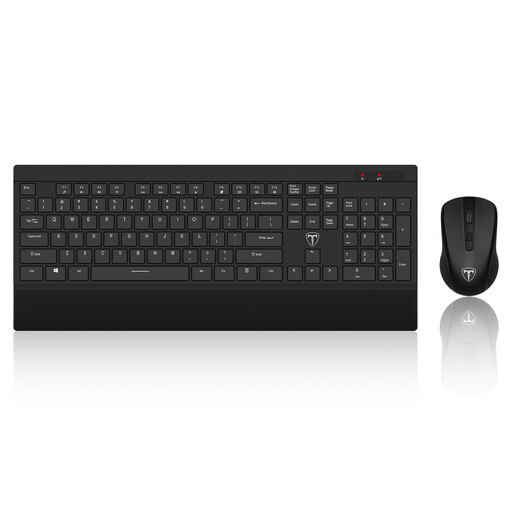 No image available
ET Silent Wireless Keyboard and Mouse Combo, US Layout
For a raised-laptop workstation that needs separate keyboard and mouse controls.
The listing states a 104-key keyboard, integrated wrist rest, adjustable mouse resolution, one wireless receiver and up to 10 metres of wireless range.
This is explicitly a US-layout keyboard, so check that the layout, dimensions, wrist-rest position and mouse shape suit your UK typing needs and desk space.
Joybuy
Frequently asked questions
Does regular home laptop work automatically mean I need a monitor, stand, keyboard, mouse and dock?
No. For workers to whom Great Britain DSE duties apply, the employer should assess the individual workstation and reduce identified risks. The Health and Safety Executive says home equipment may be suitable, but it may also be unsuitable or insufficient. Choose or request equipment to address an identified workstation or workflow need rather than as a default bundle.
If I raise my laptop on a stand, can I keep using its keyboard and trackpad?
Not as the intended prolonged-use arrangement. The Health and Safety Executive advises using a separate keyboard and mouse so that the laptop screen can be elevated on a riser or similar support.
What should I verify before buying a USB-C dock?
Check the exact laptop model’s supported display-output protocol, maximum external-display count and resolution, operating-system limits, charging requirement, monitor inputs and the dock’s supported host platforms. USB-C is a connector description, not proof that video, high bandwidth or power delivery are available.
Can a USB-C monitor replace a separate dock?
Sometimes. A USB-C hub monitor can combine a display, laptop charging and selected ports for a single-laptop fixed desk. Check the monitor’s upstream USB-C video mode and power-delivery rating against the laptop’s requirements, as not every USB-C monitor supplies enough charging power and not every laptop USB-C port carries video.
What should I check for returns and after-sales support when buying online in the UK?
Keep the order record, seller terms and compatibility evidence. GOV.UK states that distance-selling customers generally have 14 days after receiving an item to notify the seller that they wish to cancel, followed by 14 days to return it; exclusions apply. For faulty goods, the Consumer Rights Act 2015 provides repair or replacement rights in applicable cases, with necessary repair or replacement costs borne by the trader.


