What to consider before buying
For sustained laptop-based home or hybrid work, consider how the screen, input devices, connections and available desk space work together before choosing equipment.
| Concern |
What to check when buying |
Who this matters to |
| Screen and input position |
Check stand adjustment and whether a separate keyboard and mouse can be positioned independently. |
If I raise my laptop for sustained work, I also need a practical place for separate input devices. Consumers whose primary concern is screen and input position make up about 29% in this buying scenario. |
| Usable display space |
Compare the exact screen size, resolution, stand adjustment and desk footprint. |
If my regular tasks would benefit from a separate display, I need its size and position to suit the work and desk. About 29% of consumers in this scenario prioritise usable display space. |
| Video and charging compatibility |
Check the laptop’s video output, cable and display input; compare the monitor’s stated power delivery with the laptop’s charging requirement. |
If I want a straightforward laptop-to-display connection, I need the devices and cable to support the same video route. Consumers who put connection compatibility first account for about 21% in this buying scenario. |
| Desk fit and portability |
Measure available width and depth, including room for input devices, and check whether equipment needs to be stored between uses. |
If I share or clear my desk, I need to know what can stay set up and what will need moving. About 21% of consumers in this scenario prioritise desk fit and portability. |
Joybuy product choices
These Joybuy choices cover adjustable laptop stands and external monitors for laptop-based work. Check each product’s fit and connections against your workstation before choosing.
 No image available
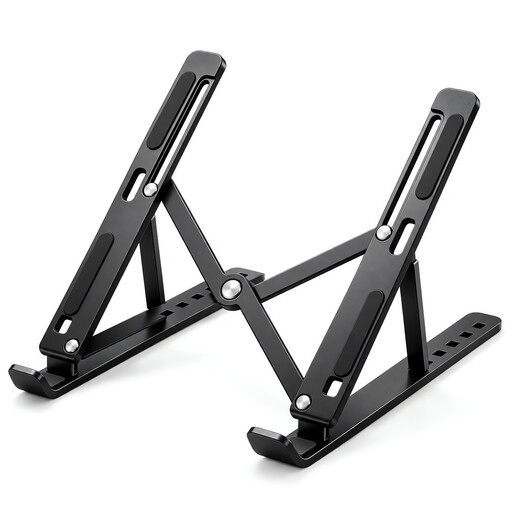
Foldable Adjustable Laptop Stand, 10–17 Inch
For a laptop screen that needs repositioning while retaining the laptop as the display.
Seven listed height levels from 15 to 45 degrees; foldable design; fits 10 to 17 inch laptops.
For prolonged laptop use, HSE guidance calls for a separate keyboard and mouse when the screen is raised.
View on Joybuy
 No image available
Modern MD342CQPW 34-inch UWQHD 120Hz Monitor
For a regular workstation where a separate display suits the work and the desk can accommodate its stand.
34-inch 3440 × 1440 UWQHD display; 120 Hz; 1500R curved screen.
The listed stand has height, swivel and tilt adjustment, USB-C and 98 W power delivery. Its listed base measures 808.6 × 250.6 mm. Check desk space and laptop compatibility; USB-C video requires the host, cable and display to support DisplayPort Alternate Mode.
View on Joybuy
 No image available
BenQ MA270UP 27-inch 4K Monitor
For a laptop workstation where a separate 27-inch 4K display and adjustable positioning suit the available desk.
3840 × 2160 resolution; USB-C with 90 W power delivery, HDMI and USB-A ports; listed stand adjustment includes height, pivot, swivel and tilt.
Check that the laptop supports the intended USB-C video connection and that its charging requirement suits the stated power delivery.
View on Joybuy
 No image available
ASUS ProArt PA278CV 27-inch WQHD Monitor
For a laptop-based workstation where a separate 27-inch WQHD display and multiple positioning adjustments suit the setup.
Listed connections include HDMI, DisplayPort and USB-C with power delivery, plus a USB hub. The stand is listed with height, tilt, swivel and pivot adjustment, and VESA mounting compatibility.
Check the laptop’s video output and charging requirement against the monitor and cable before choosing USB-C.
View on Joybuy
 No image available
UPERFECT 18.4-inch Portable 4K Monitor
For a separate screen described for laptop use across different work locations, where a compact display suits the task.
18.4-inch 3840 × 2160 display; listed connections are USB-C and Mini HDMI. The product description lists an integrated mount and VESA mounting compatibility.
Check that one of the listed connections suits the laptop’s video output.
View on Joybuy
Frequently asked questions
Do I need to buy equipment myself after a home-working DSE assessment?
Not necessarily. If an applicable assessment identifies equipment as needed, discuss its provision with your employer before buying it yourself. HSE guidance says a worker cannot be charged for equipment provided to meet a need identified by the assessment.
Does a hybrid worker need an assessment for both home and office work?
Where a worker uses DSE in both locations and the regulations apply, HSE guidance says the assessment should cover both situations. HSE identifies daily DSE use as part of normal work, continuously for an hour or more, as the threshold for a DSE user; occasional short periods at home are treated differently.
Can I use a laptop riser and keep typing on the built-in keyboard?
For prolonged laptop use, HSE guidance calls for a separate keyboard and mouse so the screen can be elevated, or for a separate display. Consider the full workstation arrangement rather than treating a riser alone as the complete setup.
Will any USB-C laptop connect to and charge from a USB-C monitor?
No; the connector shape alone does not establish video or charging compatibility. For DisplayPort Alternate Mode video, StarTech.com says the host port, cable and connected device must support it. Compare the monitor’s stated power delivery with the laptop’s charging requirement separately.
When should an employer review a workstation setup?
HSE says an assessment is needed when a new workstation is set up, an existing workstation or its use changes, or a user reports pain or discomfort. Its home-working guidance also advises reviewing whether existing controls remain sufficient.


