Windows report reviewers
If your chart workflow requires Power BI Desktop, operating-system compatibility comes before screen or battery claims. Microsoft Learn describes Power BI Desktop as a Windows application.


If you need Power BI Desktop, choose a Windows laptop; Microsoft Learn describes it as a Windows application. If your required chart tools run on macOS, a MacBook Air is another option. When sockets are scarce, compare the exact laptop’s screen and charging options, and treat advertised battery life as a test claim rather than a guarantee of working time.
If your chart workflow requires Power BI Desktop, operating-system compatibility comes before screen or battery claims. Microsoft Learn describes Power BI Desktop as a Windows application.
If your required applications run on both Mac and PC, you have more freedom to choose by screen size and portability. Tableau says Tableau Desktop is available on both platforms.
If you regularly inspect charts, labels and tables together, compare the screen size, resolution and finish of the exact laptop configuration rather than relying on its product-family name.
Settle which applications must run on the laptop, then compare how long you need to work away from a socket and how much chart space you need on screen.
| Concern | What to check | Who this matters to |
|---|---|---|
| Unplugged use and charging | Compare battery claims for the exact configuration, and check whether it accepts charging from a compatible USB-C power source. | If I review charts between meetings without a dependable socket, I need working time I can plan around. Around 31% of consumers put unplugged use and charging first. |
| Software compatibility | Confirm whether your work requires Power BI Desktop or can use applications available on your chosen operating system. | My reports depend on a desktop application, so a portable laptop is no help if it cannot run that workflow. Around 25% of consumers put software compatibility first. |
| Chart-viewing space | Compare the selected screen’s size, resolution and finish, especially if you view charts and tables together. | When I compare several labelled charts, repeated zooming interrupts the review. Around 25% of consumers put screen workspace and readability first. |
| Configuration fit | Check the memory, processor and storage of the exact variant against the applications and files you use together. | I keep reports, spreadsheets and browser tabs open at once, so the configuration has to suit that workload. Around 19% of consumers put multitasking fit first. |
Microsoft Learn describes Power BI Desktop as a Windows application. A Mac is therefore not a straightforward choice if that application is essential to your work.
List the applications, data connectors and employer-managed tools you must use before comparing laptops.
Chart-review runtime can differ from a stated test result. Dell notes that actual battery life varies with configuration, software, use and power settings.
Use battery claims to narrow your choices, then look for relevant independent runtime testing and check charging requirements before planning extended unplugged sessions.
ASUS and Dell list differing display and memory configurations within the laptop lines discussed here. A product-family name alone does not identify the panel or capacity you will receive.
Match the full model number to the screen, memory, charging input and supplied charger on the product listing.
Cancellation of an eligible online order, remedies for faulty or misdescribed goods, and a voluntary warranty are separate matters.
Keep the listing, configuration summary and order confirmation, and check the applicable cancellation terms and warranty before ordering.
MacBook Air offers a macOS route in 13-inch and 15-inch sizes for chart workflows that support macOS.
Zenbook S 14 UX5406 is a compact Windows line with differing 14-inch display configurations.
ThinkPad X1 Carbon Gen 13 Aura Edition is a Windows route for reviewers considering a 14-inch business laptop.
Latitude is a Windows business-laptop line worth comparing when screen and memory choices matter to your reporting workflow.
These choices cover 14-inch and 16-inch laptops for chart review, plus a Chromebook for workflows that work on ChromeOS. Check your required applications and charging arrangements against each model before choosing.
 Image unavailable
The 14-inch format is worth considering if you carry your chart-review laptop between locations. This variant names a Snapdragon X processor, 16GB RAM and a 512GB SSD; confirm your required applications and charging method before relying on it away from sockets.
 Image unavailable
This convertible is an option for chart review that requires Windows desktop software. The variant names Windows 11 Home, 16GB RAM and a 1TB SSD; check its screen and unplugged runtime against your working needs. Confirm the graphics configuration before ordering, as the product information gives conflicting graphics descriptions.
 Image unavailable
Consider the larger screen if viewing several charts matters more to you than carrying a smaller laptop. This Windows 11 Home variant names a 16-inch 4K OLED touchscreen, AMD Ryzen AI 9 HX 370, NVIDIA GeForce RTX 5080 16GB, 64GB RAM and a 2TB SSD; check its carrying weight and working runtime before choosing it for frequent unplugged use.
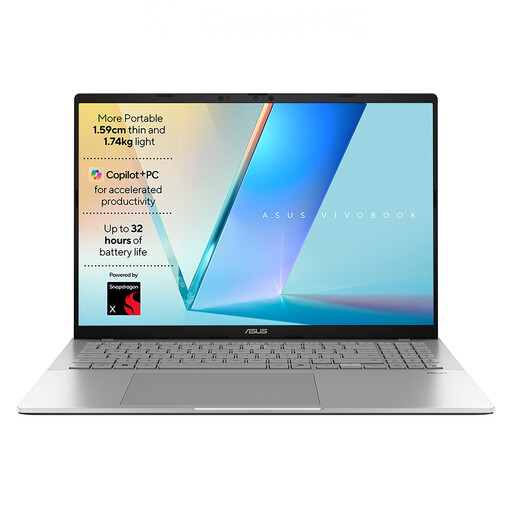 Image unavailable
This 16-inch Windows laptop is an option if screen size matters to your chart review. It names a WUXGA display, Snapdragon X1-26-100 processor, 16GB RAM and a 512GB SSD; confirm that your required applications run on this configuration and check its charging input and working runtime.
 Image unavailable
Consider this Chromebook for chart review only if your required workflow works on ChromeOS; Microsoft Learn describes Power BI Desktop as a Windows application. The 14-inch model names a WUXGA (1920 × 1200) display, Intel Core 5 120U, 8GB RAM and a 512GB SSD. Confirm the supplied charger and working runtime before planning time away from sockets.
Choose Windows if you need to install and use Power BI Desktop: Microsoft Learn describes it as a Windows application. If you only view reports in a browser, check the access method and your employer’s requirements separately rather than assuming it replaces the desktop workflow.
Yes, if all your required applications support macOS. Tableau says Tableau Desktop is available on Mac and PC, while Apple advertises up to 18 hours of battery life for MacBook Air; that maximum is not a promise of your chart-review runtime. Choose between the 13-inch and 15-inch sizes according to your screen-space and carrying needs.
It gives you a stated test result, not guaranteed working time. Dell notes that actual battery life varies with configuration, use, software and power settings, so check relevant independent tests and the exact laptop’s charging requirements if you expect long sessions away from a socket.
For an eligible change-of-mind cancellation, GOV.UK says customers normally have 14 days from receiving an online purchase to tell the seller they want to cancel, followed by another 14 days to return it. Check applicable exceptions and terms; remedies for faulty or misdescribed goods are separate from change-of-mind cancellation and voluntary warranties.