What matters when choosing?
Confirm the invoice software and security setup first, then choose the screen and desk arrangement that fit the work. Treat specifications for a product family as a starting point, not a substitute for checking the exact configuration.
| Concern |
What to check |
Who this matters to |
| Access and data protection |
Confirm individual accounts, storage-encryption support and who will manage recovery information. If personal information is stored locally, the Information Commissioner’s Office advises enabling storage encryption on the laptop. |
When different colleagues open supplier records, I want separate access and protection for files kept on the device. Around 42% of consumers put controlled access and data protection first. |
| Working across documents |
Check the exact RAM and storage configuration, screen resolution and any external-display connection needed for the desk. |
If I compare invoices with spreadsheets and supplier emails, I need screen space and a configuration that accommodates those open tasks. For around 33% of consumers, working across documents is the primary concern. |
| Repeatable office setup |
Record the exact part number and check the included charger, required accessories and support terms. |
When setting up or replacing office laptops, I need a configuration colleagues can identify and a workable support arrangement. Keeping that setup manageable comes first for around 25% of consumers. |
Business laptop brands to consider
These manufacturer product lines provide configuration references for invoice work; their features should be checked on the precise model being considered.
HP
HP’s UK ProBook 440 G11 listing includes a DD7V9EA#ABU configuration with Windows 11 Pro, Intel Core Ultra 5, 16 GB RAM, a 512 GB SSD and a 14-inch 1920 × 1200 display.
- The specified part number gives office buyers a concrete configuration to compare with their software and desk requirements.
- Check the exact listing for included equipment and support terms; optional HP accessories are separate from the laptop configuration.
Lenovo
Lenovo UK presents the ThinkPad E14 Gen 6 (14-inch AMD) as a small-business laptop family with configuration-dependent memory and security options.
- The family is relevant when a compact business design and stated security options are on the shortlist.
- Lenovo says specifications vary by model and region. Check the precise configuration for biometric features, memory, ports and security hardware.
ASUS
ASUS describes the ExpertBook B1 B1403 as a business-laptop family with configurable memory, storage and connections.
- ASUS lists USB-C and USB-A connections and family-level memory and storage options relevant to comparing shared-desk setups.
- Family maximums and ASUS’s repairability claims do not establish the features or service terms of every individual configuration.
Joybuy laptops for invoice work
These laptops include compact and larger-screen choices for a shared desk. Check your invoice software, individual-account arrangement and storage-encryption setup against the exact device before selecting one.
 No image available
ASUS Vivobook 14 X1407QA-LY003W Copilot+ PC, Snapdragon X, 16GB RAM, 512GB SSD, Quiet Blue
The 14-inch model is worth considering when the laptop needs to be moved or put away between uses.
Its named configuration has 16GB RAM and a 512GB SSD. Check that your invoice software works with this Snapdragon X device, and confirm the Windows 11 Home encryption setup before storing sensitive files locally.
View on Joybuy
 No image available
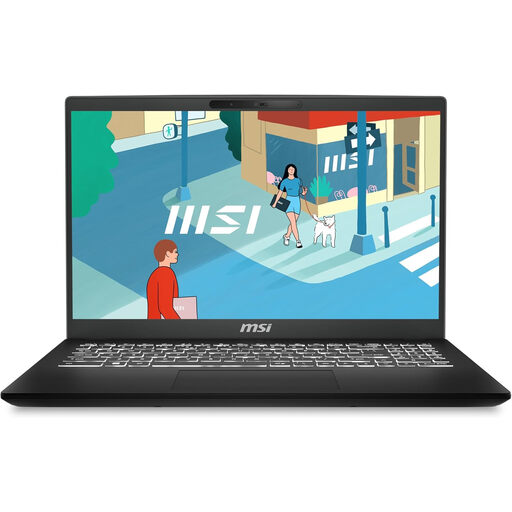
MSI Modern C13M-274UK, 15.6-inch, Intel Core 15-1342OH, 16GB RAM, 512GB SSD
The 15.6-inch screen is an option for a shared desk where invoices and spreadsheets are often viewed together.
The named configuration has 16GB RAM and a 512GB SSD. Confirm the installed Windows edition, your invoice software’s requirements and the connections needed for any external display.
View on Joybuy
 No image available
MSI Modern C2RMG-282UK (9S7-15H431-282), 15-inch FHD, 16GB DDR IV RAM, 512GB SSD
This is another larger-screen option for comparing supplier documents at a shared desk.
The named variant has 16GB DDR IV RAM and a 512GB SSD. Confirm the exact processor configuration, installed Windows edition and invoice-software compatibility before choosing it.
View on Joybuy
 No image available
HP OmniBook Ultra Flip 14-fh0006na, 2-in-1 Copilot+, 16GB RAM, 1TB SSD, Windows 11 Home
The 14-inch convertible format is an option if the shared-office laptop also needs to move between rooms.
The named variant has 16GB RAM and a 1TB SSD. Check its exact ports and confirm storage-encryption support and setup before keeping sensitive invoices on the device.
View on Joybuy
 No image available
HP OmniBook X Flip 16-as0004na, 16-inch 2-in-1, Intel Core Ultra 5 226V, 16GB RAM, 512GB SSD, Windows 11 Home
Consider the 16-inch model when screen size at the desk matters more than choosing a compact laptop.
The named configuration has 16GB RAM and a 512GB SSD. Check its weight and display connections if it will be moved or used with a monitor, and confirm the office’s encryption setup.
View on Joybuy
Frequently asked questions
Do we need Windows Pro to check invoices?
Not automatically: choose the Windows edition around your invoice software and the office’s device-management needs. Microsoft says Device Encryption can be available on some Windows Home devices, while BitLocker Drive Encryption management is available on Pro, Enterprise and Education editions. Check support and activation on the exact laptop.
Should a shared-office laptop have storage encryption?
If it stores invoices containing personal information, the Information Commissioner’s Office advises enabling storage encryption on the laptop. Confirm who manages access and recovery information as part of the office setup.
Can a 14-inch laptop be the main invoice-checking computer?
Yes, if its screen and connections suit the work and its smaller size helps with moving or storing it. If colleagues regularly compare several documents at once, assess the actual display workspace and whether the exact laptop supports the external-monitor arrangement they need.
What should we consider when replacing an old office laptop?
Plan how office data will be cleared and how the device will be transferred for reuse or recycling. GOV.UK describes the UK’s Waste Electrical and Electronic Equipment framework, though the cited guidance is directed principally at manufacturers, importers and distributors rather than setting a single disposal instruction for every purchaser.


