Who needs which device?
Your course software is the starting point; where you study and how you take notes then help narrow the device type.
Students doing lectures and general coursework
A laptop is a practical starting point for course platforms, documents, recorded lectures and online sessions across different locations. Check your university’s requirements before settling on a model; UWE Bristol says course software determines the type of device you need.
Students using specialist software
Get the names and requirements of your applications before choosing an operating system or hardware configuration. The University of Bath’s mechanical engineering guidance, for example, identifies several Windows-only applications; requirements for your own programme may differ.
Students who favour handwritten notes
A tablet with a keyboard or stylus can serve reading, notes and online resources. Loughborough University and Queen’s University Belfast caution that tablet software or storage limits can restrict study applications, so confirm every required task before making one your only device.
What should you check before choosing?
Choose a route that can run your course work, then check how well it fits the places where you study. Jisc’s 2024/25 digital experience survey received 15,398 responses from students at 30 participating UK higher-education organisations between October 2024 and April 2025; its figures describe those students’ experiences and investment priorities, not device-purchase preferences.
Laptop
Choose when: You need one device for work in teaching spaces and at home, including installed applications.
Trade-off: A portable design does not establish that a particular model meets your department’s software requirements.
Tablet with keyboard or stylus
Choose when: Reading and handwritten notes are central, and your course confirms that its required workflows run on the tablet.
Trade-off: Loughborough University notes that tablets have access to a narrower range of software than laptops.
Fixed desktop setup
Choose when: A larger fixed workspace, specialist external equipment or an accessibility requirement matters more than carrying the device.
Trade-off: As the University of Bristol’s device guidance notes, a desktop does not offer a laptop’s flexibility across locations.
| Priority | What to check | Your needs |
|---|
| Access to study tasks |
Check access to course platforms and required documents. Confirm the camera, microphone and other equipment needed for online sessions. |
I need a device I can use for coursework when it is due. In Jisc’s 2024/25 survey of students at 30 participating UK providers, 37% reported lacking access to a suitable device at some point; 12% identified more computers and devices as a future investment priority. Neither figure measures intended personal purchases. |
| Course software |
Ask your department for named applications, supported operating systems and required processor, memory, storage, graphics or peripherals. Check these against the exact model. |
If my course uses specialist applications, they must run in the form my assessments require. In the same Jisc survey, 24% identified specialist course software as a future investment priority, not necessarily a need for a high-specification personal laptop. |
| Study locations |
Decide whether the device must travel to lectures and study spaces. For a fixed setup, consider how you will access work when away from it. |
Some days I need to continue the same work away from my usual desk. The University of Warwick recommends a laptop for portability, while noting that departments may set different requirements. |
| Connectivity |
Check how you will access online course materials where you study. Treat a connection problem separately from device suitability. |
I need to join online sessions and reach course resources reliably. In Jisc’s 2024/25 survey of students at 30 participating UK providers, 60% reported Wi‑Fi issues on or off campus; that does not mean a different device would resolve them. |
| Useful lifespan |
Compare course requirements with a device you already own. Check operating-system support, warranty terms and condition before relying on it through your studies. |
I want to keep using a suitable device rather than replace it solely for specifications my coursework does not require. |
A relevant brand reference
Brand choice comes after course compatibility: a product family alone cannot tell you whether required applications will run.
Apple
Consider a MacBook or iPad only after checking your course’s macOS or iPadOS requirements against the particular model and your intended workflow.
- An iPad may suit reading and handwritten notes where those are the tasks you need it to perform.
- The University of Bath identifies Windows-only applications in its mechanical engineering guidance, while Loughborough University cautions that tablets have a limited range of accessible software. Check your own course rather than assuming either Apple device can replace a required Windows computer.
Laptop options on Joybuy
These laptops are options for students considering a portable main device. Their listed configurations differ; confirm your course applications and hardware requirements before choosing one. This selection does not compare tablet or desktop models.
 No image available
ASUS Vivobook 15 X1504VA, Core 5 120U, 24 GB, 1 TB SSD
A 15.6-inch laptop to consider if you need portable access to coursework and your course supports its configuration. The title specifies an Intel Core 5 120U, 24 GB of memory and a 1 TB SSD; confirm required applications and connections before relying on it as your main device.
View on Joybuy
 No image available
ASUS Vivobook 14 X1407QA-LY003W, Snapdragon X, 16 GB, 512 GB SSD
This 14-inch laptop is an option for work across study locations. Its title specifies a Snapdragon X processor, 16 GB of memory and a 512 GB SSD; check each required application and peripheral against this Snapdragon-based model before making it your only computer.
View on Joybuy
 No image available
Lenovo Legion Pro 7 16IAX10H, 83F5000UUK, RTX 5090
Consider this 16-inch laptop for specialist work only if your department’s named applications call for its configuration. The title specifies an Intel Core Ultra 9, 64 GB of memory, a 2 TB SSD, NVIDIA GeForce RTX 5090 graphics and Windows 11 Home. Check course compatibility and the carrying and battery requirements of your study routine.
View on Joybuy
 No image available
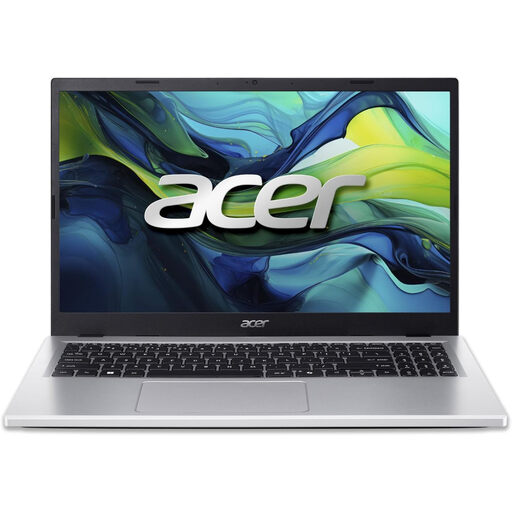
Acer Aspire Go 15 AG15-71P, Core i5-13420H, 8 GB, 256 GB SSD
This 15.6-inch laptop is an option for coursework if its memory and storage meet your course requirements. Its title specifies an Intel Core i5-13420H, 8 GB of memory and a 256 GB SSD. Confirm whether the supplied Windows 11 Home installation is in S Mode, and whether your required applications can be installed.
View on Joybuy
 No image available
Lenovo IdeaPad 1, Ryzen 3 7320U, 8 GB, 128 GB SSD
This 15-inch laptop is worth considering for coursework that fits its stated configuration. The title specifies a Ryzen 3 7320U, 8 GB of memory, a 128 GB SSD and Windows 11 Home in S Mode. Check available storage and whether your course applications work in that Windows configuration.
View on Joybuy
Common questions
Should a laptop or tablet be my main university device?
Start with a laptop if you need installed applications or a wider range of peripherals. A tablet can be your main device if your course confirms that its required applications, assessments, storage and printing workflows work on that platform; Loughborough University and Queen’s University Belfast both flag limits to tablet software access.
Do I need Windows, macOS or a Chromebook?
Choose the operating system that runs your course’s named applications. UWE Bristol describes Windows as the more compatible general route, while the University of Bath identifies Windows-only software in mechanical engineering. Do not rely on macOS or a Chromebook for a required application until your department confirms a workable route.
When does a desktop setup make sense?
Consider a fixed setup when specialist external equipment, a larger workspace or an accessibility requirement matters more than carrying your computer. The University of Bristol notes those reasons for choosing a desktop; if you also need to work in lectures or libraries, establish how you will access the same work there.
What should I ask my department before buying?
Ask for the required applications and supported operating systems, then check the minimum processor, memory, storage, graphics and peripheral requirements. Ask whether any specialist application is available through university remote access, and whether that arrangement covers the tasks you must complete away from campus.
Can I keep using the computer I already own?
Yes, if it remains suitable for your course’s software and the way you study. Compare its operating-system support, condition and specifications with your department’s requirements before replacing it; a general student specification cannot override a specialist course requirement.


