Choose a compact laptop if your train journeys involve desktop applications, extensive file work or long typing sessions. A tablet with a compatible keyboard makes more sense when reading, notes and touch use matter more, provided your required apps work on it. National Rail says onboard Wi-Fi and power outlets vary by train company, so plan battery life and connectivity around your usual service rather than assuming either facility will be available.
Who each setup suits
Desktop-work commuters
If you need conventional laptop applications, local files, several documents open at once or sustained keyboard work, start with a compact laptop or a Windows 2-in-1. Check its battery use against your journey rather than relying on a socket.
Reading and note-taking travellers
If your tasks centre on reading, email, web apps, cloud documents or annotation, a tablet-led kit may suit you. Confirm that the keyboard fits the exact tablet and that your work or study apps run on it.
Commuters with uncertain onboard facilities
If you cannot count on a socket or Wi-Fi on your usual service, consider battery use and a connectivity fallback before choosing a device. National Rail says facilities vary by train company.
What matters when choosing
For regular work or study on trains, check whether your essential tasks require laptop software before weighing up carry size, onboard independence and tablet features.
| Concern |
What to check |
Who this matters to |
| Software and typing |
Check required apps, files and peripherals on the intended operating system; try the keyboard and pointer setup for longer tasks. |
If I must edit documents for much of the journey, I need my usual software and comfortable input. Around 36% of consumers put software and typing first. |
| Carry and workspace |
Compare the complete kit, including accessories, and consider whether you normally work at a table or on your lap. |
When I carry my kit through stations and transfers, manageable weight matters more to me than a larger screen; roughly 29% of consumers prioritise carrying and workspace fit. |
| Power and connectivity |
Check facilities on your usual service, battery behaviour with your apps and whether you need mobile data. |
If my work must continue without a socket or train Wi-Fi, I need enough battery reserve and another way to connect. About 21% of consumers make that independence their main concern. |
| Tablet flexibility |
Confirm keyboard compatibility and that the required apps and file formats work on the tablet. |
For reading and handwritten notes between shorter writing sessions, I would rather use a touch-first device; around 14% of consumers put that flexibility first. |
Buying pitfalls
-
Assuming every train has usable Wi-Fi and a socket
National Rail says many train companies provide these facilities, but availability and charges vary. A setup that depends on them may not suit every service you take.
Check your usual operator and service, then plan for the battery and connectivity your tasks require without onboard facilities.
-
Comparing a bare tablet with a complete laptop
A tablet used for typing may also need a compatible keyboard. Its accessories change what you carry and how the setup fits your seat.
Compare the complete travel kits and confirm keyboard compatibility with the exact tablet model.
A keyboard case, pen, charger or sleeve may add items to carry.
-
Treating a battery-life claim as work runtime
Manufacturer figures quoted for video playback do not tell you how long your own apps, screen settings and network use will run during a journey.
Use the stated test condition as a starting point, then look for work-use evidence relevant to your tasks and longest regular journey.
-
Overlooking flight rules for a train-and-air trip
UK Civil Aviation Authority guidance says power banks belong in cabin baggage, not checked luggage, and must be individually protected when not in use.
If the same kit will fly, check the power bank’s rating and your airline’s current conditions before travelling.
Relevant brands to consider
Microsoft Surface
The Surface Laptop and Surface Pro lines illustrate the choice between a conventional compact Windows laptop and a detachable Windows device.
- Microsoft lists a 13-inch Surface Laptop at 1,225 g; Surface Pro offers an optional keyboard for laptop-style use.
- Check the exact configuration and whether the Surface Pro keyboard is included. Manufacturer battery figures are not promises of runtime for your train work.
Apple
An iPad with a compatible keyboard is a tablet-led option for travellers whose required apps support that workflow.
- Apple offers iPad keyboards intended for typing and device protection.
- Check the keyboard against the exact iPad generation and size; adding one does not make laptop-only software available on iPad.
Lenovo ThinkPad
The cited ThinkPad X13 is a compact conventional laptop to consider for typing-heavy travel.
- Lenovo UK lists the cited X13 at 1.29 kg with a 13.3-inch display.
- Those figures concern the cited X13, not every ThinkPad. Check the configuration, battery and warranty of the model you are considering.
Samsung Galaxy Tab
A compatible Galaxy Tab and keyboard may suit lighter Android-based work alongside reading and notes.
- Samsung describes its cited Pro Keyboard as offering keyboard and trackpad input with a DeX interface.
- Confirm exact tablet compatibility and test whether your required apps work in the intended Android or DeX workflow.
Joybuy laptop choices
These laptops cover conventional keyboard-based work and, in some models, touch or convertible use. Compare their operating systems with your required apps, then check how the complete kit and battery performance fit your journeys.
 No image available
ASUS Vivobook 14 X1407QA-LY003W Copilot+ PC, Snapdragon X, 16GB, 512GB, Quiet Blue
Consider this laptop for keyboard-based work if your essential apps and peripherals are compatible with its Snapdragon-based configuration.
The named variant has a 14-inch format, Snapdragon X, 16GB memory and 512GB SSD. Check work-use battery performance against your journey length.
Joybuy
 No image available
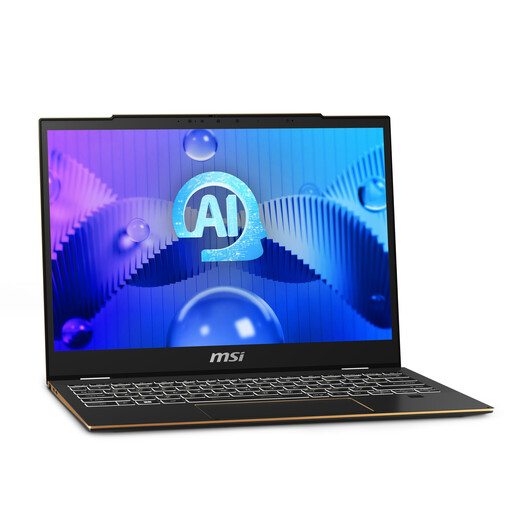
MSI Summit E13 AI Evo, Core Ultra 7 155H, 32GB, 1TB SSD
Consider this model if you want laptop input alongside touch use during parts of a journey.
Its name specifies a 13-inch FHD+ 60 Hz touch display, Intel Core Ultra 7 155H, Intel Arc, 32GB LPDDR5 memory and 1TB SSD. Confirm the exact display variant and work-use battery runtime before choosing it.
Joybuy
 No image available
Apple 13-inch MacBook Air (2026), M5, 24GB, 1TB SSD, Midnight
This is a laptop option for document work if your required software and peripherals work with macOS.
The named M5 variant has a 10-core CPU, 10-core GPU, 24GB memory and 1TB SSD. Check its carry weight and battery performance with your own work rather than treating video-streaming runtime as a work-use figure.
Joybuy
 No image available
HP OmniBook Ultra Flip 14-fh0006na 2-in-1, 16GB, 1TB SSD
Consider a convertible if you need laptop-style work but also expect to use touch input for reading or notes.
This named variant has 16GB memory, a 1TB SSD and Windows 11 Home. Check whether its working positions fit your usual train seat and how long it runs with your apps.
Joybuy
 No image available
Apple 13-inch MacBook Neo (2026), A18 Pro, 8GB, 256GB SSD, Silver
This compact laptop format is worth considering for journey-based documents and study once you have checked your required apps and peripherals.
The named A18 Pro variant has a 6-core CPU, 5-core GPU, 8GB memory and 256GB SSD. Check the complete carry weight and work-use battery runtime for your typical journey.
Joybuy
Frequently asked questions
Can I rely on Wi-Fi and sockets on my train?
Do not make either essential to your work plan without checking your service. National Rail says many train companies offer Wi-Fi and power outlets, but availability and charges vary by operator.
When should I choose a laptop instead of a tablet with a keyboard?
Choose a laptop when your journey work requires desktop applications, conventional file handling or sustained keyboard use. A tablet is a reasonable alternative for compatible apps and touch-led tasks, but a keyboard case alone does not establish software compatibility.
Do I need a power bank for train work?
Not necessarily: start with your device’s battery use and the facilities on your usual service. If you want a backup, confirm that the device accepts the power bank’s charging connection and output before buying.
What if I also fly with my power bank?
Pack it in cabin baggage, not checked luggage. UK Civil Aviation Authority guidance also says to protect power banks individually when not in use; check your airline’s current conditions for your particular battery.


