What should you check before choosing?
Check required course software first, then consider how you will work across locations and join online sessions. The figures below come from Jisc’s September 2025 report on 15,398 students at 30 UK higher-education providers; they describe reported access and connectivity experiences, not device preferences.
Portable laptop
Choose when: You need to write documents and use learning platforms across campus, home and accommodation, as in the University of Warwick’s laptop guidance.
Check first: A general-purpose configuration may not meet the software or hardware requirements of a specialist course.
Tablet with keyboard
Consider when: Your main tasks are notes, reading and online resources, and your course confirms that its required tools work on the tablet.
Trade-off: Loughborough University notes that the software available on tablets is more limited, so do not assume one can replace a laptop for specialist applications.
| Priority |
What to check |
Your needs |
| Suitable device access |
Check that the device can run your everyday learning tools and that you can use it consistently in each study location. Confirm your course requirements before replacing an existing machine. |
I need dependable access to a device that suits my coursework. In Jisc’s survey, 37% of students reported lacking access to a suitable device at some point; among international students surveyed, it was 49%. |
| Course software |
Ask your department for its required applications, supported operating systems and processor types. For specialist work, check graphics needs and hardware connections too. |
My required applications and equipment need to work on the device I choose. The University of Bath identifies Windows-only mechanical-engineering software, while the University of Nottingham cautions that some ARM-based devices may not support required engineering software or interfaces. |
| Online sessions |
Check for a compatible camera, microphone and audio setup, whether built in or external. Test the connection where you plan to join sessions or use remote software. |
For online teaching, I need both a usable device and a reliable connection. In the same Jisc survey, 60% reported Wi-Fi connectivity issues on or off campus; that figure does not identify a device fault. |
| Everyday specification |
Compare memory, SSD storage, ports and carrying weight with your course guidance. The University of York lists an Intel i3 or AMD Ryzen 3 processor, 8 GB RAM and at least 256 GB SSD for taught students; specialist requirements may differ. |
I want to carry my work between locations without assuming that a university-wide minimum covers every module. I also need to check battery runtime against the time I expect to work away from a socket. |
| Files and protection |
Check storage connections and keep a separate copy of important work if using an external drive. For an extended warranty, examine its duration, exclusions and overlap with existing protection. |
I need access to my study files and clarity about what protection I already have. GOV.UK says an extended warranty is optional and does not replace statutory rights for faulty goods. |
Brand references
No brand information to display.
Joybuy laptops and study accessories
These options include laptops for personal study and an external SSD for supplementary file storage. Match a laptop to your course software and daily study pattern; the SSD is an accessory, not a replacement for a study computer.
 No image available
ASUS Vivobook 15 X1504VA, Core 5 120U, 24 GB, 1 TB SSD
Consider this Windows laptop for document work and online sessions across study locations. Its listing specifies Windows 11 Home, a 15.6-inch Full HD IPS display, an integrated webcam with microphone, Wi-Fi 6, HDMI and USB ports, and a weight of 1.70 kg.
Check your department’s software requirements and the active-use battery runtime you need; the stated battery figure concerns standby time.
Joybuy
 No image available
HP OmniBook X Flip 16-as0004na, Core Ultra 5 226V, 16 GB, 512 GB SSD
The 2-in-1 format is worth considering if you want a Windows laptop with a touchscreen for study. The listing specifies Windows 11 Home, a 16-inch 2K touchscreen, an FHD IR camera, Wi-Fi 7 and a 512 GB SSD.
Confirm its weight and active-use battery runtime if you will carry it around campus, as well as compatibility with any specialist course software or hardware.
Joybuy
 No image available
Acer Aspire Go 15 AG15-71P, Core i5-13420H, 8 GB, 256 GB SSD
This Windows laptop has a webcam and microphone for online tutorials. Its listing specifies Windows 11 Home, a 15.6-inch Full HD display, Wi-Fi 6, HDMI, a weight of 1.8 kg and up to 7 hours of use; that runtime is a listing claim, not an independent measurement.
The 8 GB RAM and 256 GB SSD meet the figures in the University of York’s taught-student baseline, but check your own course requirements before relying on them for specialist work.
Joybuy
 No image available
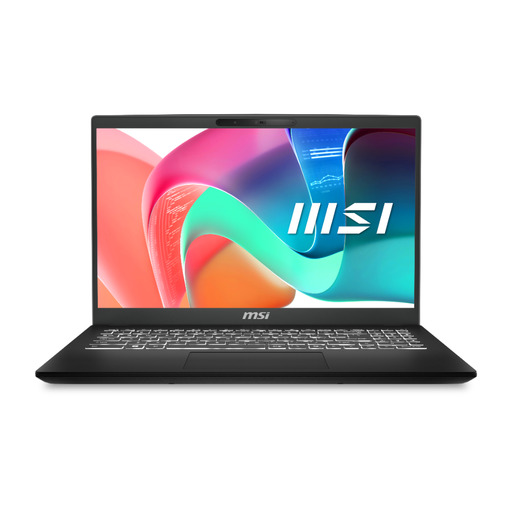
MSI Modern C2RMG-282UK, 9S7-15H431-282, Core 5, 16 GB, 512 GB SSD
Consider this laptop if its wired connections fit your study setup. The listing specifies a 15-inch Full HD display, 1.86 kg weight, USB-C with Power Delivery and an RJ-45 Ethernet port.
Before choosing it for required software or online sessions, confirm the installed operating system, webcam and active-use battery runtime, along with your programme’s requirements.
Joybuy
 No image available
Samsung Portable SSD T7, 1 TB, USB 3.2 Gen 2, Blue
This external drive provides supplementary storage for study files, rather than a computer for coursework. The listing specifies USB-C connectivity, included USB-C-to-C and USB-C-to-A cables, and a weight of 58 g.
Check its connection and file-system compatibility with your devices, and keep a separate copy of important work rather than treating one drive as a complete backup plan.
Joybuy
Common questions about study devices
Can a tablet with a keyboard replace a university laptop?
It can cover notes and online resources if your required tools work on it, but do not assume it will replace a laptop for specialist applications. Loughborough University cautions that tablet software is more limited, so confirm compatibility with your course before making a tablet your only device.
What laptop specification is a starting point for a non-specialist course?
The University of York lists an Intel i3 or AMD Ryzen 3 processor, 8 GB RAM and at least 256 GB SSD for taught students, and notes that a built-in webcam and microphone are useful. Treat that as York’s general guidance, not a specification for every programme; check your department’s requirements.
Why does processor and operating-system compatibility matter for engineering?
Some required tools have platform restrictions. The University of Bath identifies Windows-only mechanical-engineering software, while the University of Nottingham warns that ARM-based devices may not support all required electrical and electronic engineering software or hardware interfaces. Ask your department for its exact requirements before choosing.
Do I have to buy an extended laptop warranty in the UK?
No. GOV.UK guidance says an extended warranty is optional and does not replace statutory rights, which may include a refund, repair or replacement if goods are faulty. Check the cover and exclusions alongside protection you already have.
Can remote access replace a laptop that runs specialist software locally?
Only if your university confirms that remote access supports the applications and hardware tasks you need. Check when the service is available and test the connection where you will work; do not assume a virtual desktop will cover every assessed activity.


