Who is this setup for?
The useful starting point is the work your device must complete, not whether you prefer taking notes on a screen or a keyboard.
Students doing everyday coursework
If you regularly write documents, join online sessions and use a virtual learning environment, plan for regular access to a computer. Oxford and UCL recommend a laptop or desktop for study rather than relying on a tablet alone.
Students using specialist software
Engineering, computing and design work can depend on particular applications or connected equipment. The University of Bath notes that some mechanical-engineering software is Windows-only, while the University of Nottingham warns that ARM devices may not support every required engineering application or hardware interface.
Mobile note-takers with access to a computer
A tablet can be useful for handwriting, reading and opening course resources between classes. Keep access to a suitable laptop or university computer for work that needs desktop software or extended document editing; Loughborough University cautions that software available on tablets is limited.
What should you check before choosing?
Confirm the course software first. That determines whether a tablet can cover your work and which laptop specifications matter.
Laptop as the main device
Choose it when: you need to write substantial coursework and run required computer applications. Oxford and UCL recommend regular access to a laptop or desktop for study.
Bear in mind: a laptop does not automatically meet a specialist course’s software or hardware requirements.
Tablet with a keyboard
Choose it when: notes and reading are the main tasks and you have access to a suitable computer for anything the tablet cannot do.
Bear in mind: Loughborough University notes that tablet software availability is limited; confirm every required application and assessment workflow before using one as your only device.
| Priority | What to check | Your needs |
|---|
| Course software |
Get the department’s application list. Check operating system, processor architecture and any graphics, driver or connected-equipment requirements; the University of Bath identifies Windows-only mechanical-engineering software, and Nottingham flags possible ARM limitations for engineering work. |
I need the device to run my actual course applications, not just open lecture recordings and websites. |
| Everyday coursework |
Check access to the virtual learning environment, document tools and video meetings. For a new computer, compare its memory and storage with your university’s guidance; the University of Bristol advises ideally 16GB RAM and no less than 8GB. |
Long writing sessions and online classes call for a workable keyboard and screen, wherever I study. |
| Portability and screen space |
Consider the laptop’s stated weight and screen size for carrying it. If adding a monitor, check the exact device’s display output and any adapter needed. |
I move between study locations, but may also want room for notes beside lecture material at a desk. |
| Online participation |
Check the built-in camera and microphone, headset connection and internet access where you will join sessions. A separate camera will not address a connection problem. |
In a shared space, I want to hear and be heard clearly during seminars without buying a camera unnecessarily. |
| Files and backups |
Compare internal storage with the size of your course files. Check external-storage connectors and decide how you will keep a separate backup; the University of Glasgow advises considering external storage for backups. |
Large project files or a local backup may make portable storage useful, rather than necessary for every course. |
Relevant laptop brands
These product-line examples help frame configuration checks; the brand name alone does not establish course compatibility or Joybuy availability.
Apple
MacBook Air is a macOS laptop option when the required course applications work on macOS. Apple lists 16GB unified memory, a 512GB SSD and Thunderbolt 4 ports in its MacBook Air specifications.
- Compare the exact MacBook Air configuration and ports with your workload and accessories.
- Check specialist software before choosing macOS: the University of Bath identifies Windows-only applications in mechanical engineering.
Microsoft
Surface Laptop is a Windows laptop family. Microsoft lists current Snapdragon X2-based models with USB-C and USB-A ports, while memory and storage depend on the configuration.
- Check the chosen model’s memory, storage and connections against your course and desk setup.
- For engineering applications or connected hardware, confirm ARM compatibility; the University of Nottingham warns that some required tools may not work on ARM devices.
Lenovo
Lenovo offers Windows laptops across different product lines. Lenovo describes optional dedicated NVIDIA graphics on some Yoga Pro 7 configurations and positions P Series mobile workstations for demanding assignments.
- A line with configuration choices can be assessed against a department’s stated graphics and software requirements.
- Dedicated graphics and other specifications vary by model; do not assume they are present across the brand.
Laptop options on Joybuy
These laptops represent the main-computer route for coursework. Compare each configuration with your department’s requirements before treating it as suitable for a specialist course.
 No image available
ASUS Vivobook 15 X1504VA, 15.6-inch, Core 5 120U, 24GB RAM, 1TB SSD
A conventional laptop configuration to consider for regular document work and online coursework. Its stated Intel Core 5 120U, 24GB RAM and 1TB SSD do not, by themselves, confirm compatibility with specialist course applications.
View on Joybuy
 No image available
HP OmniBook X Flip 16-as0004na, 16-inch touchscreen 2-in-1, 16GB RAM, 512GB SSD
The touchscreen 2-in-1 format offers a keyboard for coursework alongside touch interaction for reading or annotation. The title specifies an Intel Core Ultra 5 226V and Windows 11 Home; check required applications and whether rotation-related features work as intended for your use.
View on Joybuy
 No image available
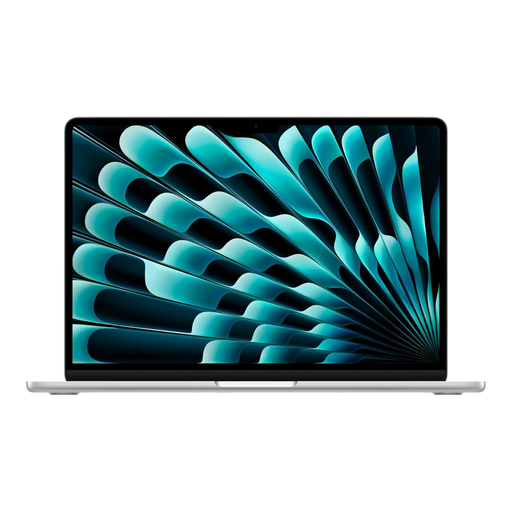
Apple 13-inch MacBook Air (2026), M5, 16GB, 512GB SSD, Silver
The 13-inch format is an option for coursework across study locations. This variant names an M5 chip with a 10-core CPU and 8-core GPU; confirm its operating system and every required course application, particularly where a department specifies Windows-only software.
View on Joybuy
 No image available
Lenovo Legion Pro 7 16IAX10H, 16-inch, RTX 5090, 64GB RAM, 2TB SSD
Consider this Windows 11 Home configuration only if your course calls for its stated graphics or memory capabilities. It names an Intel Core Ultra 9 and NVIDIA GeForce RTX 5090; check application compatibility, and confirm weight and battery details if you will carry it regularly.
View on Joybuy
 No image available
MSI Modern C2RMG-282UK, 15-inch FHD, Core 5, 16GB RAM, 512GB SSD
This conventional laptop is an option for document and online work. Check the installed operating system before purchase, then compare the required course software and connections with this exact configuration.
View on Joybuy
Common questions
Can a tablet with a keyboard replace a university laptop?
Only if your department confirms that its required applications, assessments and document workflows work on that tablet. Loughborough University notes limits to tablet software availability, while UCL advises regular access to a laptop or desktop rather than relying on a tablet alone.
Should I choose Windows or macOS for university?
Choose the system that runs your course’s required software. Either may suit general online and document work, but the University of Bath identifies Windows-only mechanical-engineering applications; for engineering involving specialist tools or interfaces, also check processor compatibility against departmental guidance.
What should I check for a specialist course?
Ask the department for its application list and requirements for the operating system, processor architecture, memory, graphics, ports and connected equipment. If it offers campus computers or remote access, confirm whether those options cover the particular coursework you must complete.
Do I need both a headset and an external webcam?
Not necessarily: check the audio and camera already available on your computer against the online sessions you attend. A headset with microphone may address difficulties hearing or speaking in a shared space; add a separate webcam if the built-in camera or its position does not meet your needs.


