What matters when choosing?
Check required course software first, then decide how much desk and bag space you can give the laptop. Compare the screen, keyboard, memory and storage on the exact model rather than relying on a product-family name.
| Concern |
What to check |
Who this matters to |
| Writing comfort |
Check the exact screen size, aspect ratio, glare treatment and keyboard layout. A backlit UK keyboard is configuration-specific. |
If I spend evenings moving between notes, browser sources and a draft on a small desk, I want a screen and keyboard I can work with comfortably. Around 31% of consumers put writing comfort first. |
| Portability |
Compare the exact model’s stated weight and dimensions; read the conditions behind battery claims. |
When I carry my laptop to lectures and performances, its size and weight matter every time I pack my bag. Carrying comfort is the leading concern for around 31% of consumers. |
| Research and files |
Confirm fitted RAM and SSD capacity, not a range maximum. The cited Lenovo and ASUS configurations offer 16GB of memory and 512GB SSDs as comparison points. |
I keep research tabs, documents and reference files open together, so I need a configuration that fits that workload. Around 23% of consumers make multitasking and file space their priority. |
| Workflow compatibility |
Check required applications, operating system, file formats and connections for accessories you already use. |
If my course requires a particular app or I need to connect an existing display, compatibility could decide which laptop I can use. It comes first for around 15% of consumers. |
Joybuy products for review writing
These laptops cover compact and larger-screen choices for researching and writing a theatre review. Compare each listed configuration with your desk space, carrying needs and required software; a larger screen or a higher specification is not automatically necessary for text editing.
 Image unavailable
ASUS Vivobook 14 X1407QA-LY003W Copilot+ PC, Quiet Blue
Consider this compact option if you carry your review drafts between your room and campus.
The listed configuration has a Snapdragon X processor, 16GB RAM and a 512GB SSD. Check that required course applications work with its processor and confirm the keyboard layout.
View on Joybuy
 Image unavailable
MSI Summit 16 AI Evo, Core Ultra 7 255H, 32GB, 1TB
Its 16-inch format is worth considering if you mainly draft at a desk and want room for multiple documents.
The title lists a QHD+ 165Hz display, Intel Arc graphics, 32GB LPDDR5 RAM and a 1TB SSD. Allow for the larger desk and bag footprint, and confirm the keyboard layout.
View on Joybuy
 Image unavailable
ASUS Vivobook 15 X1504VA, Core 5 120U, Cool Silver
Consider this larger format if your review writing involves keeping source material beside your draft at a student-room desk.
The title lists a 15.6-inch display, 24GB memory and a 1TB SSD. Check the keyboard layout, and do not treat a standby-time claim as a measure of working battery life.
View on Joybuy
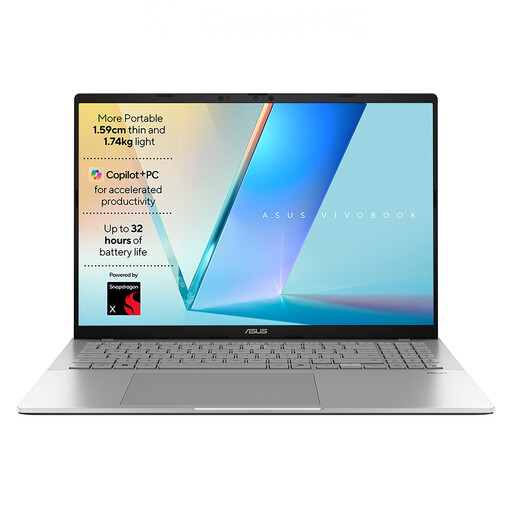 Image unavailable
ASUS Vivobook S3607QA-PL004W, Snapdragon X1-26-100
This 16-inch option gives room-based drafting more screen space, provided it fits your desk and required software workflow.
The title lists a WUXGA display, 16GB LPDDR5x memory, a 512GB SSD, Wi-Fi 6E and Windows 11 Home. Confirm course-app compatibility, weight and keyboard layout before ordering.
View on Joybuy
 Image unavailable
MSI Modern C2RMG-282UK (9S7-15H431-282)
Consider this for desk-based research and drafting if its exact screen and software configuration meet your needs.
The title lists an Intel Core 5 processor, 16GB DDR IV memory and a 512GB SSD. Confirm the display size, operating system and UK keyboard layout on the exact item before ordering.
View on Joybuy
Common questions
Do I need a dedicated graphics card to edit a written theatre review?
No dedicated graphics card is called for by the stated text-first task alone. Compare the keyboard, screen, memory, storage and software compatibility instead; regular video production or colour-critical image work needs a separate assessment.
Should I choose Windows or macOS for theatre-review coursework?
Choose the operating system that supports your course’s required applications and your existing devices. Before ordering, check named software, file-sharing requirements and connectors with your institution and the exact laptop listing.
Can I cancel a UK online laptop order if I change my mind?
For qualifying online purchases, GOV.UK says consumers can cancel up to 14 days after delivery without giving a reason. Follow the trader’s cancellation instructions and check any applicable exception; this is separate from remedies for a faulty or misdescribed laptop.
What should I do if the laptop arrives faulty?
Contact the retailer promptly and keep your order, delivery details and evidence of the fault. The Consumer Rights Act 2015 provides remedies for qualifying faulty goods, distinct from a change-of-mind cancellation; the applicable remedy depends on the circumstances and timing.
What should I do with an old laptop?
Use an appropriate electrical-equipment recycling or take-back route rather than putting it in general waste. GOV.UK identifies laptops as electrical equipment covered by the UK waste-electrical-equipment framework; check which collection service your council or retailer offers.


