Choose a 13- to 14-inch lightweight laptop for full desktop software, sustained typing, file management or multi-window work; choose a detachable two-in-one when you also want tablet use; and choose a keyboard tablet mainly for reading, media, notes, email and focused documents. Plan around the device battery rather than assumed train sockets or Wi-Fi, and check charging input, USB-C PD wattage, cable capability and accessory weight before adding portable power.
Who each route suits
Commuters doing desktop-style work on the train
If you need an integrated keyboard, full desktop applications, dependable file handling or several windows, a compact laptop or Windows two-in-one is usually the safer starting point. Microsoft and Samsung UK distinguish full laptop programs and multitasking from more limited mobile-app workflows.
Students and readers carrying a device every day
This route suits reading, annotation, media, notes, email and focused documents when low carried weight matters more than unrestricted desktop software. Apple lists the 11-inch iPad Air Wi-Fi model at 464g, while keyboard compatibility still needs checking.
Commuters without dependable onboard power
Choose with battery expectations and charging compatibility in mind if you cannot rely on a socket or usable Wi-Fi at your seat. National Rail says facilities and charges vary by train company.
Buying priorities
Lightweight laptop
Choose it when: You need full desktop programs, long-form writing, local files, peripherals or several windows.
Trade-off: Include the charger in your bag weight, and treat manufacturer battery figures as test-based maximums rather than guaranteed commute time.
Detachable two-in-one
Choose it when: You want Windows-style productivity alongside tablet-mode reading, annotation or note-taking.
Trade-off: Check whether the keyboard is included and whether a kickstand-and-keyboard setup works comfortably on your usual train table.
Tablet with keyboard
Choose it when: Reading, streaming, email, notes and focused documents matter more than desktop-app compatibility.
Trade-off: Mobile apps can offer less functionality than full laptop programs, and the keyboard adds to the kit you carry.
| Priority |
What to check |
Your needs |
| Carried weight and workspace |
Compare the exact configuration weight, screen size and keyboard setup. Add the case, charger and any power bank before comparing a tablet with a laptop. |
I want a device I can carry daily without giving up enough room for documents and typing. |
| Battery and train facilities |
Use battery claims only as a starting point for your workload, brightness and network use. Check your booked service and seating close to travel, and prepare offline files or media. |
I need enough power for the journey without treating a train socket or Wi-Fi connection as certain. National Rail says availability and charges vary by train company. |
| Software and typing workflow |
Confirm that your required applications, browser tools, files and peripherals work on the operating system. Check the exact keyboard layout, fit and stand arrangement. |
I need to know whether a mobile operating system can complete my actual work before replacing a laptop with a tablet. |
| Portable charging |
Confirm the device supports USB-C charging or USB Power Delivery, then compare its required wattage with the power bank output profile and cable rating. |
I want a charging backup that matches my specific laptop rather than choosing by connector shape alone. |
Mistakes to avoid
-
Assuming every train seat has power or dependable Wi-Fi
A work setup that depends on mains power or an internet connection can fail where those facilities are unavailable. National Rail says availability and charges vary, while Avanti West Coast notes that sockets can depend on the seating offering.
Plan around device battery and offline capability. Check the operator and booked service close to travel, and treat a socket as a useful backup.
-
Buying a USB-C power bank because the laptop has a USB-C port
USB-C describes the connector, but charging depends on a supported USB PD profile shared by the device, charger and cable. A physically compatible lead may still not provide adequate laptop charging.
Confirm USB-C charging support, required input wattage, the power bank USB PD output and the cable rating for the exact laptop configuration.
-
Comparing tablet body weight with laptop weight while ignoring accessories
A keyboard case changes both the carried weight and the total setup, and optional keyboards can be model-specific.
Compare the complete commuting kit: device, keyboard or case, charger, cable and any power bank. Check the keyboard fits the exact generation and regional layout you intend to buy.
A compatible keyboard case, pen, charger or higher-capacity portable power source may be a separate item.
-
Using a damaged, counterfeit or unsuitable charger
Damaged batteries and poor-quality charging equipment can create safety risks. The London Fire Brigade advises using the supplied charger or a branded, genuine replacement from a trusted supplier.
Protect batteries from damage and stop charging a battery that swells or expands. Use an appropriate, undamaged cable for the intended charging level.
Relevant brand references
Apple
Relevant if you are considering a lightweight macOS laptop or an iPad-and-keyboard route for commuting.
- Apple UK states that the 13-inch MacBook Air can charge from a USB-C power adapter or other USB PD source, with a stated 30W minimum for charging.
- Apple lists the 11-inch iPad Air Wi-Fi model at 464g, but keyboard weight and whether needed work software is available on iPadOS remain separate checks.
Microsoft Surface
Relevant for Windows productivity in a conventional laptop or detachable two-in-one form.
- Microsoft UK lists the 13-inch Surface Laptop at 1225g with USB-C and USB-A ports, while the 12-inch Surface Pro is listed at 686g.
- The Surface Pro keyboard is optional, so tablet-body weight is not the weight of the complete commuting setup.
Lenovo
Relevant for buyers seeking a light Windows laptop with a conventional clamshell keyboard.
- Lenovo UK states that the Yoga Slim 7i Ultra Aura Edition weighs 975g for the shown configuration.
- The same configuration lists 45W minimum and 65W maximum power requirements, so recheck the selected model and adapter before choosing portable power.
Samsung
Relevant for Android tablet buyers considering a keyboard accessory and DeX-style desktop interface.
- Samsung UK states that its Book Cover Keyboard Slim works with the Galaxy Tab S11 series and can be used with DeX mode.
- Compatibility is model-specific and the keyboard may be sold separately. Samsung also notes that tablet apps can have less functionality than full laptop programs.
Joybuy product options
Joybuy options for commuter laptop work and compatible USB-C portable charging, with laptop choices focused on lightweight and cloud-first workflows.
 Image unavailable
Apple 13-inch MacBook Air (2026) M5, 24GB, 1TB SSD
A conventional macOS laptop option for desktop-style documents, files and multi-app work during rail journeys.
13.6-inch 2560 × 1664 display, 24GB unified memory, 1TB SSD, backlit Magic Keyboard, two Thunderbolt 4 ports and MagSafe charging.
The stated up-to-18-hour video-streaming figure is not a guaranteed work runtime; confirm complete carried weight and the exact portable-power charging specification before buying a power bank.
Joybuy
 Image unavailable
ASUS Vivobook 14 X1407QA-LY003W, 16GB RAM, 512GB SSD
A Windows laptop for documents and multi-window tasks when an integrated keyboard is preferred.
14-inch 1920 × 1200 anti-glare display, 16:10 aspect ratio, Windows 11, 16GB LPDDR5X memory, 512GB SSD, Wi-Fi 6E, HDMI and USB4 Type-C ports with Power Delivery.
Its stated 1.49kg weight excludes the charger and power bank. The 50Wh battery capacity does not establish a fixed commute runtime; check the required USB-C PD profile and cable before using portable power.
Joybuy
 Image unavailable
Acer Chromebook Plus 514 CB514-5H, Core i3, 8GB, 256GB SSD
A cloud-first option for focused web, document and study work where required tools run in ChromeOS.
14-inch 1920 × 1200 anti-glare display, 1.41kg stated weight, backlit keyboard, 8GB memory, 256GB SSD, Wi-Fi 6, two USB-C ports with PD and DisplayPort, and a 45W USB-C adapter.
The stated up-to-12-hour typical-use figure is not guaranteed rail-work duration. Traditional Windows and macOS desktop-native software is not compatible, so confirm applications, peripherals and file workflows first.
Joybuy
 Image unavailable
Acer Chromebook Plus 514 CB514-5H, Core 5, 8GB, 512GB SSD
A ChromeOS laptop for browser, Google Workspace and web-app workflows during regular travel.
14-inch 1920 × 1200 16:10 display, integrated backlit keyboard, 8GB memory, 512GB SSD, Wi-Fi 6E, two USB-C ports with charging support, 65Wh battery and 65W USB-C adapter.
Its approximately 1.49kg stated weight and claimed up-to-10-hour battery life do not include every commuting condition. Check required app compatibility and the exact portable-power profile before purchase.
Joybuy
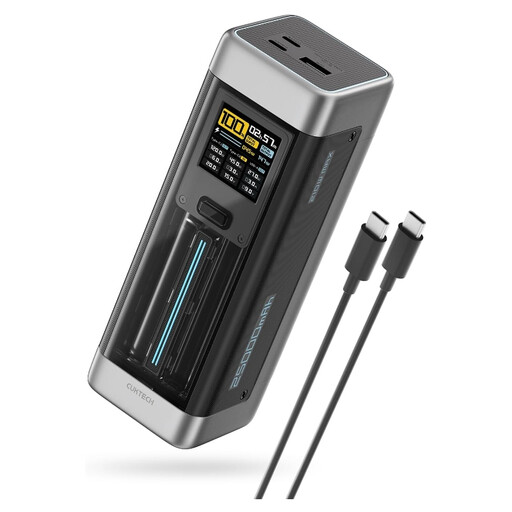 Image unavailable
CUKTECH NO.20 25,000mAh 140W USB-C Power Bank
A portable charging option for commuters whose laptop is confirmed to accept a compatible USB-C PD supply.
25,000mAh capacity, up to 140W PD3.1 output, two USB-C ports and one USB-A port.
Confirm the laptop charging input, required wattage, negotiated PD profile and cable capability. Check the listed heat and ventilation precautions, as weight and dimensions are not stated here.
Joybuy
Frequently asked questions
Can I rely on power sockets or Wi-Fi on a UK train?
No. National Rail says many train companies offer Wi-Fi and power outlets, but availability and charges vary, so check with the train company. Seating can also matter: Avanti West Coast states that its Standard Premium service has sockets at every window seat, which does not mean every seat has one.
What should I check before buying a USB-C power bank for a laptop?
Check the exact laptop manual or official specifications for USB-C charging support, required USB PD input and minimum wattage, then compare the power bank output profile and cable rating. A USB-C connector alone does not confirm that a laptop can accept charging from a power bank.
When is a keyboard tablet sufficient instead of a laptop?
A keyboard tablet can suit browsing, email, media, notes, annotation and focused document editing when the required apps provide the functions you need. Keep a laptop or Windows-style two-in-one for full desktop programs, extensive file work and sustained multi-window productivity.
Should a detachable keyboard be treated as included with a two-in-one or tablet?
No. Check the exact listing and model. Microsoft states that Surface Pro keyboards are optional, while Samsung states that its Book Cover Keyboard Slim may be sold separately and is compatible only with the Galaxy Tab S11 series.


