What to check before buying
Start with the work that must remain possible during a signal gap, then assess power, shared-carriage use and the weight of everything you will carry.
| Concern | What to check | Who this matters to |
|---|
| Access during signal gaps |
Check that essential apps, documents and reference files work offline. Treat a compatible phone or hotspot as backup, not a requirement for continuing individual work. |
If the signal drops before I finish a document, I need my files and tools to remain usable; around 36% of consumers put connection resilience first. |
| Power for the journey |
Compare battery claims with your workload. For backup charging, match the laptop's USB-C PD input, the bank's output from the chosen port and the cable; check each operator's policy. |
On a long journey without a usable socket, I need enough power to keep working; around 29% of consumers prioritise power resilience. |
| Noise, calls and privacy |
Check headphone comfort and microphone features for your tasks. For sensitive material, check the fit of any screen privacy accessory; headphones cannot prevent others overhearing a call. |
In a shared carriage, I need to concentrate without exposing my screen or conversation; around 21% of consumers make quiet work and privacy their primary concern. |
| Carrying and handling |
Compare the combined laptop, charger, battery, headphones and bag. If carrying or boarding is difficult, check the operator's accessible-travel and assistance arrangements. |
When changing trains, I need a kit I can carry and retrieve comfortably; around 14% of consumers put carrying and accessibility needs first. |
Joybuy products for train-based work
These laptops offer options for work and files kept on the device; the headphones address listening and noise in a shared carriage. Compare the laptop you choose with your actual software, journey length and carrying needs, and plan connectivity and backup power separately.
 No image available
Apple 13-inch MacBook Air M5, 24GB, 1TB SSD, Midnight
Consider this laptop if your train work needs locally stored files and sustained typing. This variant has an M5 chip with a 10-core CPU and 10-core GPU, 24GB memory and a 1TB SSD. Apple specifies a minimum 30W USB PD charging source for the 13-inch MacBook Air M5; its battery ratings are not guarantees for your work workload.
View on Joybuy
 No image available
ASUS Vivobook 14 X1407QA-LY003W, 16GB, 512GB SSD, Quiet Blue
This 14-inch laptop is an option for documents and study that you can prepare for offline use. It has a Snapdragon X processor, 16GB RAM and a 512GB SSD. Check that your required applications run on this model, and confirm work-task battery life and charging requirements before planning a power-bank backup.
View on Joybuy
 No image available
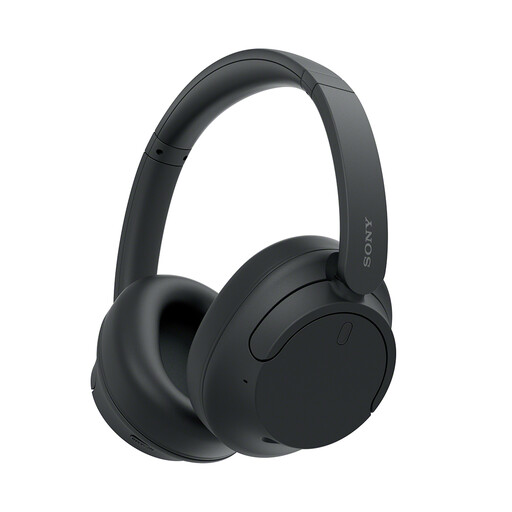
Sony WH-CH720N Noise-Cancelling Headphones, Black
These over-ear headphones are an option if listening and carriage noise matter alongside your work device. Sony specifies noise cancelling, multipoint Bluetooth, microphones and up to 35 hours of battery life. Check call suitability for your circumstances, keep announcements audible and do not rely on headphones to make conversations private.
View on Joybuy
 No image available
Acer Aspire Lite AL15-36P-C29Z, 15.6-inch, 8GB, 128GB SSD, Silver
Consider this laptop for study or document work if its screen size fits the space and bag you expect to use. Its title specifies a Full HD display, Intel N150 processor, 8GB DDR4 RAM and 128GB SSD. Confirm whether the supplied Windows 11 Home configuration is in S Mode so your required apps will be available; check battery life and charging compatibility for your journey.
View on Joybuy
 No image available
Lenovo IdeaPad 1, 15-inch, Ryzen 3 7320U, 8GB, 128GB SSD, Cloud Grey
This laptop is an option for everyday work with documents saved for offline access. Its title specifies a Full HD display, AMD Ryzen 3 7320U processor, 8GB RAM, 128GB SSD and Windows 11 Home in S Mode. Check that your required apps are available in that mode, and confirm battery life and charging requirements before relying on it for a longer journey.
View on Joybuy
Frequently asked questions
Can I rely on train Wi-Fi and plug sockets for work?
Do not make them essential to finishing your work. National Rail says many train companies offer Wi-Fi and power outlets, but availability and charges vary by company; prepare files locally and charge your devices before departure.
Will a mobile hotspot keep calls working throughout the journey?
A hotspot is a conditional backup, not a guarantee for live calls. Ofcom's 2026 measurements across 24 rail lines found substantial variation in mobile performance, so arrange essential work to continue through interruptions where possible.
What should I check before buying a laptop power bank?
Confirm that your laptop accepts USB-C PD charging, then match its required input to the chosen bank port's output and the cable's rating. Apple specifies a minimum 30W USB PD source for the 13-inch MacBook Air M5, but that requirement does not apply to every laptop; also check each train operator's policy for your item.
Can I count on a Quiet Coach as my workspace?
Only if your service offers one, and its rules suit the work you intend to do. National Rail says not every operator provides Quiet Coaches and rules differ, so check the service before planning calls or other audio-dependent work there.
How should carrying needs affect my work-kit choice?
Compare the weight and handling of the whole kit, including cables, charger, bag and any backup battery, rather than judging the laptop alone. If carrying, boarding or changing trains is difficult, check the relevant operator's accessible-travel information and assistance arrangements for your journey.


