Choose the display and exact configuration for your workspace before paying for editing capability you may not use. A 13-inch MacBook Air M5 is a portable option for writing and moderate photo editing if your software works on macOS; a larger creator laptop is worth considering when your regular projects need more screen space or demanding graphics. Brightness figures alone cannot tell you how distracting reflections will be beside your window, so check the panel finish as well as the stated brightness.
Who these laptops suit
Window-side writers who edit photos
If you write long entries and make light-to-moderate changes to travel photos, concentrate on screen readability and a size you are comfortable carrying. A discrete graphics processor need not drive the choice unless your editing software or projects require one.
Travellers working with large media libraries
If you routinely import RAW photos, edit high-resolution video or use demanding creative applications, check memory, storage and graphics against those applications as well as assessing the display.
Windows users who want a larger canvas
If your tools require Windows and you prefer a 16-inch workspace for images and layouts, compare the precise panel finish and brightness of the configuration you plan to buy.
What matters when choosing
Start with reflections and screen readability at your usual writing spot, then match the operating system and hardware to your editing work before deciding how much laptop you want to carry.
| Concern | What to check | Who this matters to |
|---|
| Window-side readability |
Check the exact panel finish and stated brightness; distinguish an HDR peak figure from sustained brightness. |
When the window reflects across text or photo controls, I need a screen I can work with at my usual seat. Around 36% of consumers put readability and reflections first. |
| Colour and editing capacity |
Check colour specifications alongside your editor’s memory and graphics requirements. Adobe recommends 16GB or more RAM for Lightroom desktop. |
If I regularly sort RAW files or work on video and detailed layouts, editing capacity matters more to me than a smaller bag. Roughly 29% of consumers make this their primary concern. |
| Travel and charging |
Compare screen size, stated weight, charging connections and the charger supplied with the exact laptop. |
I update my journal away from a desk, so carrying the laptop and its charger should feel manageable. About 21% of consumers prioritise that travel convenience. |
| Software and storage fit |
Confirm the operating system, application and plug-in compatibility, and fitted SSD capacity. |
My editor and existing files must work before a brighter or larger screen is useful to me. Around 14% of consumers put workflow compatibility and storage fit first. |
Mistakes to avoid
-
Treating HDR peak brightness as a bright-window guarantee
ASUS describes the ProArt P16 H7607 display as reaching up to 1,600 nits at HDR peak. That figure does not measure reflections from your window or describe brightness in every usage mode.
Compare the type of brightness claim and the panel finish. If reflections are your main difficulty, look for an explicitly stated anti-reflective or anti-glare treatment and assess the screen in a similar setting where possible.
-
Choosing by laptop range rather than configuration
Display, memory, storage and graphics can differ within a range. For example, the cited Lenovo Yoga Pro 9i Gen 11 configuration has a 1,000-nit glare touch display; a separately described optional panel must not be assumed to be fitted.
Keep the exact model or part number beside the listing while checking its screen, memory, SSD, graphics, keyboard layout and charger.
-
Confusing minimum software requirements with your workload
An application launching does not establish how comfortably it will handle your larger photo batches, video clips or complex layouts. Adobe recommends 16GB or more RAM for Lightroom desktop and specifies additional graphics requirements for certain 4K functions.
Compare your largest routine project with the requirements for the application version and features you actually use.
Brands and product lines to consider
Apple
MacBook Air M5 offers 13-inch and 15-inch macOS options for writing, selecting images and moderate creative work.
- Apple specifies a 500-nit P3 display and 16GB base unified memory for MacBook Air M5, with memory and SSD choices varying by configuration.
- Confirm that your applications and peripherals work on macOS, and assess window reflections rather than relying on brightness alone.
ASUS
ProArt P16 H7607 is a 16-inch Windows creator-laptop route for more demanding media and graphics work.
- ASUS specifies an anti-reflection coating and up to 1,600 nits HDR peak brightness for the H7607.
- HDR peak brightness does not establish sustained window-side readability. The stated 1.77 kg weight also matters if you carry the laptop frequently; these H7607 specifications should not be applied to a different ProArt P16 model.
Lenovo
The cited Yoga Pro 9i Gen 11 configuration offers a larger Windows workspace for image and layout work.
- Lenovo lists a 16-inch 3.2K Tandem OLED display, 32GB RAM, a 1TB SSD and an RTX 5060 Laptop GPU for that UK configuration.
- Its listed 1,000-nit display is also described as glare and touch. Check how reflections affect your workspace and confirm the panel on the exact part number.
Joybuy laptop options
These options span smaller macOS laptops and larger laptops for writing and media work. Compare each exact configuration with your software and the light at your usual editing spot.
 No image available
Apple MacBook Air 13-inch (2026, M5), 24GB/1TB, Midnight
Consider this 13-inch model if travel writing and moderate photo editing fit your macOS workflow.
The named configuration has an M5 chip with a 10-core CPU and 10-core GPU, 24GB unified memory and a 1TB SSD. Apple specifies a 500-nit P3 display for MacBook Air M5; check the panel finish if reflections are a concern.
View on Joybuy
 No image available
Apple MacBook Pro 14.2-inch (M5 Pro), 24GB/2TB, Silver
Consider this configuration if you want a 14.2-inch macOS laptop and have larger media files to keep on the internal SSD.
Its named configuration includes an M5 Pro with a 15-core CPU and 16-core GPU, 24GB memory and a 2TB SSD. Check the panel finish and supplied power adapter before choosing it for window-side travel work.
View on Joybuy
 No image available
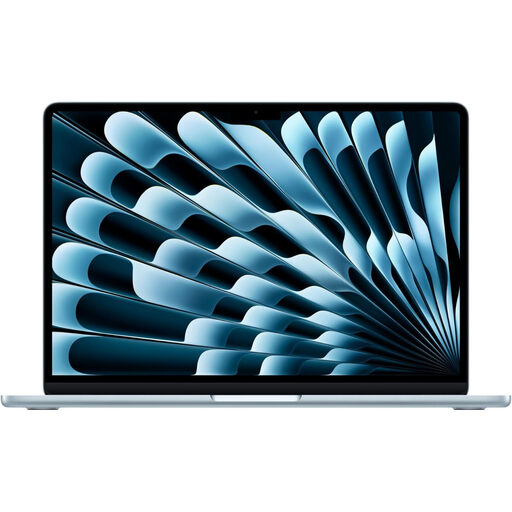
Apple MacBook Air 15-inch (2026, M5), 16GB/1TB, Sky Blue
The 15-inch screen is worth considering if you prefer more room for a journal layout while staying with MacBook Air.
The named configuration has an M5 chip with a 10-core CPU and 10-core GPU, 16GB memory and a 1TB SSD. Apple specifies a 500-nit P3 display for MacBook Air M5; confirm the fitted memory, storage and panel finish for the item you order.
View on Joybuy
 No image available
ASUS ProArt P16 H7606WW-SE006W, 64GB/2TB, Black
Consider this Windows configuration when your routine editing calls for its named graphics and memory specification and a 16-inch workspace suits your travel plans.
Its title specifies a 16-inch 4K OLED touchscreen, AMD Ryzen AI 9 HX 370, NVIDIA GeForce RTX 5080 with 16GB graphics memory, 64GB RAM and a 2TB SSD. Check this H7606 model’s brightness and panel finish separately; specifications for the ProArt P16 H7607 do not establish them.
View on Joybuy
 No image available
Lenovo IdeaPad Slim 3 15.3-inch (83K7009MUK), 24GB/512GB, Grey
This Windows model is an option for journal writing on a 15.3-inch screen; check its display and graphics against your particular editing work.
Its named configuration specifies a WUXGA display, AMD Ryzen 5 7535HS, 24GB DDR5 RAM, a 512GB PCIe SSD, Windows 11 Home and Wi-Fi 6. Confirm brightness, panel finish and the graphics requirements of your editor before relying on it beside a bright window.
View on Joybuy
Common questions
Will a higher brightness figure make a laptop easier to use beside a window?
Not necessarily: the measurement and panel finish matter too. ASUS calls the cited ProArt P16 H7607 figure an HDR peak of up to 1,600 nits, while Lenovo lists the cited Yoga Pro 9i configuration as a 1,000-nit glare display. Neither figure alone tells you how reflections will look at your seat.
How much memory should I look for if I edit with Lightroom?
Adobe recommends 16GB or more RAM for Lightroom desktop on Windows and macOS. Check the requirements for your application version and the features you use, particularly if your projects involve 4K-related graphics functions.
Should I choose a 13-inch or 16-inch laptop for my travel journal?
A 13-inch model makes more sense if frequent carrying is your priority; consider 16 inches if room for images and editing panels matters more to you. Compare the exact laptop’s weight, charger and panel finish before deciding, especially when you will work beside a bright window.


