Check your course’s required applications, operating system and hardware guidance before choosing a study device. A laptop is the more dependable primary option when you need installed desktop or specialist software; a keyboard tablet may suit a confirmed browser-based workflow and note-taking, while a refurbished computer is worth considering when its exact condition and specifications meet your course needs. Keep a separate backup plan whichever device you use.
Who this guide is for
Students using specialist course software
Check your department’s named applications, supported operating systems and any course-specific hardware guidance before choosing a device. UWE Bristol IT Services and the University of Warwick both advise students to follow course requirements.
Students keeping device spending in check
If you already have a computer, check whether it meets your course needs before replacing it. Heriot-Watt University advises students not to feel obliged to buy new equipment when their current device is likely to be sufficient.
Students studying in different locations
Consider how you will carry the device and use it for lectures, reading and notes, as well as whether its applications can handle your assessments. Jisc Digital Insights reports that students value recorded lectures, virtual learning environments and collaboration tools for flexible study.
What to check before choosing
For UK higher-education consumers choosing a personal study device or essential backup, start with course requirements: UWE Bristol IT Services, Loughborough University IT Services and the University of Warwick all emphasise checking what your course needs.
| Concern |
What to check when buying |
Who this matters to |
| Course software compatibility |
Confirm application names, supported operating systems and any course-specific memory or graphics guidance with your department. |
If my course depends on particular desktop software, I need a device that can run it before I weigh other features. Consumers whose first priority is course-software compatibility account for around 36%. |
| Affordability and reliable access |
Check whether your current computer meets course requirements; for a refurbished device, confirm its condition, battery and warranty terms. |
If I need dependable access without replacing suitable equipment, I would compare the exact specifications and support before choosing. Consumers who put affordability first account for around 29%. |
| Portability, notes and typing |
Try the screen and typing arrangement for your study tasks, and confirm the exact keyboard’s compatibility and whether it is included. |
When I move between teaching spaces, I want a practical device for notes and coursework, not just a manageable one to carry. Consumers who prioritise portability and note-taking account for around 21%. |
| Keeping coursework recoverable |
Check available university cloud storage and keep any external backup in a separate place from your device. |
If protecting existing coursework is my main concern, I need another copy that would not be lost with my laptop. Consumers who put coursework backup first account for around 14%. |
Common buying pitfalls
-
Choosing an operating system before checking course software
A device may open online materials but still be unable to run an installed application required for your coursework.
Ask your department for the application names and supported operating systems before you choose.
-
Assuming a tablet keyboard makes it a laptop replacement
A keyboard helps with typing, but it does not establish that the tablet’s applications can handle your course software or assessment tasks.
Check the course workflow and the precise keyboard-and-tablet pairing, including whether the keyboard is part of the bundle.
-
Assuming every refurbished computer has the same support
Lenovo’s stated inspection process and one-year warranty apply to its Certified Refurbished devices, not every second-hand Lenovo computer.
Check the individual listing’s condition, battery information, warranty and course compatibility.
-
Keeping your only backup beside your laptop
If the laptop and its backup are together, losing one bag could mean losing both copies of your coursework.
Keep another copy separately, using university cloud storage where it is available and suitable.
Relevant brands to consider
Dell
Dell’s UK Dell 14 Windows laptop configurations are one conventional laptop route to check against your course’s software requirements.
- Dell lists configurable processor, memory, storage, display and keyboard options for model DC14255.
- Those configuration details do not establish that every Dell laptop suits a specialist course.
Apple
MacBook Air and MacBook Neo are macOS laptop options; iPad Air is a separate tablet route for workflows supported by iPadOS.
- Apple lists a 13-inch M5 MacBook Air configuration with 16GB memory and 512GB storage.
- Check course software before relying on a Mac or iPad instead of a Windows computer; supported keyboard accessories do not establish that they are included.
Lenovo
Lenovo Certified Refurbished Windows-ready computers are an option to consider when an individual device meets your course requirements.
- Lenovo says its Certified Refurbished devices are inspected and tested and carry a one-year warranty.
- That statement applies to devices covered by the named certification, not all used Lenovo products.
Microsoft
Surface Pro with a compatible keyboard is a detachable-keyboard option for students considering a Windows-based workflow.
- Microsoft identifies its 12-inch Surface Pro Keyboard as compatible with the 12-inch Surface Pro.
- Accessory compatibility does not confirm that a particular course application will run on your chosen Surface configuration.
Samsung
The Galaxy Tab S11 and compatible keyboard accessories are another tablet option for study workflows supported by the device.
- Samsung lists an S Pen in the Galaxy Tab S11 box and identifies a compatible Book Cover Keyboard Slim accessory.
- Check the specific bundle and course applications; accessory support does not establish desktop-software equivalence.
Joybuy laptop choices
These Joybuy choices are laptops for students considering a conventional laptop workflow. Check each model and configuration against your course software before choosing.
 No image available
Lenovo IdeaPad Slim 3 15.3-inch, Ryzen 5 7535HS, 24GB RAM, 512GB SSD, Windows 11 Home, 83K7009MUK
A Windows 11 Home laptop for students whose course workflow calls for a conventional laptop; confirm that its operating system and specification meet your department’s requirements.
15.3-inch WUXGA display; AMD Ryzen 5 7535HS; 24GB DDR5 RAM; 512GB PCIe SSD; full-size keyboard; 1.59 kg.
Joybuy
 No image available
ASUS Vivobook 15 X1504VA, Intel Core 5 120U, 24GB RAM, 1TB SSD
A Windows 11 Home laptop option for coursework that suits a conventional computer workflow; check course software compatibility before selecting it.
15.6-inch Full HD IPS display; Intel Core 5 120U; 24GB RAM; 1TB SSD; 1.70 kg.
Joybuy
 No image available
Apple 13-inch MacBook Neo, A18 Pro, 8GB memory, 256GB SSD, Silver
A 13-inch laptop with a built-in Magic Keyboard for students who want a laptop form factor; confirm that the course applications you need are supported.
A18 Pro chip with 6-core CPU and 5-core GPU; 8GB memory; 256GB SSD.
Joybuy
 No image available
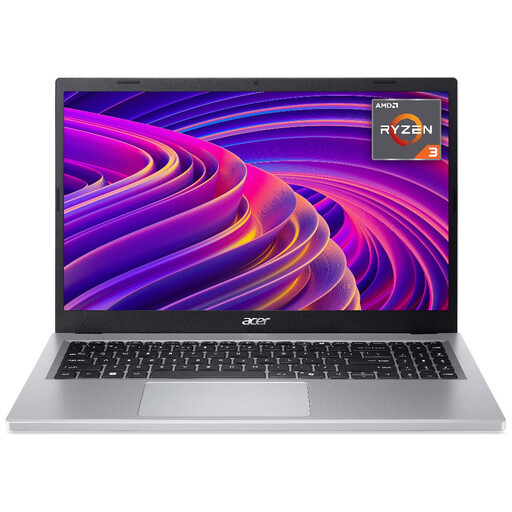
Acer Aspire Go 15 AG15-21P, Ryzen 3 7320U, 8GB RAM, 256GB SSD
A Windows 11 Home laptop for students whose course requirements suit this configuration; check the required applications and hardware guidance before buying.
15.6-inch Full HD (1920 x 1080) IPS display; AMD Ryzen 3 7320U; 8GB RAM; 256GB SSD; 1.6 kg; full-size keyboard.
Joybuy
 No image available
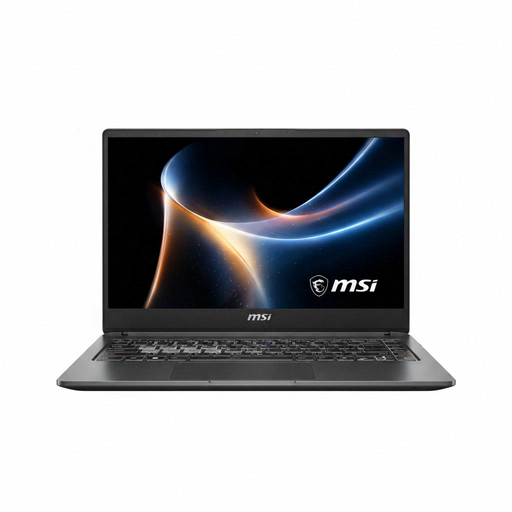
MSI Prestige N16 Flip AI+ C1XMT-044UKY, 16-inch 2-in-1, 32GB RAM, 1TB SSD
A Windows 11 Home convertible laptop with a touchscreen for students whose course workflow suits a conventional laptop; consider its carrying trade-off if you move between locations.
16-inch 2.8K 120Hz OLED touchscreen; 32GB RAM; 1TB SSD; UK keyboard; 1.9 kg.
Joybuy
University study-device FAQs
What should I ask my department before buying?
Ask for the names of required applications, supported operating systems and any course-specific hardware specifications. General university guidance may be superseded by requirements from your department.
Can a keyboard turn a tablet into my only university computer?
Only if your course confirms that its required applications and assessment tasks work on that tablet. A keyboard helps with input but does not remove tablet-software limitations; check accessory compatibility and whether the keyboard is included.
How should I protect coursework files?
Back up regularly and keep a copy apart from your laptop. The University of Westminster cautions that an external backup kept in the same bag could be lost with the device; University of Cumbria guidance describes a backup as an extra copy of important files.
What UK rights should I consider when buying online or refurbished from a trader?
For an eligible distance sale, GOV.UK says a customer can notify the trader of cancellation within 14 days of receiving the goods and then has another 14 days to return them. The Consumer Rights Act 2015 says satisfactory quality takes account of the goods’ description, price and other circumstances; change-of-mind cancellation is separate from remedies for faulty or misdescribed goods.


