What to check before buying
Identify the one change that matters most to your work, then check the connections and desk arrangement needed to make it usable.
| Concern | What to check | Who this matters to |
|---|
| Display space and positioning |
Match the laptop’s video output to the monitor input; check where the screen and input devices will sit. |
If I spend long periods working from a laptop screen, I want a display arrangement I can position for my work. Around 36% of consumers put display space or positioning first. |
| Desk reconnection |
Check the laptop’s port functions against the dock’s display configuration and charging requirements. |
When I return to my desk, I want to reconnect my displays and peripherals without handling each connection separately; roughly 29% of consumers prioritise that need. |
| Compact setup |
Check the space an accessory occupies and whether a direct display connection or compact hub covers the devices you use. |
I need to clear or move my work setup between desks, so equipment size matters more to me than extensive expansion. About 21% of consumers place a compact setup first. |
| Input and calls |
Check keyboard layout, device connections and, for calls, compatibility with your meeting software. |
If my screen space is sufficient, I would rather address typing, pointing or regular calls. Around 14% of consumers make input or communication their primary concern. |
Joybuy workstation upgrade options
These options address desk connections, additional screen space and separate laptop input. Choose according to the part of your setup you want to change, and confirm device compatibility before ordering.
 No image available
Targus USB-C Universal Dual HDMI 4K Docking Station, 100W pass-through
Consider this dock if reconnecting HDMI displays at a fixed desk is your main need.
- Named with dual HDMI 4K connections and 100W Power Delivery pass-through.
- Check your laptop’s video capability and charging needs; confirm the required power adapter and whether it is included.
View on Joybuy
 No image available
Baseus Metal Gleam Series II 10-in-1 USB Hub, Cosmic Black
Consider this hub when a laptop desk needs display connections and several peripheral ports.
- The product name lists separate HDMI connections labelled 4K120Hz and 4K60Hz, USB data ports, RJ45, SD/TF and USB-C Power Delivery input.
- Confirm your laptop’s USB-C video support and simultaneous display capabilities; check the charging power delivered to your laptop and any charger required.
View on Joybuy
 No image available
ASUS ZenScreen MB166C 15.6-inch Full HD portable USB monitor
This portable display is an option if you want a second screen for a laptop setup that moves between desks.
- The product name specifies an IPS screen and USB Type-C connection.
- Confirm that your laptop supports the required USB-C video connection, and check the included positioning accessories.
View on Joybuy
 No image available
AOC Q32V4 31.5-inch IPS monitor
Consider this larger external screen if you have room for a fixed desk arrangement.
- The product name also identifies built-in speakers.
- Check the laptop’s video output against the monitor’s inputs and confirm that its stand or a suitable mounting arrangement meets your positioning needs.
View on Joybuy
 No image available
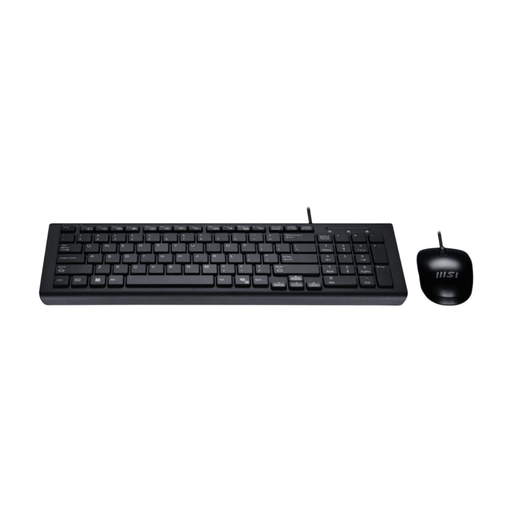
MSI GK-701 Office keyboard and mouse set, UK layout, black
This set addresses separate typing and pointing at a laptop desk without requiring another display.
- The product name specifies a USB connection and CoPilot key.
- Check available computer connections, keyboard compatibility and whether the mouse shape suits the intended user.
View on Joybuy
Frequently asked questions
Do display screen equipment rules apply when I work from home?
They can apply to employees who use display screen equipment daily for continuous periods of an hour or more, including permanent and hybrid home workers. The Health and Safety Executive says an applicable assessment should address the work arrangements involved, including home and office work where both are used.
Should I check with my employer before buying workstation equipment?
Yes, if your work falls within the applicable display screen equipment assessment process, check that process before deciding what to obtain yourself. The Health and Safety Executive says an assessment may identify a need for additional equipment; it does not prescribe a monitor, dock or stand for every worker.
Will any USB-C port run a monitor through a dock?
No. Lenovo notes that USB-C functionality varies by system, so a matching connector does not establish video support. Check the exact laptop port specification alongside the dock’s host and display requirements.
When does a Thunderbolt dock make sense?
A Thunderbolt dock is worth considering when both the laptop and dock support Thunderbolt and you need the particular display and peripheral arrangement they document. Do not identify a port as Thunderbolt from its USB-C shape alone; check both devices’ specifications and charging requirements.
What should I check before choosing a DisplayLink dock?
Check operating-system support and the software and driver requirements for the exact setup. For Windows compatibility, DisplayLink specifically identifies graphics drivers, USB host-controller drivers and potentially incompatible software drivers as checks.


