What to prioritise
Start with the intended games and settings, then decide how much portability and built-in screen space you need. Electronic Arts recommends 8 GB of RAM for The Sims 4, but 16 GB and a specified dedicated graphics card for skate.; neither requirement predicts how an untested laptop will perform at your chosen settings.
Integrated-graphics laptop
Consider it when: Your games are less demanding and the exact laptop configuration meets the requirements relevant to you.
Trade-off: Do not rely on a processor-family name alone. Intel says Arc graphics availability depends on the processor and system configuration, including memory and manufacturer enablement in some systems.
Dedicated-GPU laptop
Consider it when: Your game list points towards dedicated graphics, but you still need a computer you can move.
Trade-off: GPU, screen and portability differ between configurations; a high-refresh screen does not establish the frame rate of a particular game.
Desktop PC
Consider it when: The computer can remain at a desk and you have, or plan to obtain, a suitable display and input devices.
Trade-off: A desktop does not provide a laptop’s built-in screen, keyboard, battery or portability, so compare complete setups rather than computer specifications alone.
| Concern |
What to check |
Who this matters to |
| Games and settings |
List each game’s recommended GPU and RAM requirements, then compare them with the exact computer and your intended resolution. |
If I want particular games to look and run as I expect, merely meeting their minimum requirements is not enough. Around 36% of consumers put game-and-settings headroom first. |
| Everyday portability |
Check the exact laptop’s weight, dimensions, ports and stated battery information alongside its graphics configuration. |
Moving the computer between rooms or taking it out regularly makes carrying and unplugged use important to me; around 21% of consumers make portability their primary concern. |
| Screen and storage |
Compare native resolution and refresh rate with the games you plan to play. Allow SSD space for installed games, updates and personal files. |
I want room for my games and files without choosing a screen solely for its refresh-rate figure. Screen and storage planning comes first for around 29% of consumers. |
| Complete setup |
For a desktop, account for the display and input devices; for a refurbished laptop, check its exact graphics hardware, operating-system support and seller terms. |
If I am considering a desktop or refurbished device to limit upfront outlay, I need to know what is required to use it. Around 14% of consumers prioritise the complete setup and purchase terms. |
Joybuy dedicated-graphics laptops
These laptops offer dedicated-graphics configurations for comparing everyday computing with your intended games. Check each game’s requirements and your portability needs before choosing among the different screen sizes and specifications.
 No image available
Lenovo LOQ Essential 15ARP11, Ryzen 7 170, RTX 5050
Consider this 15.6-inch laptop if you want dedicated graphics for games alongside general computing. Its listed configuration has 16 GB RAM, a 1 TB SSD and a 144 Hz Full HD display; check your games against the exact GPU and confirm battery runtime if you will often use it unplugged.
View on Joybuy
 No image available
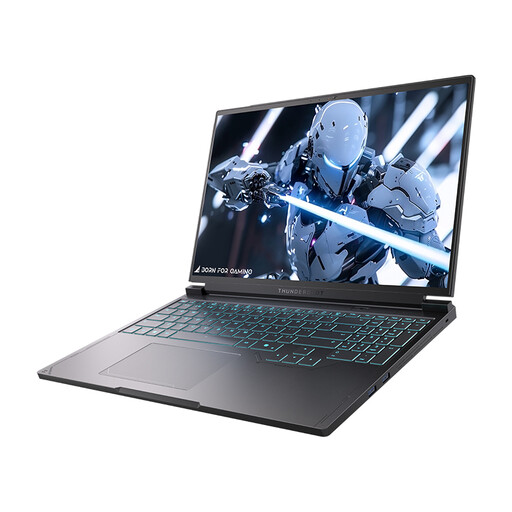
Thunderobot Radiant S16 5060, Core i7-13650HX
Consider this model if a 16-inch QHD+ screen appeals alongside a dedicated GPU for gaming and everyday tasks. The title lists an RTX 5060, 16 GB DDR5 RAM, a 1 TB SSD and a 240 Hz display; that refresh rate does not establish frame rates in your games. Confirm graphics-power details, weight and battery runtime where they matter to your choice.
View on Joybuy
 No image available
HP OMEN 17-db1000na, Ryzen AI 7 350, RTX 5060
Consider this laptop if a larger built-in screen matters more than compact dimensions. It lists a 17.3-inch Full HD display, 16 GB RAM, a 1 TB SSD and Windows 11 Home. Check the games you intend to play and the laptop’s battery runtime if you expect to use it away from a socket.
View on Joybuy
 No image available
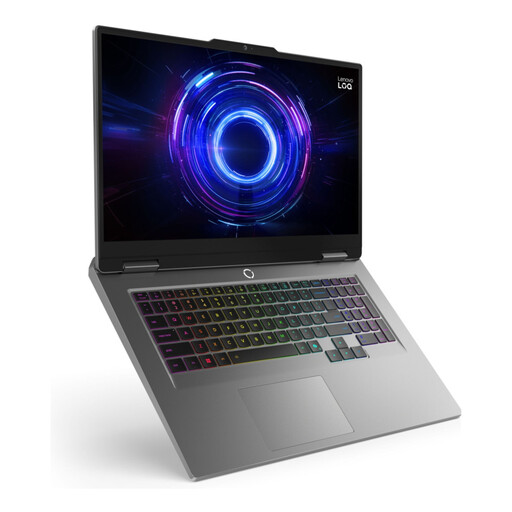
Lenovo LOQ 17IRX10, i7-13650H, RTX 4050
Consider this configuration if you want a large laptop screen for work and games and do not need to carry it frequently. Its listing names 24 GB RAM, a 1 TB SSD and a 17.3-inch Full HD 165 Hz display. Compare your games with its RTX 4050 configuration, and confirm battery details if unplugged use is important.
View on Joybuy
 No image available
ASUS ROG Zephyrus G14 GA403WR-QS088W, RTX 5070 Ti
Consider this 14-inch model if you want to compare a smaller dedicated-graphics laptop with the larger-screen options. Its title lists a Ryzen AI 9 HX 370, 32 GB RAM, a 2 TB SSD and a WQXGA+ display. Confirm the finish, keyboard layout, weight and battery runtime for this exact variant before buying.
View on Joybuy
Common questions
What should I find out about my games before choosing a computer?
Collect each game’s publisher-stated minimum and recommended CPU, GPU, RAM, storage and operating-system requirements, then decide on your preferred resolution and settings. For perspective, Electronic Arts recommends 8 GB RAM for The Sims 4 but 16 GB and a specified dedicated graphics card for skate.; the exact laptop still needs checking against your own game list.
Is a processor name enough to compare integrated and dedicated graphics?
No: compare the exact laptop configuration, including its graphics hardware and memory. Intel says availability of certain Arc integrated graphics depends on qualifying processors and system conditions; dedicated-GPU laptops also differ by exact GPU, memory, screen and other configuration details.
Is a 512 GB SSD enough for everyday use and games?
It may suit a smaller game library, but work from the installed sizes of your games, expected updates and your personal files. Microsoft Support notes that Windows reserves storage for temporary files and caches, so the SSD’s stated capacity is not all available for games.
What matters most when considering a refurbished gaming-capable laptop?
Check the exact CPU and GPU against your games, then confirm RAM, storage, battery condition, keyboard layout, charger and seller terms. Check its supported operating-system route too: Microsoft Support says Windows 10 reached the end of support on 14 October 2025.


