For students who regularly study both at home and at school or college, a laptop is a sensible starting point: the University of Warwick recommends one for work across locations, while UCL advises regular access to a laptop or desktop. A desktop makes more sense for study mainly at a fixed desk; a tablet can suit notes and lighter work, but only if the course confirms that its required apps and assessment tools work on it. Check course software, accessibility needs and peripherals before settling on a device.
Who is each setup for?
Students working across locations
If lessons, home study and online sessions all require the same device, a portable computer with a keyboard deserves consideration. The University of Warwick recommends a laptop for students working on campus, in residences and at home.
Students using specialist software
For engineering, design, coding or other application-dependent coursework, the course requirements should decide the operating system and configuration. UWE Bristol advises checking course software before buying equipment.
Students focused on notes and reading
A tablet with a suitable keyboard or stylus may appeal to students reading resources, annotating documents and taking handwritten notes. Loughborough University cautions that tablet software is more limited, while the University of Oxford notes the constraints of small screens and keyboards during prolonged work.
What matters when choosing?
Choose the device type around where coursework happens and which applications it requires. Then check the exact configuration and accessories against the school or course requirements.
Laptop
Consider it when: Coursework involves regular travel between home and an education setting, sustained typing and online sessions.
Trade-off: A portable model may have a smaller display or fewer ports than a fixed setup; check whether it accommodates the required peripherals.
Desktop
Consider it when: Most study takes place at one desk and a larger screen or connections for specialist work matter.
Trade-off: It cannot travel to lessons, and online sessions may require a separate webcam or audio equipment.
Tablet with keyboard or stylus
Consider it when: Reading, annotation and handwritten notes dominate, and required course tools work on the tablet.
Trade-off: Loughborough University warns of more limited software availability; the University of Oxford notes that tablet screens and keyboards can restrict long document sessions.
| Concern |
What to check |
Who this matters to |
| Course software |
Confirm the required operating system and applications with the course; check the exact device and configuration against them. |
If my coursework depends on a particular application, I need to know it will run before choosing a device. Around 36% of consumers put course compatibility first. |
| Study across locations |
Check the device’s carry weight, charging arrangement and connections needed away from home. |
When I move between lessons and home, I need to take my coursework and a usable keyboard with me. For around 29% of consumers, working across locations is the primary concern. |
| Notes and lighter tasks |
Check tablet support for required learning and assessment tools, plus the keyboard or stylus needed for your work. |
If I mainly read, annotate and handwrite notes, I want those tasks to feel manageable without losing access to course tools. Around 21% of consumers prioritise this style of study. |
| Fixed-desk work |
Check whether the course needs a larger display, particular graphics capability or several connected peripherals. |
For long sessions at one desk or graphics-intensive coursework, I may value screen space and connections more than mobility. Fixed-workspace needs come first for around 14% of consumers. |
Buying pitfalls
-
Assuming a tablet can handle every course task
A tablet can serve notes and online resources, but Loughborough University warns that its software range may be limited. Required specialist applications or sustained document work could change the choice.
Ask the course which applications and assessment tools must run on a personal device. If considering a tablet-only setup, confirm that the complete workflow works on its operating system.
A keyboard and stylus may also be needed, without resolving an incompatible course application.
-
Treating a general specification as a course requirement
A baseline intended for broad study does not cover every subject. UCL notes that some programmes have specialist equipment requirements.
Compare the exact processor, memory, storage, operating system and graphics configuration with your department’s requirements before buying.
-
Overlooking equipment for online sessions
A desktop or particular laptop setup may need additional equipment for calls. UCL advises desktop users to consider a webcam and notes that a headset can improve online-session audio.
Check the selected device for a camera, microphone, suitable audio connection and any display adapters you need.
A separate webcam, headset or adapter may need to be part of the setup.
-
Keeping coursework in only one place
A lost, damaged or erased device can also mean lost files. The National Cyber Security Centre advises keeping a copy of important data in a separate safe location.
Arrange a separate backup for coursework and check that you can restore an important file from it.
Brands to consider
These brands offer relevant device lines, but the course requirements and exact model matter more than a brand name.
Apple
Mac and iPad are routes to consider where macOS or iPadOS suits the required work, particularly for students interested in stylus-led notes.
- Apple presents Mac and iPad for student tasks including presentations and note-taking; those are the brand’s own descriptions, not a comparison of course suitability.
- Confirm compatibility before choosing either device for Windows-only or other specialist applications.
Lenovo
A Windows laptop line with configurations to compare against portable study and course-software needs.
- Lenovo lists education laptops with varying memory, storage and display specifications.
- Check the selected model’s software fit, connections and support needs rather than assuming every configuration meets the same course requirements.
Dell
Windows laptops to compare when deciding between a compact portable device and a larger study screen.
- Dell’s student listings include different display sizes, weights, memory and storage configurations.
- Treat battery and performance statements as manufacturer claims and check their relevance to the exact model and coursework.
HP
Laptop and desktop lines relevant to students considering either a mobile or fixed study setup.
- HP lists laptops, desktops and accessories through its UK student-and-teacher store for eligible education users.
- Confirm the chosen configuration meets course requirements; student-store eligibility alone does not establish device suitability.
Laptop options on Joybuy
These laptops are options for students considering one portable computer for coursework and online study. Compare each configuration with your course’s software requirements; the choice between a laptop, desktop and tablet still depends on how and where you work.
 No image available
ASUS Vivobook 15 X1504VA, 15.6-inch, Cool Silver
Consider this laptop for coursework involving sustained typing and locally stored files, subject to your course’s software requirements.
Intel Core 5 120U, 24 GB memory and 1 TB SSD.
If you need to work away from a charger, check battery runtime under the tasks you expect to do.
View on Joybuy
 No image available
HP OmniBook X Flip 16-as0004na, 16-inch 2-in-1
Consider the touchscreen format if you want to switch between keyboard and touch interaction for study, after confirming that required course apps work on it.
Intel Core Ultra 5 226V, 16 GB RAM, 512 GB SSD and Windows 11 Home.
If handwritten notes matter, check whether a compatible stylus is included or needed separately.
View on Joybuy
 No image available
ASUS Vivobook 14 X1407QA-LY003W, Quiet Blue
Consider this 14-inch laptop for study across locations, but confirm that required course applications and peripherals work with its Snapdragon X processor before choosing it.
Snapdragon X, 16 GB RAM and 512 GB SSD.
Check whether its memory configuration meets any course-specific requirements.
View on Joybuy
 No image available
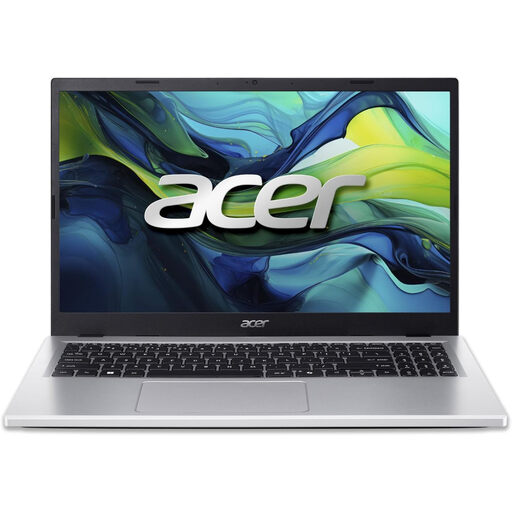
Acer Aspire Go 15 AG15-71P, 15.6-inch, Silver
Consider this laptop for document work and online learning, checking its configuration against any specialist applications or large local coursework files.
Intel Core i5-13420H, 8 GB DDR5 RAM, 256 GB NVMe SSD, Full HD display and Windows 11 Home.
Confirm that its memory and storage meet the course requirements before buying.
View on Joybuy
 No image available
MSI Modern C2RMG-282UK, 9S7-15H431-282
Consider this laptop if a 15-inch screen and local file storage suit your study setup; confirm its operating system and required course-software compatibility.
Full HD display, Intel Core 5, 16 GB DDR IV RAM and 512 GB SSD.
If online sessions are essential, check the webcam and audio setup for this exact configuration.
View on Joybuy
Common questions
Is a tablet with a keyboard enough for school or college?
It may be enough for notes, online resources and lighter writing if the school or course confirms that required apps and assessments work on that tablet. For prolonged document work, the University of Oxford cautions that tablet screens and keyboards can be limiting; UCL advises its students to have regular access to a laptop or desktop.
What should I ask the course before buying a device?
Ask which operating systems, applications and assessment tools your course requires, then check any stated memory, storage, graphics, accessibility and peripheral needs. UWE Bristol advises checking course software before buying, because subject-specific requirements can change which device is suitable.
Do I need external storage for coursework?
Not necessarily: what matters is keeping a separate, restorable copy of important files. The National Cyber Security Centre recommends backing up data to a separate safe location, so check that your chosen cloud or removable-storage arrangement has enough capacity and lets you restore your work.


