What should you check before buying?
Settle the primary-device question first, then check your connection and add accessories for tasks or surroundings that call for them.
Laptop as the main device
Choose it when: Your course requires desktop applications, software installation or a computer-based assessment environment.
Check carefully: Meeting a video platform’s requirements does not establish that the laptop meets those of your course software.
Tablet as the main device
Choose it when: Your provider confirms that classes, coursework submission and assessments all work on the tablet.
Check carefully: The Open University excludes tablets from its ProctorU online-invigilation exams; other providers’ rules may differ.
Jisc’s 2024/25 UK higher-education digital experience survey ran from October 2024 to April 2025 and received responses from 15,398 students at 30 participating organisations. The figures below describe those respondents, not all UK students; experiences with devices and Wi-Fi are distinct from priorities for future investment.
| Priority |
What to check |
Your needs and respondents’ concerns |
| Suitable main device |
Confirm the course platform, assessment method and supported operating system. Check whether required applications or extensions can be installed and whether a camera, microphone and speakers are needed. |
I need a device I can use for coursework as well as live classes. In Jisc’s 2024/25 survey, 37% of respondents said they had lacked access to a suitable device at some point during their studies. |
| Connection |
Test Wi-Fi in the room where you study, including a live call and a file upload. Check the browser or app route required by your teaching platform. |
Classes and submissions need to work from my usual study spot. Wi-Fi connectivity issues on or off campus were reported by 60% of respondents to Jisc’s 2024/25 survey; that figure does not identify where or why each problem occurred. |
| Specialist software |
Get the named software and version from your department. Compare its operating-system, processor, memory, graphics and storage requirements with the exact device configuration. |
If my course uses specialist software, a device that handles video calls alone is not enough. In Jisc’s 2024/25 survey, 24% of respondents selected specialist course software as a priority for future investment, not as a purchase they personally intended to make. |
| Audio and video |
Check the camera, microphone and speaker requirements for classes and assessments. Consider a wired headset for tutorials in a shared home, but check whether it is permitted during exams. |
I want to hear and be heard in tutorials without letting household activity dominate the call. An external webcam or headset is worth considering when the existing setup does not meet that need. |
| Desk setup |
Check that the main computer supports the display connection you intend to use. Consider your available desk space and whether a separate keyboard or mouse fits your coursework. |
For regular work at a fixed desk, I may want more room for documents or detailed on-screen tasks. A monitor remains an accessory, not a substitute for a compatible computer. |
Brand references
No brand references to display.
Joybuy options for home study
These options include laptops for the primary-device role and a monitor for an existing desk-based computer setup. Check each laptop against your course requirements; the monitor does not replace a computer.
 No image available
ASUS Vivobook 15 X1504VA, Intel Core 5 120U, 24 GB, 1 TB SSD
A laptop option for coursework and online classes, with Windows 11 Home, a 15.6-inch Full HD IPS display, an integrated webcam and microphone, and a full-size keyboard with numeric keypad. Check your course software, extensions and assessment platform against this configuration before buying.
View on Joybuy
 No image available
Lenovo IdeaPad Slim 3 83K7009MUK, 15.3-inch WUXGA, Ryzen 5 7535HS
For coursework and video calls, this Windows 11 Home laptop lists 24 GB DDR5 RAM, a 512 GB PCIe SSD, an HD webcam and speakers. Confirm that its operating system, browser and installation options meet your module and assessment requirements.
View on Joybuy
 No image available
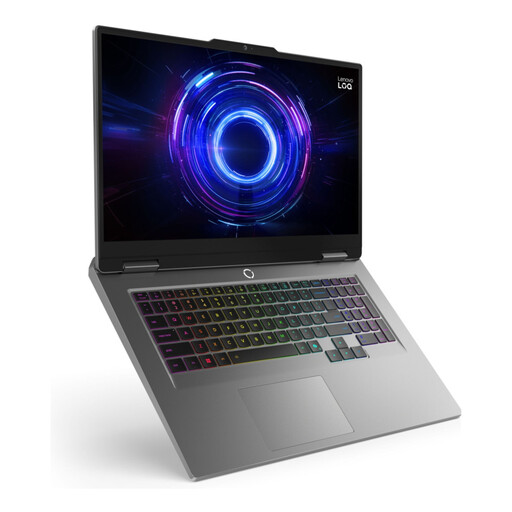
LOQ 17IRX10, 17.3-inch, 24 GB, 1 TB
This Windows 11 Home laptop lists a 17.3-inch Full HD display, dedicated NVIDIA graphics, 24 GB DDR5 RAM and an integrated webcam for a larger-screen study setup. The processor is named differently in its title and descriptions, so confirm the exact model and your course software requirements before buying. At approximately 2.9 kg, consider whether it suits how often you will carry it.
View on Joybuy
 No image available
Acer Aspire Lite AL15-36P-C29Z, Intel N150, 8 GB, 128 GB SSD
This 15.6-inch Full HD laptop lists a webcam, microphone and speakers for online sessions. Its detailed listing specifies Windows 11 Home in S Mode and a maximum of 8 GB RAM; check whether your required applications can be installed and whether its memory and storage meet your course requirements.
View on Joybuy
 No image available
AOC Q32V4 31.5-inch QHD IPS monitor
An additional display to consider for regular work at a fixed desk, with HDMI and DisplayPort inputs and integrated speakers. It is not a primary study device: check your computer’s video output, the connection you will use and your available desk space.
View on Joybuy
Common questions
Should I buy a laptop or tablet for online university study?
Choose according to your module software and assessment rules, not live classes alone. Make a tablet your main device only if your provider confirms it supports coursework, submission and assessments; The Open University, for example, excludes tablets from its ProctorU online-invigilation exams.
Are Microsoft Teams requirements enough to choose a course laptop?
No. Microsoft’s Teams requirements cover Teams, not every application your course may use. Autodesk’s stated requirements for AutoCAD 2026 differ, so obtain your department’s named software and versions and compare their requirements with the exact laptop.
Can I wear headphones during an online invigilated exam?
Check your assessment provider’s rules rather than assuming tutorial equipment is allowed. The Open University’s ProctorU guidance prohibits headsets and earphones unless an approved adjustment applies; permitted headsets under that adjustment must be wired. Other assessment routes may have different instructions.
Can I join Teams through a browser instead of installing it?
Microsoft says Teams for Web supports current desktop versions of Edge, Chrome, Firefox and Safari, but not mobile browsers. Check whether your university uses Teams through a browser and whether any other course or assessment software must be installed.


