Who this suits

Students needing a primary study computer

You write assignments, join online seminars, use course platforms and may need specialist or institution-provided software. Start with a laptop and confirm the course operating-system requirements before considering a tablet-only setup. University College London and the University of Hertfordshire both emphasise regular access to a laptop or desktop computer.

Lecture annotators and handwritten note-takers

You regularly read PDFs, annotate slides or prefer handwriting, while still needing dependable access to course systems. A stylus tablet or hybrid can support pen input when a keyboard and computer-compatible workflow are available where needed.

Students moving between study spaces

You carry a device between lectures, library spaces, home and collaborative sessions. Consider size, weight, battery life, webcam, microphone, Wi-Fi and the ports needed for your own study setup.

Buying priorities

Laptop

Choose it when: You need a lower-risk primary device for essays, online seminars, course platforms and possible desktop software.

Trade-off: It is less convenient than a tablet for handwritten notes and direct PDF annotation.

Stylus tablet

Choose it when: Portable reading, slide annotation and handwriting matter most, and a computer is already available when required.

Trade-off: A compatible stylus and keyboard may be separate purchases, and course software may not run on the tablet.

Hybrid laptop

Choose it when: You will genuinely switch between typed coursework and touch or pen-based note-taking.

Trade-off: Check whether the keyboard, pen and charger needed for your workflow are included.

Priority What to check Your needs
Access to teaching tools Confirm a supported operating system and browser for the virtual learning environment, recorded lectures and collaboration tools. Check Wi-Fi, webcam, microphone and headset needs for live sessions. I need to open course materials and join group work reliably, whether I am on campus or studying away from it.
Course-software compatibility Ask for the department software list before buying. Check the required operating system, browser, RAM, storage, graphics and remote-access tools against the exact device configuration. My course may need more than web browsing and documents, so I want the device to meet its specific technical requirements.
Handwriting and typed work Verify active-pen support for the precise model, then check keyboard and trackpad availability. A convertible or detachable design only helps if both modes will be used regularly. I want to annotate lecture materials or draw diagrams without making long-form writing and file handling awkward.
Complete setup Compare included and optional pens, keyboards, chargers, hubs and storage. Use the supplied or manufacturer-approved charger and check compatibility before adding accessories. I want a study setup that is ready for typing, meetings, charging and storage rather than only the base device.

Mistakes to avoid

  • Treating a stylus tablet as a guaranteed laptop replacement

    A tablet can be useful for reading and handwritten notes, but it does not automatically meet desktop-software, long-writing or assessment-workflow requirements. University College London advises that students need regular access to a laptop or desktop computer.

    Before choosing a tablet as your main device, ask the course team which operating systems, desktop applications, browsers and peripherals are required for assessed work.

    You may still need access to another computer for course software, extended writing or assessment tasks.

  • Comparing only the headline device price

    A tablet or hybrid may need extra equipment before it works as a practical study device. Microsoft sells its Surface Pro keyboard separately, while Lenovo describes the Yoga Pen for its Yoga 7 2-in-1 Gen 10 as optional.

    List what you need for typing, handwritten notes, online meetings, charging and storage, then compare complete setups rather than base devices alone.

    A compatible pen, keyboard, case, charger, headset or external storage may be needed for your intended workflow.

  • Choosing an operating system before checking course requirements

    Browser, email and document tasks can work across several platforms, but specialist software and departmental tools can have different requirements. The University of Hertfordshire notes that some specialist software may not work on a Chromebook.

    Obtain the department requirements for the operating system, browser, memory, storage, graphics and remote-access tools before choosing Windows, macOS or ChromeOS.

  • Using an unsuitable replacement charger

    Rechargeable batteries can overheat or pose a fire risk when charging equipment is unsuitable or used carelessly. Greater Manchester Fire and Rescue Service advises using the charger supplied with the battery.

    Use the supplied or manufacturer-approved charger, keep charging devices uncovered on a hard heat-resistant surface, and do not leave them charging unattended or overnight.

    Battery damage and replacement needs can interrupt a study setup as well as creating a safety risk.

Relevant brand references

Apple

Relevant for students considering an iPad-based annotation and note-taking setup, particularly an iPad Air paired with a compatible Apple Pencil and keyboard.

  • Apple states that the current UK iPad Air line is available in 11-inch and 13-inch sizes, supports Apple Pencil Pro and works with Magic Keyboard accessories.
  • These manufacturer specifications do not confirm that iPadOS meets a particular course’s software requirements; do not assume a tablet-only setup is sufficient.

Microsoft Surface

Relevant for students wanting a Windows-oriented detachable hybrid that can be used in tablet mode for pen work and with a keyboard for assignment writing.

  • Microsoft states that its Surface Pro 13-inch Keyboard provides compatible Surface Pro devices with a mechanical keyboard and glass touchpad.
  • The keyboard is a separately sold accessory. Confirm the exact Surface generation, keyboard compatibility, pen requirements and course hardware specification.

Lenovo Yoga

Relevant for students who prefer a conventional hinged laptop that converts into tablet, tent and presentation modes rather than a detachable tablet.

  • Lenovo describes the Yoga 7 2-in-1 Gen 10 14-inch AMD model as a 360-degree touchscreen convertible.
  • Lenovo states that the Yoga Pen is optional, so check the exact configuration rather than assuming pen accessories are included.

Joybuy product options

Joybuy laptop and hybrid options for students who need a portable primary computer for coursework, course platforms, recorded teaching and online collaboration.

ASUS Vivobook 14 X1407QA-LY003W laptop

ASUS Vivobook 14 X1407QA-LY003W, Snapdragon X, 16GB RAM, 512GB SSD

A conventional Windows laptop for sustained writing, course materials and online seminars.

Stated specifications include Windows 11 Home, 16GB LPDDR5X memory, 512GB SSD, a 14-inch 16:10 anti-glare display, Wi-Fi 6E, camera, microphone, two USB4 ports with Power Delivery, HDMI and a 1.49kg weight.

Its non-touch display does not provide tablet-mode or pen-note-taking use. Confirm that department software, remote-access tools and assessment workflows support this configuration.

Joybuy

ASUS Vivobook 15 X1504VA laptop

ASUS Vivobook 15 X1504VA, Intel Core 5 120U, 24GB RAM, 1TB SSD

A larger-screen Windows laptop for typed coursework, local course files and peripheral use.

The listing states Windows 11 Home, 24GB DDR5 memory, a 1TB SSD, a 15.6-inch anti-glare IPS display, Wi-Fi 6, webcam, microphone, HDMI and multiple USB-A and USB-C connections.

The listed battery figure is up to 8 hours of standby time rather than a study-use runtime. Check course-specific software and required remote-access tools before purchase.

Joybuy
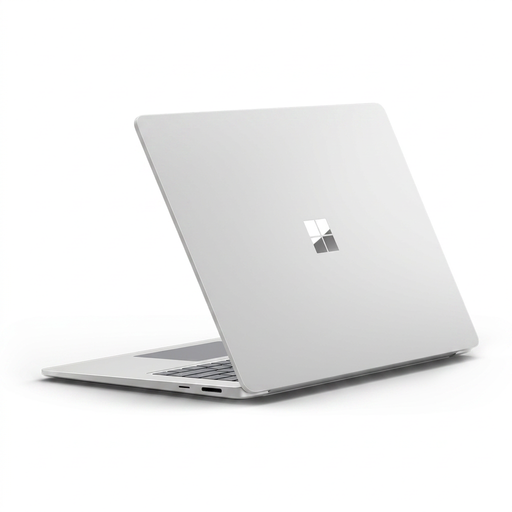
Microsoft Surface Laptop 7 15-inch laptop

Microsoft Surface Laptop 7 15-inch, Snapdragon X Elite, 16GB RAM, 256GB SSD

A Windows laptop option for students who want a 15-inch screen for reading, writing and video meetings.

Listed features include Windows 11, 16GB memory, 256GB SSD, a 15-inch 3:2 touchscreen, Full HD camera, dual microphones, Wi-Fi 7, USB4 ports and a 1.66kg weight.

Active-pen support is not stated. Confirm course-software compatibility, and consider whether 256GB storage suits media-heavy modules or larger local file collections.

Joybuy
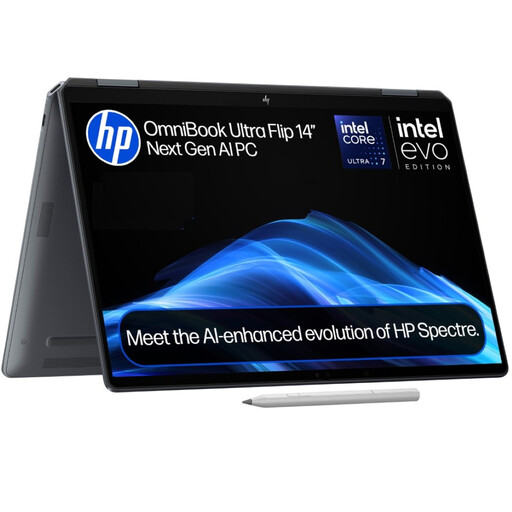
HP OmniBook Ultra Flip 14-fh0006na 2-in-1 laptop

HP OmniBook Ultra Flip 14-fh0006na, 16GB RAM, 1TB SSD

A Windows convertible for students who expect to alternate between keyboard work and touchscreen use.

The listing specifies Windows 11 Home, 16GB RAM, 1TB SSD, a 14-inch 3K OLED touchscreen, 360-degree hinge, 9MP IR camera, Thunderbolt 4 and a 1.34kg weight.

Active-pen compatibility and pen inclusion are not stated. The listing gives conflicting port information, so verify the exact port configuration and department software requirements.

Joybuy

HP OmniBook X Flip 16-as0004na 2-in-1 laptop

HP OmniBook X Flip 16-as0004na, 16GB RAM, 512GB SSD

A 16-inch Windows convertible for typed coursework with occasional tablet-style touchscreen use.

Stated features include Windows 11 Home, 16GB memory, 512GB SSD, a 16-inch 2K touchscreen, 360-degree design, Wi-Fi 7 and a 5MP IR camera with privacy shutter.

Active-pen support and inclusion are not stated, and the listing does not give a weight. Check portability, course software and institution tools before relying on it as a primary device.

Joybuy

Frequently asked questions

Can a tablet replace a laptop for university?

Do not assume so. University College London states that students need regular access to a laptop or desktop computer and that a tablet or smartphone alone is not sufficient for effective study there. A tablet can still be useful for reading and handwritten notes when your course software and assessment workflow are confirmed.

Which operating system should I choose?

Check your department’s software list first. The University of Hertfordshire describes Windows as working with a wide range of software, macOS as supporting many professional applications, and Chromebooks as suitable for basic study tasks but potentially incompatible with specialist software. Keep the operating system current for campus Wi-Fi and course software.

What should I check on a general-study laptop?

Treat general guidance as a starting point rather than a universal specification. The University of Hertfordshire recommends at least 8GB RAM, at least 256GB SSD storage, a 14-inch-or-larger screen, webcam, microphone, Wi-Fi, good battery life and enough ports for most students; specialist courses may require more.

Are a stylus and keyboard normally included with a tablet or hybrid?

Not necessarily. Apple lists compatible Apple Pencil and Magic Keyboard accessories for iPad Air, Lenovo says the Yoga Pen is optional for the Yoga 7 2-in-1 Gen 10, and Microsoft sells its Surface Pro keyboard separately. Check the exact listing’s included items and compatibility before comparing complete setups.

How should I charge a laptop or tablet safely?

Use the charger supplied with the battery or a manufacturer-approved compatible replacement. Greater Manchester Fire and Rescue Service advises buying replacement chargers from reputable sellers, charging on a hard heat-resistant surface, and not leaving charging batteries unattended or charging while asleep.