Replacement-adapter buyers
If a charger is lost, damaged or needed in a second location, match the replacement to the laptop’s connector, recommended wattage and exact model. Lenovo and HP support guidance both make model-specific checks important.


Choose a wall charger against your laptop’s exact model, recommended adapter type and wattage—not the appearance of its charging port alone. A model-specific adapter is the route to check for a proprietary connector; a USB-C Power Delivery charger is an option only if the laptop accepts USB-C charging and the charger and cable meet its requirements.
If a charger is lost, damaged or needed in a second location, match the replacement to the laptop’s connector, recommended wattage and exact model. Lenovo and HP support guidance both make model-specific checks important.
If your laptop is documented to charge through USB-C, you may want one wall charger for it and other devices. Check the laptop’s power requirement alongside the charger and cable ratings.
If you use a charger in several places, look for an identifiable product and supplier, inspect the plug and lead, and check relevant UK product-safety alerts. London Fire Brigade also advises against covering charging equipment.
Confirm how the laptop accepts power before comparing charger output. If it accepts USB-C charging, check the cable and, for a multi-port charger, the output available in the setup you intend to use.
| Concern | What to check | Who this matters to |
|---|---|---|
| Exact laptop compatibility | Check the exact model against the manufacturer’s adapter type, connector and approved parts. Do not assume a USB-C port accepts charging. | If I am replacing a lost adapter, I need a connector and charging method that my laptop actually accepts. Around 36% of consumers put that exact fit first. |
| Charger and cable power | Compare the laptop’s recommended wattage with the relevant charger output and, for USB-C charging, the cable’s power rating. | When my laptop charges through USB-C, I need the whole charging setup to meet its stated power requirement. That is the primary concern for around 29% of consumers. |
| Electrical safety and traceability | Identify the product and supplier, inspect the plug and lead, and check relevant UK product-safety alerts. | I want to identify the charger I am buying and avoid using damaged equipment at home. Around 21% of consumers place safety and traceability first. |
| Portability and multiple devices | For a compatible USB-C laptop, check the port arrangement and the output available when other devices are connected. | If I carry a laptop and smaller devices, I would rather assess one charger than pack several power bricks. For around 14% of consumers, that convenience is the main priority. |
A plug that looks right does not establish the laptop’s charging method or power requirement. Lenovo’s adapter guide, for example, covers round-tip, Slim Tip and USB-C families.
Find the exact laptop model, then check its specified connector, adapter type and recommended wattage before choosing a replacement.
USB Implementers Forum describes higher-power USB Power Delivery, but a standard’s maximum does not establish what an individual laptop, charger and cable can use together.
For USB-C charging, compare the laptop’s requirement with the charger’s relevant output and the cable’s rating.
A September 2026 Office for Product Safety and Standards report identified a particular 45 W laptop charger as presenting a high fire and electric-shock risk because of its plug pins. Damage to a plug or lead is another reason not to use that equipment.
Choose an identifiable product from a traceable supplier, inspect it before use and check official UK safety alerts for the exact model where relevant.
For a multi-port charger, the output available to the laptop can depend on which other ports are in use.
Check the manufacturer’s output information for the particular port arrangement you plan to use.
Apple offers USB-C power adapters for specified MacBook models.
Lenovo documents replacement adapters across several connector families.
HP directs notebook owners to model-specific adapter information.
Anker offers USB-C chargers to consider for laptops documented to accept USB-C charging.
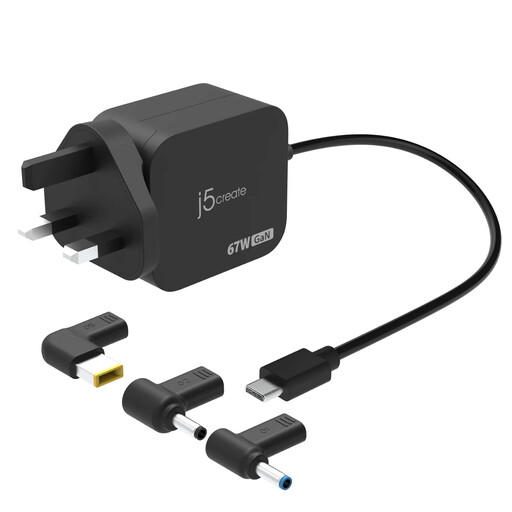
These options cover USB-C wall chargers for laptops that accept the appropriate charging method, including a model supplied with DC connector tips. Check your laptop’s exact requirements before choosing one; the presence of a connector tip does not establish model compatibility.
 No image available
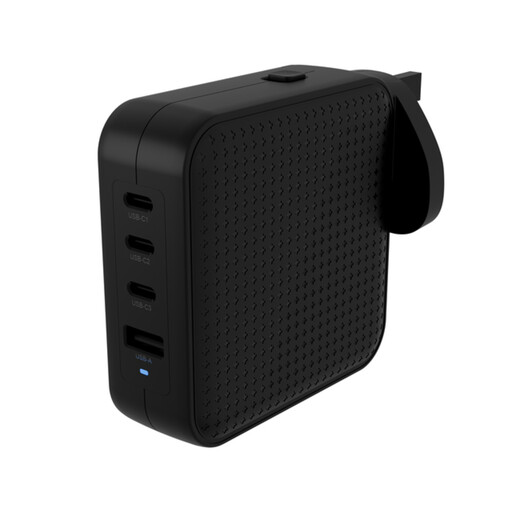
Consider this for a compatible USB-C laptop when you also want ports for other devices. The 3C+1A variant has three USB-C ports and one USB-A port; check the output available to the laptop in your intended port arrangement, as well as its charging requirements.
 No image available
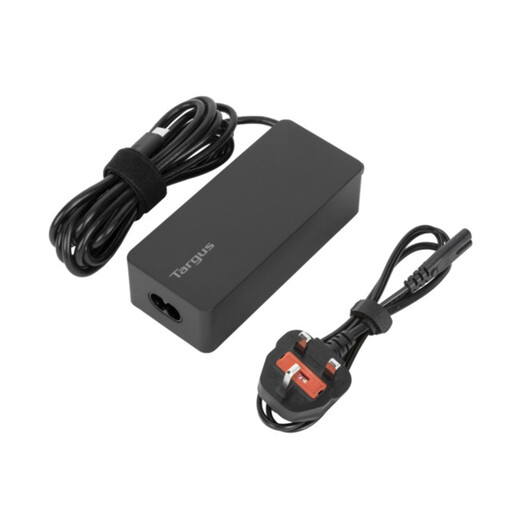
Consider this for a laptop documented to charge through USB-C if its recommended power requirement fits the charger’s 65 W rating. Check the cable’s power rating against that requirement too.
 No image available
Consider its USB-C or DC connector route only after checking which charging method your laptop accepts. For a DC tip, confirm the exact connector, voltage and polarity; for USB-C charging, confirm the required cable and its power rating.
No: the laptop must support charging through USB-C, and the charger and cable must meet its stated requirements. The USB Implementers Forum’s maximum Power Delivery capability is not a compatibility rating for an individual laptop.
Check the adapter recommendation for your exact model in the manufacturer’s support information or system utility. HP, for example, says its system information identifies the recommended supply wattage and whether USB Type-C is the recommended adapter type.
Not necessarily if the laptop explicitly supports USB-C charging and the alternative charger and cable meet its documented requirements. For a proprietary connector, check a manufacturer-approved or model-specific adapter against the exact laptop and part number.
Choose an identifiable charger from a traceable supplier, inspect the plug and lead, and check the Office for Product Safety and Standards’ alerts for the exact product where relevant. A marking or a seller’s safety claim should not replace checking the product you are buying.
Do not cover the charger while it is in use. London Fire Brigade advises keeping charging equipment uncovered; stop using a charger if its plug, cable or adapter is damaged.