People building a site away from a socket
If you mainly write and test a small website while moving between workspaces, charging arrangements and a manageable carrying weight may matter more to you than extra performance you will not use.


Choose a laptop whose charging arrangement and manufacturer-stated battery test fit the time you expect to work away from a socket, then check its memory against your browser and local-tool workload. A compact macOS model is an option if your tools are compatible; if you need Windows or plan to add a monitor and peripherals, check the exact configuration’s ports, display support and supplied charger before choosing.
If you mainly write and test a small website while moving between workspaces, charging arrangements and a manageable carrying weight may matter more to you than extra performance you will not use.
If your preferred tools or client environment require Windows, check that the exact laptop supports your software and has enough memory for your editor, browser, terminal and local utilities together.
If you sometimes work unplugged but also connect a monitor and peripherals, check the laptop’s display outputs and charging requirements against the desk setup you intend to use.
Start with the time you need away from mains power, then size the laptop for your actual development tools and decide whether it must also serve a monitor-based desk.
| Concern | What to check | Who this matters to |
|---|---|---|
| Unplugged work | Read the conditions behind the manufacturer’s battery figure. Check the charging wattage and whether a suitable adapter is supplied. | If I spend long stretches writing and testing a site without a free socket, I need to plan around more than a headline battery figure; around 36% of consumers put unplugged working time first. |
| Development multitasking | Choose installed memory for your browser, editor and planned local tools; check storage against your project files and dependencies. | Running several tabs alongside an editor and local services makes capacity my main concern. Roughly 29% of consumers prioritise development multitasking. |
| Desk connections | Confirm charging and display support on the exact ports, plus the power required by any planned dock. | When I move to a monitor-based desk, I want to know how the laptop, display and peripherals will connect without relying on an assumed USB-C capability; about 21% of consumers put desk connections first. |
| Moving between desks | Compare the stated weight, screen size, keyboard layout and charger you would carry. | If I regularly work at temporary or cramped desks, carrying the laptop and fitting it into the available space matter most; approximately 14% of consumers prioritise portability and desk flexibility. |
Apple lists up to 15 hours of wireless web use for the cited 13-inch M5 MacBook Air, but that test does not reproduce every combination of browser tabs, local servers and display brightness.
Use manufacturer figures to narrow your choices, while allowing for your own workload. Do not treat figures from different test methods as directly comparable.
Apple’s UK MacBook Air purchase page states that a power adapter is not included. That matters when you need a working charging setup from the outset.
Check the exact box contents, plug arrangement and compatible charging wattage before ordering.
You may need to obtain a compatible power adapter separately.
ASUS lists on-package memory configurations for the Zenbook S 14, while HP lists different memory options within the OmniBook Ultra Flip series. A family name alone does not tell you the capacity of the unit you are buying.
Choose the exact configuration for the browser, editor and local tools you expect to run; check upgradeability rather than assuming you can add memory later.
Microsoft states that Windows 10 support ended on 14 October 2025, including free security fixes and technical assistance.
For a new Windows setup, confirm the operating system supplied with the exact laptop and whether your development tools support it.
The 13-inch M5 MacBook Air is a compact macOS option if your website tools run on macOS and working away from a socket is a priority.
The Zenbook S 14 UX5406 is a Windows option for a compact website-building setup.
The ThinkPad X1 Carbon Gen 13 Aura Edition is a compact Windows option to examine if you also intend to connect a monitor and peripherals.
The OmniBook Ultra Flip 14 series is a Windows convertible option if you would use its touch and fold-back format as well as its laptop mode.
These laptops offer different ways to build a small website, including Windows and macOS configurations, convertible designs and compact screens. Compare their exact charging arrangements and your software requirements before choosing one for a socket-limited workspace.
 No image available
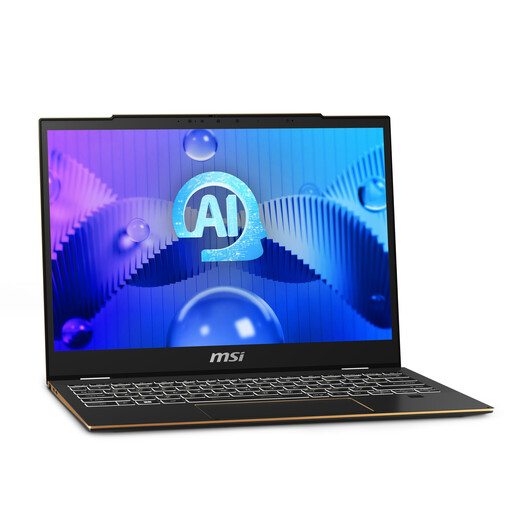
Consider this convertible if touch or fold-back use would help with your website workflow; neither feature is necessary for writing code.
The listed configuration has 16GB RAM, a 1TB SSD and Windows 11 Home. For extended unplugged work, check its battery rating and the conditions behind it before deciding.
 No image available
This is a Windows-based option to assess if you want to use an editor and browser at a compact desk; confirm that your required development tools work with its Snapdragon X configuration.
The title specifies 16GB RAM and a 512GB SSD. Check whether that memory capacity meets your longer-term local-tool needs, as well as the exact battery rating and charging setup.
 No image available
Consider its stated memory capacity if your site-building workflow includes several local tools, while checking that the touchscreen format suits how you work.
The title lists a 13-inch FHD+ 60Hz touch display, 32GB LPDDR5 RAM and a 1TB SSD. Confirm the exact battery specification, its test conditions and the supplied adapter before planning long sessions away from power.
 No image available
This compact macOS option is worth considering if your website tools are compatible and you want to work away from a socket; do not treat a manufacturer wireless-web rating as a promise for local development.
The title specifies an M5 chip with 10-core CPU and 10-core GPU, 24GB memory and a 1TB SSD. Apple’s UK MacBook Air purchase page says a power adapter is not included, so confirm this unit’s box contents and arrange a compatible charger if needed.
 No image available
The larger screen may suit you if you want more room for an editor and browser on the laptop itself, provided your website tools run on macOS.
The title specifies an M5 chip with 10-core CPU and 10-core GPU, 16GB memory and a 1TB SSD. Check this configuration’s weight and battery test conditions if you will move between desks; Apple’s UK purchase page also says a MacBook Air power adapter is not included.
Check the exact laptop’s charging connector, required wattage and supplied equipment, then account for any monitor or dock you plan to power. For the cited MacBook Air, Apple specifies a minimum of 30W for charging and says its UK purchase does not include a power adapter.
It can be enough for a modest editor-and-browser workflow, but the editor’s minimum requirements do not size the whole development setup. Microsoft’s Visual Studio Code requirements should be considered separately from any containers, local database, browser tabs or other services you intend to run.
Only when the particular laptop and your monitor or dock support the required display and charging functions. Check the laptop’s supported display arrangement, the dock’s power delivery and the cable you intend to use rather than relying on the connector’s shape.
Contact the seller and keep the order record, product listing and details of the fault. GOV.UK’s consumer-rights guidance explains that the law protects buyers of goods; a remedy for a faulty item is a different question from a voluntary change-of-mind return.