Choose a laptop configuration for the browser sessions, developer tools and local services you expect to run together, then check how that exact configuration connects to the shared desk. A portable laptop may suit moving between workstations, but its memory, storage, charger arrangement and compatibility with the desk’s display and dock matter more than the product-family name alone.
Who is this for?
Browser and local-tool multitaskers
If you keep browser sessions, developer tools, an editor and local services open together, choose the configured memory and processor for that combined workload. A laptop-family name does not identify the resources in the machine you will receive.
Hot-desk display users
If you move between desks, check the laptop against the monitor, dock, input devices and power arrangement you will actually use. The presence of a USB-C connector alone does not establish the required display or charging behaviour.
Managed-work-device buyers
If the laptop must meet an employer’s software, security or support requirements, confirm the operating system edition and exact configuration with the IT team. Features can differ within a product line, as HP notes for its configurable EliteBook 640 G11.
What matters when choosing?
Start with the applications you will run at the same time, then establish the desk connections and any employer requirements before settling on a configuration.
| Concern |
What to check |
Who this matters to |
| Concurrent work |
Compare the configured RAM, processor and SSD capacity with the browser sessions, editor and local tools you intend to keep open. |
If I run several browsers and development tools together, I need a configuration chosen for that simultaneous workload. Around 42% of consumers would put concurrent-work capacity first. |
| Desk connections |
Confirm the exact laptop and dock combination, monitor requirements, charging method and whether a charger is supplied. |
Moving between desks, I need my display and peripherals to connect through the setup available at work. For around 33% of consumers, dependable desk connectivity is the primary concern. |
| Managed and mobile use |
Check the required operating system edition and IT support requirements; assess the workstation used for regular screen work. |
If the device must follow workplace standards while moving with me between desks, I need IT compatibility and a workable setup. Managed and mobile use comes first for around 25% of consumers. |
Buying pitfalls
-
Choosing by laptop-family name
Memory, storage, operating system, display and supplied accessories can vary within one line. HP says EliteBook 640 G11 components depend on the custom configuration.
Keep the exact model or configuration code and check its specifications, accessories and external-display support before buying.
-
Assuming USB-C settles the dock question
The intended desk arrangement depends on the laptop, dock, monitor and power supply working together; a connector’s shape does not confirm the whole setup.
Identify the desk equipment and confirm compatibility with the exact laptop configuration.
Check whether a separate charger or adapter is needed. The Dell UK configurations cited for the Pro 14 Plus state that a charger is not included.
-
Relying on the laptop purchase for workstation comfort
The Health and Safety Executive (HSE) identifies hot-desking as a situation that calls for attention to display-screen workstation risks, particularly when workers change desks regularly.
For regular work use, assess screen position, input devices, breaks and the process for setting up at each desk as well as the laptop.
-
Treating annual PAT testing as an automatic legal requirement
For Great Britain, HSE says electrical equipment must be maintained to prevent danger, but annual inspection or testing of every appliance is not itself a legal requirement.
Use the employer’s maintenance process, with checks and any inspection or testing suited to the equipment and its environment.
Relevant brands to consider
Lenovo
The 14-inch ThinkPad E14 Gen 6 line is relevant if future memory or storage changes are part of your plan.
- Lenovo UK describes the line’s memory and storage as upgradeable.
- Check the upgrade options and included components for the exact configuration; the line description does not establish its desk connections.
Dell
The Dell Pro 14 Plus (PB14250) line gives configuration-led choices for buyers assessing memory alongside shared-desk use.
- Dell UK lists Pro 14 Plus configurations with 16 GB or 32 GB RAM and 512 GB SSD storage.
- Check the selected configuration and desk accessories: the cited Dell configurations state that a charger is not included.
HP
The configurable 14-inch EliteBook 640 G11 line is relevant when a work-device specification must be agreed with an IT team.
- One HP Store UK configuration lists Windows 11 Pro, 32 GB RAM, a 1 TB SSD and a 1920 × 1200 display.
- HP says components vary by custom configuration, so confirm the exact machine rather than applying those specifications to the whole line.
Joybuy laptop choices
These laptops offer different screen sizes and stated memory and storage configurations for browser-based work. Choose against your workload and carrying needs, then confirm that the exact laptop works with your shared desk’s display, dock and power arrangement.
 No image available
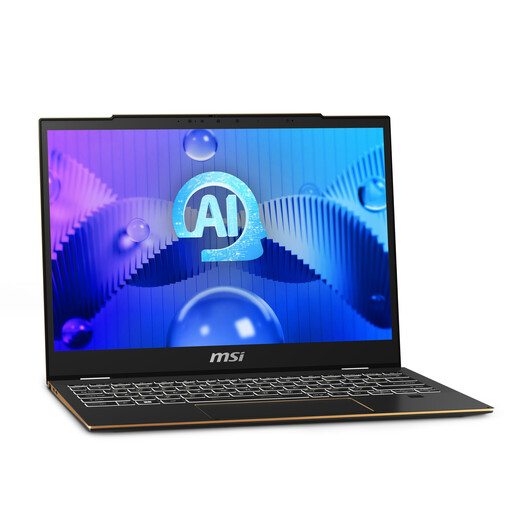
MSI Summit E13 AI Evo, Core Ultra 7 155H, 32 GB RAM, 1 TB SSD
Consider this configuration if you need stated memory and storage for browser sessions alongside local tools.
The product name lists an Intel Core Ultra 7 155H, 32 GB LPDDR5 RAM, a 1 TB SSD and an FHD+ 60 Hz touch display. Confirm the exact screen size, display outputs and compatibility with your desk dock.
View on Joybuy
 No image available
MSI Stealth 18 AI Studio A1VGG-001UK, 32 GB RAM, 2 TB SSD
Consider the 18-inch format if a larger built-in screen matters more to you than carrying a smaller laptop between desks.
The product name lists an Intel Core Ultra 9 processor, 32 GB RAM, a 2 TB SSD and an NVIDIA GeForce RTX 4070. Confirm that the intended dock, monitor and charging arrangement work with this configuration.
View on Joybuy
 No image available
MSI Summit 16 AI Evo, Core Ultra 7 255H, 32 GB RAM, 1 TB SSD
This 16-inch configuration is worth considering if you want the stated memory for concurrent browser and local-tool use and a larger built-in display.
The product name lists a QHD+ 165 Hz display, Intel Core Ultra 7 255H, 32 GB LPDDR5 RAM and a 1 TB SSD. Confirm its external-display connections, dock compatibility and operating system edition against workplace requirements.
View on Joybuy
 No image available
ASUS Vivobook 14 X1407QA-LY003W, Snapdragon X, 16 GB RAM, 512 GB SSD
Consider this 14-inch option if its stated configuration fits your browser and editor workload and the software you use supports the Snapdragon X platform.
The product name lists 16 GB RAM and a 512 GB SSD. Check required development-tool compatibility and confirm the exact dock, monitor and charging setup before choosing it.
View on Joybuy
 No image available
Lenovo LOQ Essential 15ARP11, Ryzen 7 170, 16 GB RAM, 1 TB SSD
Consider this configuration if the stated storage and 15.6-inch display suit your local projects and you are comfortable carrying that screen size between desks.
The product name lists an AMD Ryzen 7 170, 16 GB RAM, a 1 TB SSD, a GeForce RTX 5050 and a 144 Hz FHD display. Check whether its memory capacity meets your concurrent workload and confirm the required dock and display connections.
View on Joybuy
Frequently asked questions
Is a 14-inch laptop enough for testing web pages?
A 14-inch laptop can suit work away from the desk, but screen size alone cannot settle the choice for extended testing. If you regularly use a shared monitor, check that the laptop connects to it as intended; the Health and Safety Executive also advises managing workstation risks for regular display-screen work.
What should I check before connecting to a shared-desk dock?
Confirm the exact laptop configuration against the dock model, monitor inputs, required display count and resolution, charging method and any IT restrictions. USB-C alone does not confirm the required display and power behaviour; also check whether your chosen laptop includes a charger.
Does hot-desking change how the workstation should be assessed?
Yes, regular changes of desk make it important to check each display-screen setup rather than assume that buying a laptop resolves workstation risks. The Health and Safety Executive says workers who change desks regularly should carry out a basic risk assessment, while employers have duties concerning workstation assessment and risk reduction for workers covered by display-screen-equipment requirements.
Is annual PAT testing legally required for every office laptop and charger?
No blanket annual testing requirement applies to every appliance in Great Britain. The Health and Safety Executive says electrical equipment must be maintained to prevent danger, with inspection or testing decisions based on the equipment and its environment; follow your employer’s maintenance process.


