What should you check before buying?
Decide where the screen and your hands need to be first. Then check physical fit for a stand, or the exact laptop and connection requirements for an external display or dock.
| Concern | What to check | Who this matters to |
|---|
| Screen height and separate inputs |
Match the stand's stated size and weight limits to your laptop, and leave desk space for a keyboard and mouse. |
I want to look at a raised laptop screen without typing on its raised keyboard; around 33% of consumers put screen height and separate inputs first. |
| More display space |
Check the laptop's supported display count and video output against the monitor's input, resolution and intended refresh rate. |
At a permanent desk, I need room to view documents and applications on another screen. Roughly 27% of consumers make display space their primary concern. |
| A compact setup |
Check a riser's folded size and laptop fit, alongside keyboard layout and mouse fit. |
If I regularly clear the desk, I need equipment I can put away without giving up separate inputs; around 20% of consumers prioritise a compact setup. |
| Fewer connections |
Compare the laptop's video and charging support with the hub's port functions and your intended display arrangement. |
Connecting my display and peripherals each day makes fewer cables the deciding factor; roughly 20% of consumers put connectivity first. |
Joybuy products for home laptop setups
These keyboard-and-mouse, external-display and dock choices address different parts of a home laptop setup. Match each product to the equipment already on your desk and the connection capabilities of your laptop.
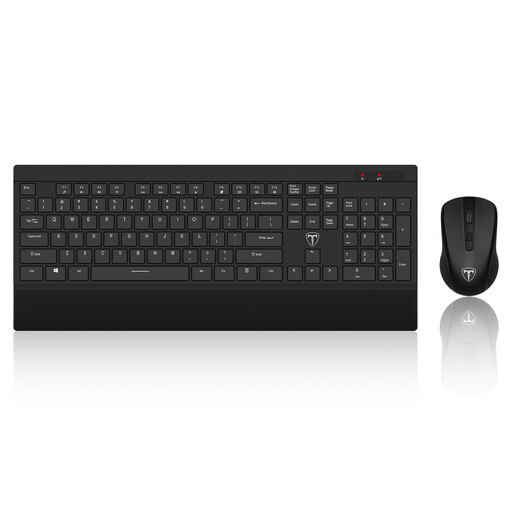 Image unavailable
ET Silent Wireless Keyboard and Mouse Combo, US Layout
Consider this combination when you need to type and use a mouse separately from an elevated laptop; it does not raise the screen itself.
The product name specifies 2.4GHz wireless connectivity and a US keyboard layout. Check that layout against the keys you use regularly.
View on Joybuy
 Image unavailable
ASUS ProArt PA278CV IPS WQHD Monitor
Consider a separate monitor for a fixed desk where more display space is the priority.
This model is identified as an IPS WQHD display. Check your laptop's video connection and the monitor's required cable before buying.
View on Joybuy
 Image unavailable
ASUS ZenScreen MB166CR FHD Monitor
Consider this separate display if your workstation moves and you want a monitor alongside the laptop.
The product is identified as an FHD monitor. Confirm that your exact laptop supports the display connection you intend to use.
View on Joybuy
 Image unavailable
Targus USB-C Universal Dual HDMI 4K Docking Station, 100W Power Delivery Pass-Through
A dock is relevant when a desk setup involves displays and other devices that you want to connect through fewer laptop ports.
The product name specifies dual HDMI 4K connectivity and 100W Power Delivery pass-through. Check your laptop's display-output support, intended monitor arrangement and power requirements, as well as whether the power adapter you need is included.
View on Joybuy
 Image unavailable
UPERFECT 18.4-inch 4K QLED Portable Monitor
Consider a portable separate display when you need more screen space but do not keep the same desk setup in place.
The product name specifies an 18.4-inch, 3840 × 2160 display with USB-C and Mini HDMI connections. Check the required cable, laptop output and display power arrangement for your setup.
View on Joybuy
Common questions
Do I need a separate keyboard and mouse with a laptop riser?
For prolonged laptop use, the Health and Safety Executive advises a separate keyboard and mouse so the screen can be elevated. Continuing to type on the raised laptop leaves its keyboard and trackpad raised too, so allow room for the full setup before choosing a stand.
Will any external monitor work with my laptop?
No: compatibility depends on the exact laptop and connection you plan to use. Apple says supported display numbers vary by Mac model, resolution and refresh rate; Microsoft says a Surface device's display connection depends on its model and the cables or adapters used. Compare those requirements with the monitor before ordering.
Does USB-C mean a dock can run my monitor and charge my laptop?
No: a USB-C connector alone does not establish which video and charging functions are available. Anker specifies different display modes for different host capabilities on its 565 hub and distinguishes its charging input from data-only USB ports. Check both the laptop and dock specifications for the functions you need.
Should I check with my employer before buying equipment for home work?
Yes, if your work falls within your employer's display-screen equipment assessment process, check that process and its equipment policy before buying. The Health and Safety Executive says the regulations can apply to permanent or long-term home workers and that employers must assess workstations for qualifying workers who use display-screen equipment daily as part of normal work for continuous periods of an hour or more.


