What to check before buying
For sustained home working, decide what the workstation needs to change first, then confirm the laptop connection and the employer’s equipment process before choosing a product.
Laptop stand with separate inputs
Choose it when: the laptop screen needs to be raised and there is room for a separate keyboard and mouse.
Keep in mind: this changes the physical arrangement but does not add screen space or extra ports.
External monitor with separate inputs
Choose it when: a separate display is needed for the assessed arrangement or work tasks.
Keep in mind: confirm the laptop’s video output and the monitor’s matching input, and plan for separate input devices.
USB-C or Thunderbolt dock
Choose it when: a compatible laptop needs a regular one-cable connection for displays, charging, network or peripherals.
Keep in mind: USB-C shape alone does not establish video output, charging capability or the supported display configuration.
Assessment-led adjustments only
Choose it when: the current home workstation is suitable and supports a comfortable, sustainable posture.
Keep in mind: a change in work pattern, workstation or comfort should prompt a review of the assessment.
| Priority |
What to check |
Your needs |
| Screen and input arrangement |
Check whether the laptop screen needs raising, whether there is desk space for a separate keyboard and mouse, and whether a separate display is actually needed. |
I want a workable arrangement for sustained laptop tasks. HSE guidance identifies a separate keyboard and mouse when the laptop screen is elevated on a riser or similar support. |
| Monitor and dock compatibility |
Confirm the exact laptop’s video output, USB-C DisplayPort Alt Mode or Thunderbolt support, charging input, monitor inputs and supported display configuration. |
I need the chosen monitor or dock to work with my specific laptop, rather than relying on the USB-C connector shape alone. |
| Employer process |
Check the assessment outcome, approved purchasing route, payment responsibility, support, repairs and any device or information-security requirements. |
I want to know whether my employer will provide or approve the equipment before I buy it personally. HSE says a worker cannot be charged for equipment identified as needed by a display-screen assessment. |
Joybuy product options
Joybuy product options for home and hybrid laptop workstations, including external displays and USB-C docking solutions. Check each item against the assessment outcome and the exact laptop’s connection requirements.
 No image available
Targus USB-C Universal Dual HDMI 4K Docking Station with 100W Power Delivery Pass-Thru
For a regular desk connection where a compatible laptop needs display, network and peripheral connections in one place.
Stated features include two HDMI 2.0 ports, dual 4K@60Hz capability, Gigabit Ethernet, USB ports, card readers and 100 W Power Delivery pass-through.
Verify the laptop’s USB-C display support, supported display configuration and charging requirement. The dock states that a 100 W or higher external adapter is required; check whether a suitable adapter is included or already available.
View on Joybuy
 No image available
AOC Q32V4 31.5-inch QHD IPS Monitor
A separate display option for a fixed home desk where a compatible HDMI or DisplayPort connection is available.
The listing states a 31.5-inch 2560×1440 IPS panel, matte surface, HDMI 1.4, DisplayPort 1.2 and VESA 100×100 mounting.
Check the laptop’s video output, the required cable or adapter, desk space and viewing height. A separate keyboard and mouse are not listed and may be needed if the laptop screen is raised or moved aside.
View on Joybuy
 No image available
MOVESPEED DK5A1 10-in-1 USB-C Docking Station
A compact connection hub for a compatible laptop needing an HDMI display output and several peripheral ports.
Stated connections include HDMI 2.0 at 4K@60Hz, USB-C and USB-A data ports up to 10 Gbps, SD/TF card readers, 3.5 mm audio and a USB-C host connection.
Check that the laptop supports video through its USB-C port. The listed USB-C power output is 5 V/3 A, so compare it with the laptop’s charging requirement; one HDMI output is specified.
View on Joybuy
 No image available
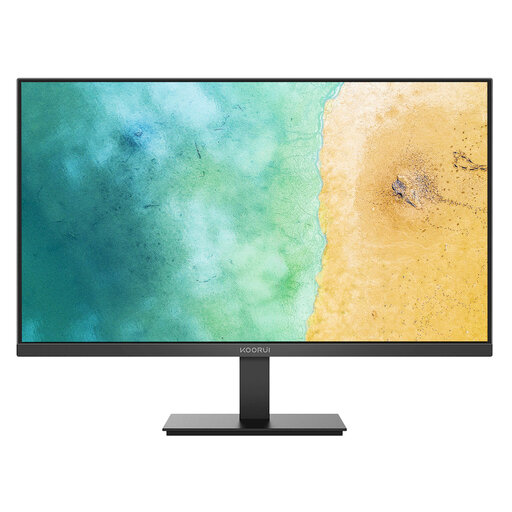
KOORUI MB27V29FS2 27-inch IPS Monitor
An external-screen option for a home desk with a matching laptop video connection and room for a 27-inch display.
The listing states a 27-inch Full HD IPS anti-glare panel, HDMI 1.4, VGA, tilt adjustment, flicker-free technology and VESA 100×100 mounting.
Confirm whether the laptop connects directly by HDMI or needs an adapter or dock. Check audio needs and viewing height, as built-in speakers and stand height adjustment are not stated.
View on Joybuy
 No image available
ASUS ZenScreen MB166C 15.6-inch Portable USB-C Monitor
A portable second-screen option for hybrid work where the laptop has a compatible USB-C video connection.
The listing states a 15.6-inch 1920×1080 IPS display, USB-C upstream connection, anti-glare surface, flicker-free feature, blue-light filter and 780 g weight.
Check that the laptop USB-C port supports DisplayPort Alt Mode or Thunderbolt video. No HDMI input or built-in speakers are listed, so confirm the required connection and audio arrangement.
View on Joybuy
Frequently asked questions
Does every home worker need an external monitor, dock or office-style workstation?
No. HSE says home workers may not need office furniture or additional equipment to achieve a comfortable, sustainable posture. Equipment should follow an assessment of the individual workstation, job and work conditions rather than a default shopping list.
When does a home or hybrid worker need a display-screen assessment?
For workers using display screen equipment daily as part of normal work for continuous periods of an hour or more, employers must carry out a workstation assessment. HSE says that where a worker uses display screen equipment at home and in the office, the assessment should cover both situations.
Can an employer charge an employee for display-screen equipment identified as necessary?
No. Where a display-screen workstation assessment indicates that action is needed, such as providing equipment, HSE says the worker cannot be charged for it. Check the employer’s process before arranging a personal purchase.
What should be checked before buying a USB-C monitor or dock?
Identify the exact laptop model and check its official documentation for video output, charging input, supported external displays and any dock compatibility table. USB-C alone is not enough: Dell states that a data-only or power-only USB-C port will not provide display video, while DisplayPort Alt Mode or Thunderbolt support is needed for the USB-C video route.
What is the basic prolonged-use laptop setup when the screen needs to be raised?
HSE guidance says the keyboard and mouse should be separate from the laptop so that the screen can be elevated on a laptop riser or similar support. A separate display is another option where it suits the assessment and work tasks.


