What matters when choosing
Decide whether your main need is screen placement, separate input or more display area before choosing connections for a fixed desk. Add call equipment according to how you communicate at work, rather than expecting it to address the desk setup itself.
| Concern |
What to check |
Who this matters to |
| Screen position and space |
Check the available desk space and whether a raised laptop can be used with separate input devices. For a monitor, check its input against the laptop’s video output. |
If I spend long periods at one desk, I need a screen position that works for me, or room for more than one on-screen task. Around 33% of consumers put screen position or display area first. |
| Keyboard, mouse and switching |
Check keyboard layout, connection method and available ports; if you use several computers, check device-switching support. |
With my laptop raised, I want to type and use a mouse separately without complicating a move between computers. Separate input or device switching comes first for around 27% of consumers. |
| Displays and peripherals |
Check the laptop’s video mode and supported display count, then compare the dock’s host requirements and power delivery with your laptop. |
At a fixed desk, I want to reconnect my display and other devices without attaching each one separately. Around 27% of consumers prioritise those connections. |
| Call audio and video |
Check conferencing-software and operating-system compatibility, connection type and available ports. |
For regular calls, I need audio or camera equipment that suits how and where I work. That is the primary need for around 13% of consumers. |
Joybuy workstation products
These products cover docks and hubs for connecting peripherals, monitors for additional display space, and a separate keyboard-and-mouse set. Choose the type that addresses your desk arrangement, then check compatibility with your laptop.
 Image unavailable
Targus USB-C Universal Dual HDMI 4K Docking Station, 100W Power Delivery Pass-Thru, Retail Packaging
Consider this dock if your fixed desk needs connections for two HDMI displays. Its title specifies dual HDMI 4K and 100W Power Delivery pass-through; check your laptop’s supported display configuration, charging needs and any external power-adapter requirement before relying on those functions.
View on Joybuy
 Image unavailable
Baseus Metal Gleam Series II 10-in-1 USB-C Hub, Cosmic Black
For a desk with displays and several wired connections, the product name specifies two HDMI outputs, USB-A and USB-C ports, RJ45, SD/TF and a USB-C PD input. It lists one HDMI output at up to 4K 120Hz and the other at up to 4K 60Hz; check whether your laptop supports the intended simultaneous display setup and USB-C video output.
View on Joybuy
 Image unavailable
ASUS ZenScreen MB249C IPS USB-C Monitor
Consider a separate monitor if your laptop screen does not provide enough working area. For this USB-C model, check that your laptop can send video through the intended connection and that its charging needs match the monitor’s capabilities. If you plan to move the screen regularly, confirm the unit’s weight before choosing it for portability.
View on Joybuy
 Image unavailable
Lenovo L32p-30 31.5-inch 4K UHD IPS USB-C Monitor
This 31.5-inch 4K UHD monitor is an option when you have room for a larger display at a fixed desk. Its name specifies IPS and USB-C; check your laptop’s USB-C video support and the monitor’s power-delivery rating if you also intend to charge through that connection.
View on Joybuy
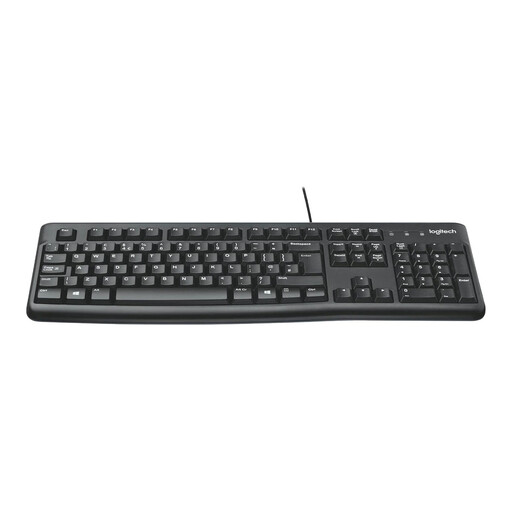 Image unavailable
Logitech MK120 Wired Keyboard and Mouse Set, Black
A separate wired keyboard and mouse can serve a desk where the laptop screen is raised or set farther back. Check that you have the required USB ports, that the keyboard layout suits you and that both devices are compatible with your operating system.
View on Joybuy
Frequently asked questions
Do home and hybrid workers need to buy their own monitor, stand or dock?
Not automatically: display screen equipment guidance calls for an assessment where the rules apply, not the same accessory for every worker. The Health and Safety Executive in Great Britain and the Health and Safety Executive for Northern Ireland advise identifying the equipment needed for the individual home workstation.
When can display screen equipment rules apply at home?
They can apply to long-term home or routine hybrid workers who use display screen equipment daily for continuous periods of an hour or more. That is the criterion set out in guidance from the Health and Safety Executive for Great Britain and the Health and Safety Executive for Northern Ireland; occasional or short periods of home use are treated differently under that guidance.
Can an employer charge for equipment identified by a DSE assessment?
No, where a display screen equipment workstation assessment indicates action such as providing additional equipment, the worker cannot be charged for it, according to guidance from the Health and Safety Executive and the Health and Safety Executive for Northern Ireland. Ask your employer how its assessment and provision process works before buying assessment-identified equipment yourself.
Does USB-C mean a laptop can run a monitor and charge through a dock?
No: check video output and charging separately for the exact laptop, dock, cable and monitor. VESA says USB-C DisplayPort Alt Mode video depends on source-device support, while the USB Implementers Forum says USB4 connections operate according to the mutual capabilities of connected devices.
Will a dock with two display outputs run two external monitors?
Not on every laptop. Kensington states that certain base-chip MacBooks and USB-C Alt Mode laptops support only one external display with its SD5760T dock, so check both the laptop’s display limits and the dock’s compatibility information for your exact configuration.


