What to prioritise when choosing a laptop workstation
Fixed external monitor
Choose this when: you can leave a screen on the desk and want to position it separately from the laptop.
Trade-off: it takes ongoing desk space, and you still need separate keyboard and mouse for the prolonged-use arrangement described by the HSE in Great Britain.
Pack-away external display
Choose this when: you share a surface or need to clear it after work, and can still position the separate screen suitably alongside the laptop.
Trade-off: check the display’s support, power and video connections, as well as where the separate input devices will sit while you work.
For prolonged laptop use in Great Britain, HSE guidance calls for a separate display and separate keyboard and mouse. The percentages below describe consumers’ main setup priorities; around indicates that the figures are approximate.
| Concern |
What to check when buying |
Who this matters to |
| Screen and input positioning |
Check how the separate display can be positioned, and leave room for a separate keyboard and mouse. |
I need the display to sit separately from the laptop, with separate input devices for prolonged work. Around 33% of consumers put screen and input positioning first. |
| Pack-away fit |
Measure the work surface and storage space; check the display support, cables and space for separate inputs. |
If I share a work surface, I need to clear or move the screen, inputs and cables after work. Around 27% of consumers prioritise a setup that can be packed away. |
| Laptop-to-screen compatibility |
Match the laptop’s documented video output to the display or dock; check cable, charging power and supported display count where relevant. |
I need my particular laptop, display and any dock to support the video and charging connections I plan to use. Around 27% of consumers put connection compatibility first. |
| Complete kit and provision |
List the equipment you already have and check what a workplace assessment identifies as needed, where applicable. |
I want to plan the complete equipment set rather than choose a screen in isolation. Around 13% of consumers put the overall kit and its provision first. |
Joybuy product options for a laptop workstation
These Joybuy options cover multiport connection accessories, fixed external monitors, separate keyboard and mouse inputs, and a portable external display for a workstation setup.
 No image available
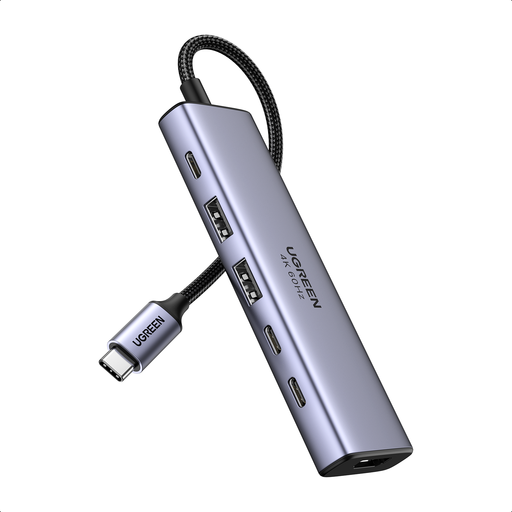
Ugreen 6-in-1 USB-C Multifunctional Adapter
A connection accessory for adding a compatible external display and peripherals to a laptop workstation.
The product name lists HDMI, 2 × USB-A 3.2, 2 × USB-C 3.2 and PD power. Check that the laptop, cable and connected display support the video and charging features you need.
View on Joybuy
 No image available
MSI MD272UPSW 27-inch 4K UHD Smart Monitor with Google TV
A fixed external-display option for a desk-based laptop workstation; plan for separate keyboard and mouse as well.
The product name lists an IPS panel and USB-C 65W. StarTech.com notes that USB-C video and power features require support from the host, cable and connected device, so check the complete connection path and your laptop’s charging requirements.
View on Joybuy
 No image available
HP 680 CFT Dual-Mode Keyboard/Mouse Combo
A keyboard and mouse set for the separate-input part of a prolonged-use laptop workstation. Check that its connection mode suits your laptop and the way you plan to use the setup.
View on Joybuy
 No image available
ASUS ProArt PA278CV IPS WQHD Monitor
A fixed separate-display option for desk-based laptop work. Compare the monitor’s connection options and screen positioning with your laptop and available desk space.
USB-C video and charging require support across the laptop, cable and display; check the exact connection requirements before relying on a single cable.
View on Joybuy
 No image available
ASUS ZenScreen MB249C IPS USB-C Monitor
A separate-display option for a shared or changing work surface. Check that the support and placement suit your surface and that the whole setup can be cleared when needed.
The product name identifies USB-C; confirm that your laptop, cable and display support the video and charging features you intend to use.
View on Joybuy
Frequently asked questions
Can a laptop riser and separate keyboard and mouse be the entire prolonged-use setup?
Not under the two restrictions in the HSE’s prolonged-use guidance for Great Britain: it also says the display should be separate from the laptop. A riser and separate inputs may form part of the arrangement, but they do not replace the separate display.
What should I check before connecting a monitor or dock?
Match the laptop’s documented video output to the display input or dock. For USB-C video and charging, check that the laptop, cable and connected device support the required features, then compare the power available with the laptop’s charging needs. Check multi-display support separately if you plan to connect more than one external screen.
Who handles a work-from-home DSE assessment or equipment identified as necessary?
In Great Britain, the HSE says employers must assess the workstation of a qualifying display screen equipment (DSE) user, and workers cannot be charged for equipment identified as necessary by that assessment. In Northern Ireland, the Health and Safety Executive for Northern Ireland addresses employers’ assessment and risk-control duties separately. These are conditional workplace duties, not a rule that every shopper must buy the same kit.
What if a screen bought online does not fit my setup?
For a qualifying UK distance purchase, GOV.UK says you may tell the seller within 14 days of receiving the item that you wish to cancel, then have another 14 days to return it. Faulty or misdescribed goods have separate rights, so check the terms that apply to your purchase rather than treating a manufacturer’s warranty as the only remedy.


