People who work in several places
If you change rooms, take your computer elsewhere or clear the table after work, a laptop gives you a portable setup. Check that the model can run the applications and meeting tools you actually use.


Choose a laptop if you regularly move between rooms, travel with your work or put the computer away after use. An all-in-one PC makes more sense when you work at a permanent desk and want the screen and computer in one unit. Whichever you choose, check the exact configuration against your work applications, meeting platform and required accessories before buying.
If you change rooms, take your computer elsewhere or clear the table after work, a laptop gives you a portable setup. Check that the model can run the applications and meeting tools you actually use.
If your computer usually stays in one place, an all-in-one combines the display and computer in a single unit. Check its screen, camera, ports and included keyboard and mouse rather than assuming every configuration is the same.
Start with your employer’s or clients’ software requirements, then check the operating system, supported browser and call equipment. Zoom lists a connection, speakers, microphone and webcam among its requirements; Microsoft specifies browser support for Teams meetings.
Choose it when: Your work computer needs to move between rooms, travel or be put away.
Consider: A portable screen and built-in controls do not, by themselves, settle whether your regular desk setup meets your needs.
Choose it when: You work mainly at one desk and want an integrated computer and display.
Consider: It stays at the desk, and the camera, ports and included input devices depend on the exact configuration.
| Priority | What to check | Your needs |
|---|---|---|
| Work location | Decide whether the computer must move, run away from a socket or be stored after work. If it will stay on a desk, compare the space needed for the complete setup. | I switch rooms or take work elsewhere, so being able to carry and put away the computer matters. If I always use one desk, an integrated desktop is also worth considering. |
| Work software | Check the required application against the exact operating-system version and any browser requirements. Microsoft says Teams meetings are fully supported in the latest Microsoft Edge and Google Chrome versions. | My regular documents and employer-required applications need to work on the computer I buy, not just on a similar model. |
| Video calls | Confirm the webcam, microphone, speakers and connection required by your meeting platform. Zoom lists these among its system requirements; built-in and external devices are possible routes. | For frequent calls, I want to know whether I can use the supplied setup or need separate call equipment. |
| Configuration | Compare the exact display, memory, storage and ports with your tasks. Manufacturer specifications from Apple, Dell and Lenovo show that these details vary by model or configuration. | I keep documents locally or use several applications at once, so the particular storage and memory configuration matters more than the product-family name. |
| Desk setup | Check the box contents, especially the keyboard and mouse on an all-in-one. Assess the complete workstation rather than judging comfort by computer type alone. | At a permanent desk, I need to know what I can connect and what equipment will actually be there on the first day. |
A processor or memory figure alone cannot tell you whether your required application, browser or meeting equipment will work.
List the applications and meeting platforms you use, then compare their publishers’ current requirements with the exact computer and operating-system version.
Camera, display and other configuration details vary. Lenovo’s UK listing for one IdeaCentre AIO 5i configuration says its keyboard and mouse are sold separately.
Check the exact model’s box contents, camera, microphone arrangement and ports before deciding whether the desk setup is ready for your calls and work.
Computer type alone does not address the furniture, equipment and working conditions involved in a regular workstation. The UK Health and Safety Executive says employers must assess workstations for workers who use display screen equipment daily as part of normal work, continuously for an hour or more; its guidance also covers qualifying long-term and hybrid home working.
If that describes your work, ask your employer about its workstation assessment before buying equipment intended to address a workstation problem.
UK Office for Product Safety and Standards guidance says electrical products bearing the crossed-out wheeled-bin symbol should not go in household rubbish.
Use an appropriate electrical recycling route. The same UK guidance says a retailer must accept an old electrical product free on a like-for-like basis when you buy a replacement.
Apple’s 24-inch iMac is an all-in-one route for a fixed desk if your work applications support macOS.
Dell offers Windows all-in-one configurations for buyers considering a permanent home desk.
Lenovo has ThinkPad laptops and IdeaCentre all-in-ones, covering both portable and fixed-desk routes.
These options include portable laptops for work that moves between locations and an all-in-one PC for a permanent desk. Compare each configuration with your applications and call setup.
 No image available
A portable option to consider if your work moves between rooms. The product title specifies a Full HD display, Intel N150, 8GB DDR4 RAM and a 128GB SSD. It says Windows 11 Home, while the detailed product information describes Windows 11 Home in S Mode; confirm the supplied edition and whether it supports your work applications.
 No image available
Consider this laptop if you need to carry your work computer and want to compare a configuration with more local storage. Its title specifies an Intel Core 5 120U, 24GB RAM and a 1TB SSD. Check the operating system against your work software and confirm the audio arrangement if you plan to join calls without a headset; a standby-time figure is not a measure of work-use battery life.
 No image available
This all-in-one is the fixed-desk option in this selection. Its title specifies a 27-inch Full HD display, Intel Core i7-13620H, 16GB DDR5 RAM, a 512GB SSD and Windows 11 Home. Check the included mouse and microphone arrangement, as well as compatibility with your work applications, before planning your desk and call setup.
 No image available
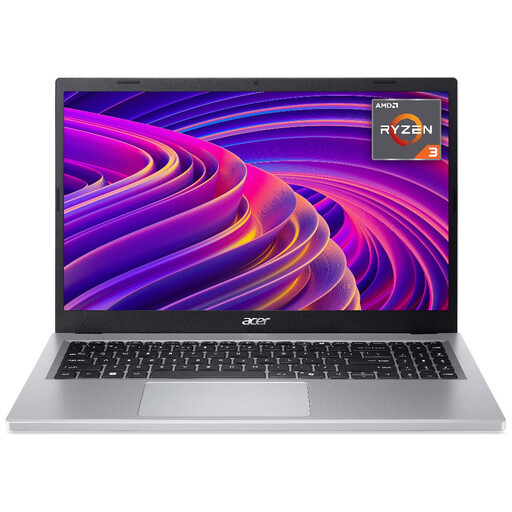
A laptop route for work away from a fixed desk. The title specifies a 15.6-inch Full HD (1920 x 1080) display, AMD Ryzen 3 7320U, 8GB RAM and a 256GB SSD. Product information also uses Aspire 3 naming, so confirm the exact model and configuration; check the microphone setup if you need calls without separate equipment.
 No image available
This portable option can be put away when the working day ends. Its title specifies a Full HD display, AMD Ryzen 3 7320U, 8GB RAM, a 128GB SSD and Windows 11 Home in S Mode. Check that S Mode works with your required applications, that the storage suits your local files and that you have the microphone setup needed for calls.
Choose a laptop if you need to move the computer between rooms, take it elsewhere or store it after work; consider an all-in-one if you mainly work at a permanent desk. Which? distinguishes the value of being able to move or put away a laptop from a fixed desktop setup. For either route, check the exact software compatibility and equipment you need for calls.
No. Start with the applications, files and meeting platform you actually use, then check the exact computer against their requirements. Microsoft’s Teams browser guidance and Zoom’s call-equipment requirements show why a hardware figure alone does not settle compatibility.
Check the exact configuration’s webcam, microphone, speakers, connection and ports against your meeting platform’s requirements. Also check the box contents: Lenovo’s UK listing for one IdeaCentre AIO 5i configuration says its keyboard and mouse are sold separately.
No. The UK Health and Safety Executive’s display screen equipment guidance concerns the workstation, not a prescribed computer type. It says employers must assess workstations for workers who use display screen equipment daily as part of normal work, continuously for an hour or more; qualifying long-term and hybrid home working can also be covered. Ask your employer about that assessment before choosing equipment to address a workstation concern.
Use an appropriate electrical recycling route rather than putting a product marked with the crossed-out wheeled-bin symbol in household rubbish. UK Office for Product Safety and Standards guidance also says a retailer must accept an old electrical product free on a like-for-like basis when you buy a replacement.