For browser-based landing-page design, start with a laptop that has 16GB of memory, SSD storage and a screen that suits your working setup; Figma’s graphical requirements are low, so a dedicated GPU is not a default requirement. If large Photoshop files are a regular part of the job, consider more memory and storage, and check the exact display and processor configuration before choosing a model.
Who needs which setup?
Figma and browser-first designers
If you build layouts and prototypes in Figma, then switch between a browser and code editor, check that your browser supports WebGL. Figma describes its graphical requirements as low; 16GB of memory is a practical starting point for this combined workflow, rather than a Figma minimum.
Windows designers reviewing visual assets
If you need Windows software and assess brand graphics on the laptop screen, compare the display specification of the exact configuration. Dell lists both 100% sRGB and 45% NTSC panel options for its Pro 14 Premium PA14250, so the family name alone does not identify the screen you will receive.
Designers working with large Photoshop assets
If you routinely edit large images while keeping design files, browsers and development tools open, allow room for that combined workload. Adobe recommends at least 16GB of RAM, 100GB of available storage and a fast internal SSD for Photoshop; consider a higher-memory configuration when those tasks regularly run together.
What matters when choosing?
Start with the tools you use throughout the day, then assess the screen you will review work on and the demands of any regular image editing.
| Concern | What to check | Who this matters to |
|---|
| Browser, Figma and coding |
Check for 16GB of memory, SSD storage and a current browser with WebGL available for Figma. |
When my design file, browser tabs and code editor are open together, I want enough room to switch between them without buying graphics hardware solely for Figma. Around 43% of consumers would put this combined workflow first. |
| Screen and asset review |
Check the selected panel’s colour gamut, resolution, brightness and finish; test the finished page at different viewport sizes. |
If I review supplied graphics on the laptop, I need to know which screen the chosen configuration has, while still checking layouts beyond that screen. This would be the primary concern for around 29% of consumers. |
| Photoshop workload |
Check memory, available SSD space and compatibility with your Photoshop version; consider more memory for regular large-file multitasking. |
For frequent work on large image assets, I need capacity for Photoshop alongside my design and development tools. Around 28% of consumers would prioritise that heavier workload. |
Purchasing pitfalls
-
Assuming every version of a laptop has the same screen
Dell lists both 100% sRGB options and a 45% NTSC FHD+ option for the Pro 14 Premium PA14250. Choosing by model-family name can therefore leave you with a different panel from the one you intended for asset review.
Check the selected configuration’s display gamut, resolution, brightness and finish before ordering.
-
Using Figma’s requirements as a Photoshop specification
Figma describes low graphical requirements, whereas Adobe recommends at least 16GB of RAM and substantial available SSD space for Photoshop. The tools place different demands on a laptop.
Choose for the most demanding task you perform regularly, and check the requirements of the Photoshop version you use.
-
Overlooking connections for a desk setup
Apple lists two Thunderbolt 4/USB-C ports on the 13-inch M5 MacBook Air. A monitor and wired accessories may require a dock or adapters even though the laptop supports external displays.
List the displays and peripherals you intend to connect, then check cable, dock and power-delivery compatibility.
-
Planning to upgrade onboard memory later
Dell lists onboard memory for the Pro 14 Premium PA14250, while Lenovo lists soldered memory for the Yoga Pro 7i Gen 11 Aura Edition. Treat memory capacity as a configuration choice to make before purchase.
If larger Photoshop files or more simultaneous tools are likely to become routine, compare the available 32GB configurations now.
Relevant brands to consider
Apple
The 13-inch M5 MacBook Air is a macOS option for browser-first design, Figma and coding.
- Apple lists 16GB starting unified memory, a P3 wide-colour display and support for up to two external displays.
- Its two Thunderbolt 4/USB-C ports may call for adapters or a dock at a desk; check the memory and SSD configuration when buying.
Dell
The Pro 14 Premium PA14250 offers a Windows business-laptop route with memory and display choices.
- Dell lists 16GB and 32GB onboard-memory options and a QHD+ IPS display option with 100% sRGB coverage.
- Dell also lists a 45% NTSC FHD+ panel, so confirm the display on the specific configuration rather than assuming the wider-gamut option is standard.
Lenovo
The Yoga Pro 7i Gen 11 Aura Edition 15-inch is a Windows option to examine when landing-page work regularly includes demanding visual assets.
- Lenovo lists a configuration with 32GB of memory, a 1TB SSD, an RTX 5050 Laptop GPU and a 100% DCI-P3 OLED display.
- The listed OLED panel has a glare finish; consider whether that suits your working environment and whether the extra hardware serves tasks you perform regularly.
Joybuy laptop choices
These laptops span browser-first macOS and Windows work and configurations to consider for heavier image assets. Compare each exact model with your software, screen and storage needs rather than treating the list as a single specification target.
 No image available
Lenovo LOQ Essential 15ARP11, Ryzen 7 170, 16GB, 1TB SSD
Consider this 15.6-inch Windows laptop if your landing-page work also calls for the listed GeForce RTX 5050 graphics. Its title specifies a 144Hz FHD display; check the exact panel details if colour-aware asset review matters to you.
View on Joybuy
 No image available
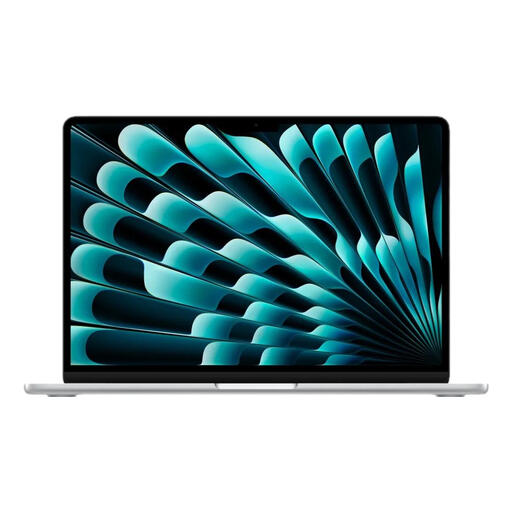
Apple 13-inch MacBook Air M5, 16GB, 1TB SSD, Silver
Consider this macOS model for Figma, browser testing and coding in a 13-inch format. Apple lists two Thunderbolt 4/USB-C ports for this range, so check your desk connections; confirm the exact processor configuration before buying.
View on Joybuy
 No image available
Lenovo Legion Pro 7 16IAX10H, 64GB, 2TB SSD, 83F5000UUK
Consider this 16-inch Windows model only if recurring creative work calls for its listed GeForce RTX 5090 graphics and substantial memory and storage. Check the display gamut, brightness and finish before relying on its screen for colour-aware review.
View on Joybuy
 No image available
Apple 15-inch MacBook Air M5, 16GB, 1TB SSD, Silver
Consider this 15-inch macOS option if you want a larger built-in screen for browser, Figma and coding work. Confirm the exact panel characteristics and the connections required by your desk setup.
View on Joybuy
 No image available
Microsoft Surface Laptop 7 15-inch, Snapdragon X Elite, 16GB, 256GB SSD, Maya
Consider this touchscreen Windows laptop for browser-based design on a 15-inch display. Check that your required Windows applications work with its Snapdragon processor, and that the 256GB SSD leaves enough working space for your files.
View on Joybuy
Common questions
Do I need a dedicated GPU to design landing pages in Figma?
A dedicated GPU is not a default requirement for Figma landing-page work. Figma says its graphical requirements are low, but its browser rendering needs WebGL, so check your browser setup before prioritising graphics hardware.
Is 16GB of memory enough for landing-page design?
16GB is a practical starting point for a combined browser, Figma and coding workflow, and meets Adobe’s recommended RAM level for Photoshop. If you regularly open large Photoshop files alongside many other tools, consider a higher-memory configuration, particularly where memory is onboard or soldered.
How should I test a landing page on a new laptop?
Test the page at multiple viewport sizes rather than judging it only on the laptop screen. MDN Web Docs explains that responsive design addresses different screen sizes and resolutions; if you use Figma in a browser, also confirm that WebGL is available.
What should I do with an old laptop when replacing it?
Check suitable electronics recycling or take-back arrangements before disposing of an old laptop. GOV.UK explains that UK waste electrical and electronic equipment rules aim to encourage recovery, reuse and recycling; confirm the options offered by your retailer or local authority.


