For a measured garden plan that two people will edit in a browser at one desk, start with a readable shared display and a mouse-friendly setup rather than specifying hardware for complex 3D work by default. A touchscreen convertible makes sense if you will sketch or present directly on screen; for detailed SketchUp models, check the exact software’s processor, memory and graphics requirements before choosing a configuration.
Who is this for?
Two-person plan reviewers
If you will compare measurements and move objects around a plan together, leave enough visible space for both the layout and its controls. The Royal Horticultural Society advises starting with a measured scale plan, while GARDENA describes planning on a laptop or PC.
Hands-on layout sketchers
If you want to turn the screen towards someone else or annotate ideas directly, a convertible touchscreen may be useful. Lenovo describes a touchscreen and 360-degree design for its Yoga 7 2-in-1, but says the pen is optional.
Aspiring 3D garden modellers
If your plan will become a detailed SketchUp model, match the laptop to the version of SketchUp and the work you intend to do. SketchUp publishes different requirements for web use and desktop software; a simple garden planner is not the same workload.
What matters when choosing?
Decide whether the usual task is sharing a measured browser plan, annotating on screen or building a detailed 3D model; then assess the screen and exact configuration against that task.
| Concern | What to check | Who this matters to |
|---|
| Shared viewing |
Check screen size and whether the exact laptop can connect to a display at your desk. |
I want us both to read measurements and see the plan controls without repeatedly handing the laptop over; shared viewing would be the primary need for around 40% of consumers. |
| Browser planning |
Confirm that your chosen planner works with the laptop’s browser and operating system, and check memory for your intended tabs. |
I mainly need to adjust and share a straightforward plan, not build a detailed 3D scene; around 30% of consumers would put this simpler workflow first. |
| Detailed 3D work |
Compare the exact processor, memory and graphics configuration with the current requirements for your SketchUp workflow. |
If I expect to develop a complex 3D model, I need to choose around that software rather than a basic web planner; this would lead the decision for around 20% of consumers. |
| Flexible desk use |
Check screen repositioning, touch and compatible pen options, alongside the space available on the desk. |
I need to turn or annotate the screen while leaving room to work together; for around 10% of consumers, that flexibility would matter most. |
Choices to reconsider
-
Choosing touch before checking shared viewing space
A repositionable screen helps with showing ideas, but a smaller display can leave less room for the measured plan and its controls while two people work together.
Start with the screen arrangement you will use most often. For a fixed desk, check whether a larger display or an external monitor would serve that arrangement better.
-
Treating browser planning and complex 3D modelling as one task
A garden plan made in a browser does not establish what a laptop needs for detailed SketchUp modelling. SketchUp publishes requirements for the particular software workflow.
Choose the intended planning software first, then compare its current requirements with the exact laptop configuration.
-
Assuming a touchscreen laptop includes a pen
Touch support alone does not establish that a compatible pen is in the box. Lenovo identifies the pen for its cited Yoga 7 2-in-1 as optional.
If annotation matters, check pen compatibility and box contents for the exact model before relying on stylus input.
-
Choosing by laptop-family name alone
Screen, memory, graphics and connection options can differ between configurations in the same family, changing how well a particular model fits a shared desk or 3D task.
Check the full model identifier and its stated display, memory, graphics and ports against your intended setup.
Relevant brands to consider
Lenovo
The Yoga 7 2-in-1 is relevant if repositioning the screen and making on-screen annotations matter more to you than maximising the viewing area.
- Lenovo describes a 360-degree touchscreen design for its cited 14-inch Yoga 7 2-in-1.
- Lenovo says the pen is optional; confirm what comes with the exact configuration.
ASUS
The Vivobook 16 family is relevant to a conventional larger-screen arrangement for reviewing a plan at a desk.
- A larger-screen configuration may suit a setup where both people view the plan on one laptop.
- Check the exact model’s processor, memory, graphics and connections if your work extends to 3D modelling or an external display.
Dell
Inspiron 16 configurations are relevant if you want a larger display for regular desk-based planning.
- Dell lists 16-inch 16:10 display and 16GB memory options for the cited Inspiron 16 model.
- Confirm the display, graphics and display-capable connections on the exact configuration you choose.
Joybuy product choices
These laptops offer different ways to work on a garden plan at a shared desk, from conventional and flexible displays to configurations with dedicated graphics. Choose against your planning software and the space you will actually use.
 No image available
ASUS ProArt P16 H7606WW-SE006W, 16-inch 4K OLED touchscreen
Consider this configuration if you need a shared touchscreen and plan to check a demanding 3D workflow against its graphics hardware; those graphics are not a requirement for a simple browser plan.
AMD Ryzen AI 9 HX 370; NVIDIA GeForce RTX 5080 with 16GB graphics memory; 64GB RAM; 2TB SSD. Confirm the requirements of the software you intend to use.
View on Joybuy
 No image available
MSI Stealth 18 AI Studio A1VGG-001UK, 18-inch
The 18-inch format is worth considering when two people will usually work at a desk and screen size takes priority over a compact laptop; check that it fits your available space.
Intel Core Ultra 9; 32GB RAM; 2TB SSD; NVIDIA GeForce RTX 4070. Match the exact graphics configuration to your intended 3D software rather than assuming every project needs it.
View on Joybuy
 No image available
ASUS Zenbook DUO UX8406CA-QL135W, dual 14-inch OLED touch displays
Its dual-display arrangement may appeal if you want separate screen surfaces while discussing a plan. Confirm the exact panel resolution before choosing this configuration, particularly if fine plan detail matters to you.
Intel Core Ultra 7 255H; 16GB LPDDR5X RAM; 1TB SSD. Check the graphics requirements separately if you intend to run complex desktop 3D software.
View on Joybuy
 No image available
HP OmniBook X Flip 16-as0004na, 16-inch touchscreen
This 2-in-1 combines a 16-inch screen with touch input for a shared desk where presenting or repositioning the display matters. If you want to draw with a pen, confirm compatibility and box contents for this exact model.
Intel Core Ultra 5 226V; 16GB RAM; 512GB SSD. Check graphics requirements before choosing it for complex desktop 3D work.
View on Joybuy
 No image available
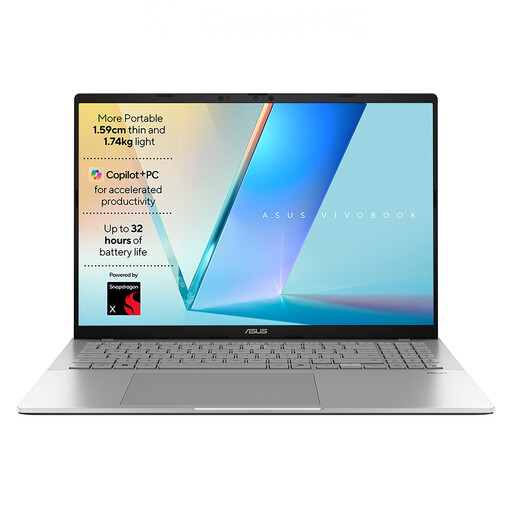
ASUS Vivobook S3607QA-PL004W, 16-inch WUXGA
Consider this conventional 16-inch laptop for viewing a browser-based plan together. If you intend to add a monitor, confirm the display outputs on the exact model before buying.
Qualcomm Snapdragon X1-26-100; 16GB LPDDR5x RAM; 512GB SSD. Check your chosen planning and 3D software against this processor configuration.
View on Joybuy
Common questions
Do I need a powerful laptop to draw a garden layout?
Not for every garden layout. GARDENA describes its myGarden planner as suitable for laptop or PC use; if your work will progress to complex SketchUp models, use SketchUp’s current requirements for that particular web or desktop workflow when choosing hardware.
Is a touchscreen necessary for garden planning?
No: a touchscreen is a choice for direct sketching, annotation or presenting a plan, not a prerequisite for browser planning. SketchUp says its web tool works best with a mouse and keyboard; if you want pen input on a convertible, check compatibility and whether the pen is included.
What should two people check when sharing one laptop?
Check whether both people can read the plan and measurements comfortably in the usual desk arrangement. The Royal Horticultural Society recommends a measured scale plan, so consider the visible workspace and, if you will use a monitor, confirm a suitable display connection on the exact laptop.


