Python beginners with limited desk space
If your desk also holds a mouse, notebook and charger, compare the laptop’s chassis dimensions with the clear space you have. A screen diagonal does not describe the room the whole setup will occupy.


For Python study on a small desk, compare a laptop’s full width and depth with the space you need for a mouse, charger and notes; screen size alone will not tell you whether the setup fits. Choose an operating system that supports your course tools, check the exact memory configuration before ordering, and consider the whole workstation if you will study for long periods.
If your desk also holds a mouse, notebook and charger, compare the laptop’s chassis dimensions with the clear space you have. A screen diagonal does not describe the room the whole setup will occupy.
You need a workable position for the screen, keyboard and mouse, not just a laptop that fits. The Health and Safety Executive advises considering the whole workstation when using a laptop for extended display-screen work.
If your course specifies an editor, packages or an operating system, check those requirements before choosing a platform. The Python Software Foundation offers Windows 64-bit and ARM64 installers, but an installer alone does not establish that your complete course toolchain will work.
Start with the desk area you can actually use, then assess your coding setup and course requirements together. A compact screen does not settle questions about workspace or software compatibility.
| Concern | What to check | Who this matters to |
|---|---|---|
| Desk footprint | Compare the exact model’s width and depth with your clear desk area, allowing room for a mouse and study materials. | If my notebook and mouse have to share a narrow desk, I need enough space left to use them comfortably. Around 42% of consumers put the laptop’s footprint first. |
| Coding view and comfort | Compare the exact display size and aspect ratio; for long sessions, assess where the screen and input devices will sit. | When I spend longer stretches moving between code and course material, I need a readable view and a workable study position. Sustained coding comfort comes first for around 33% of consumers. |
| Course and configuration fit | Check your course’s operating-system and software requirements, then confirm the exact memory and storage variant. | If my course prescribes particular tools, I need the laptop and its configuration to suit that work before I commit. Compatibility and configuration are the primary concern for around 25% of consumers. |
A 13-inch or 14-inch label does not tell you how much desk depth the laptop and the rest of your study materials will use.
Measure your clear desk area and compare it with the exact laptop’s width and depth, leaving room for the items you will use beside it.
The Python Software Foundation lists a Windows ARM64 installer, but that does not establish compatibility for a particular editor, package or native dependency.
Check the course software list against the operating system and processor architecture before choosing macOS or Windows on ARM.
Lenovo UK lists soldered 8GB memory for the cited IdeaPad Slim 5i configuration, while ASUS UK lists 16GB onboard memory for the cited Zenbook 14 UX3480 configuration. Neither description is a reason to assume a later memory upgrade.
Confirm the memory fitted to the exact variant and whether it can be upgraded before ordering.
The Health and Safety Executive notes that overuse, improper use or a poorly arranged display-screen workstation can contribute to fatigue and discomfort.
Consider screen position, keyboard and mouse placement, and breaks as part of the desk setup rather than relying on laptop specifications alone.
ASUS UK lists the Zenbook 14 UX3480 with a 14-inch 16:10 OLED display, 16GB LPDDR5X memory and a chassis measuring 31.12 × 21.58cm.
Lenovo UK lists a 14-inch IdeaPad Slim 5i configuration with a 1920 × 1200 OLED display, 512GB SSD and UK English keyboard.
Apple UK lists a 13.6-inch MacBook Air display alongside configurations with 16GB unified memory and 512GB SSD storage.
Microsoft UK lists a 13-inch Surface Laptop with a Snapdragon X Plus processor, a 1920 × 1280 touchscreen and a weight of 1,225g.
These laptops offer different approaches to Python study on a small desk, including conventional Windows, Windows on ARM, Chromebook and macOS models. Compare each one’s actual footprint and your course requirements rather than treating screen size or operating system alone as the deciding factor.
 No image available
Consider the dual-display arrangement if you want code and reference material in the same setup, but check how its screens and keyboard will fit on your desk.
Intel Core Ultra 7 255H, 16GB LPDDR5X memory and 1TB SSD. Confirm the exact display resolution before ordering.
 No image available
This Windows-on-ARM option merits consideration if your course tools support that architecture; confirm the required editor, packages and native dependencies.
14-inch display, 16GB memory and 512GB SSD.
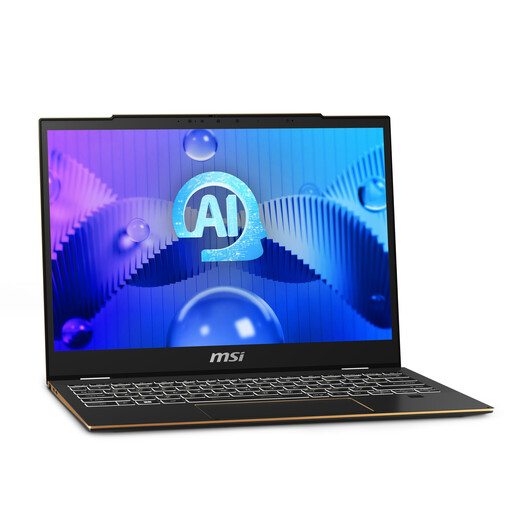 No image available
If you want a smaller-screen laptop for study, check this model’s exact chassis dimensions against your desk before deciding.
Intel Core Ultra 7 155H, 32GB LPDDR5 memory and 1TB SSD. Confirm the display size for the exact variant.
 No image available
Consider this Chromebook only after checking how your course’s editor, packages and other required tools would work in your intended setup.
1920 × 1200 display, Intel Core i3-1315U, 8GB memory and 256GB SSD.
 No image available
This macOS option is worth assessing if your course software supports it; compare the chassis dimensions with your clear desk area before choosing.
M5 chip with 10-core CPU and 10-core GPU, 16GB memory and 1TB SSD.
Choose by chassis dimensions and the space left for your other study items, not the screen diagonal alone. ASUS UK, for example, lists its cited 14-inch Zenbook 14 UX3480 at 31.12 × 21.58cm; compare the exact model you are considering with your own clear desk area.
Yes, the Python Software Foundation provides a Windows ARM64 installer, but that covers Python availability rather than your whole course environment. Check the required editor, packages and any native dependencies for Windows-on-ARM compatibility before buying.
Neither is a universal requirement, but your screen and input-device arrangement matters during long sessions. The Health and Safety Executive advises considering the whole display-screen workstation, so assess what fits your desk and lets you study comfortably.
A faulty laptop may engage consumer rights under UK law; GOV.UK states that consumer law protects purchases of goods made online or in person. Seek advice about the circumstances of the fault and your purchase rather than assuming a retailer’s change-of-mind policy determines your rights.