What matters when choosing?
For one personal device for school or college work, establish what the course requires before weighing portability against a fixed workspace. Then check how you will type, store and submit work on the device you are considering.
| Concern | What to check | Who this matters to |
|---|
| Software and assessment compatibility |
Ask for required app versions and supported operating systems; confirm browser, file and assessment-equipment rules with the course. |
If my coursework depends on a named application or assessment setup, I need to know it will work before choosing a device; around 36% of consumers put this compatibility question first. |
| Portability and typing |
Compare the exact device’s size, keyboard, charging arrangements and connections needed for study. |
When I carry coursework between locations and write regularly, a practical typing setup matters throughout the day; portability and typing come first for around 29% of consumers. |
| Browser-led study |
Confirm the learning platform, account, file-storage and offline workflow; for a tablet, check keyboard compatibility by model. |
If my work is mainly online, I want a Chromebook or tablet that can edit and submit the required files; around 21% of consumers prioritise this browser-led setup. |
| Fixed workspace |
Check whether a device must go to class and which monitor, keyboard, camera or other desk accessories the setup needs. |
With most of my work done at one desk, I may value a larger work area over carrying the device; a fixed workspace is the first concern for around 14% of consumers. |
Joybuy study laptops and Chromebooks
These Windows laptops offer conventional keyboards for typed coursework, while the Chromebook is a route for browser-led study. Match any model to your course’s software, accounts and assessment requirements before deciding.
 No image available
ASUS Vivobook 15 X1504VA, 15.6-inch, Core 5 120U, 24 GB, 1 TB SSD
A conventional Windows laptop to consider for typed coursework, subject to your course’s application and assessment requirements.
The listed configuration has an Intel Core 5 120U processor, 24 GB memory and a 1 TB SSD. If you work away from a socket for long periods, check battery runtime under a relevant workload.
View on Joybuy
 No image available
ASUS Vivobook 14 X1407QA-LY003W, Snapdragon X, 16 GB, 512 GB SSD
This 14-inch Windows laptop is an option for portable typed coursework if required applications and peripherals support its Snapdragon-based configuration.
It is listed with a Snapdragon X processor, 16 GB memory and a 512 GB SSD. Confirm compatibility with the course and software publishers, and check battery runtime if you need to work away from a socket.
View on Joybuy
 No image available
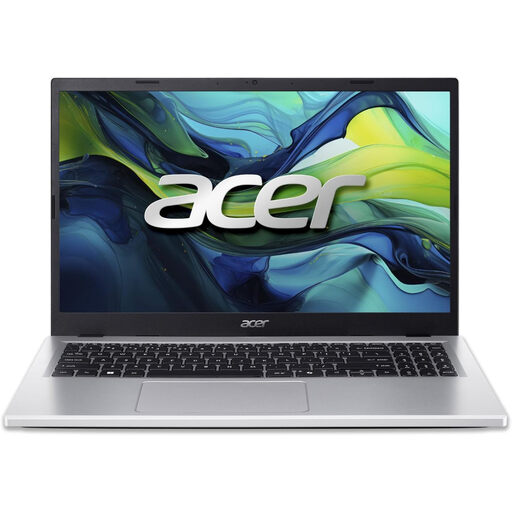
Acer Aspire Go 15 AG15-71P, Core i5-13420H, 8 GB, 256 GB SSD
Consider this Windows 11 Home laptop for conventional coursework after checking the course’s software and storage needs.
The listed configuration has a 15.6-inch Full HD screen, Intel Core i5-13420H processor, 8 GB memory and a 256 GB SSD. Compare those figures with the requirements of your applications and files.
View on Joybuy
 No image available
HP OmniBook X Flip 16-as0004na, Core Ultra 5 226V, 16 GB, 512 GB SSD
This Windows 11 Home 2-in-1 is worth considering if you want a keyboard for coursework alongside touchscreen use, provided course software is compatible.
The listed configuration has a 16-inch touchscreen, Intel Core Ultra 5 226V processor, 16 GB memory and a 512 GB SSD. Check its weight and battery runtime if you plan to carry it regularly.
View on Joybuy
 No image available
Acer Chromebook Plus 514 CB514-5H, Core i3-1315U, 8 GB, 256 GB SSD
This ChromeOS laptop is an option for browser-led coursework once your course confirms its applications and submission workflow work on a Chromebook.
It is listed with a 14-inch 1920 × 1200 display, Intel Core i3-1315U processor, 8 GB memory and a 256 GB SSD. Traditional Windows or macOS desktop-native software is not compatible with ChromeOS; Google also says Chromebook Microsoft 365 editing requires OneDrive.
View on Joybuy
Questions about study devices
What should I ask my school or college before buying?
Ask for named applications and versions, supported operating systems, browser and account requirements, file-storage arrangements, accessibility tools and any need to bring a device to class. For on-screen exams, ask the examinations office about equipment: the Joint Council for Qualifications says centres inform candidates what they need.
Is a tablet with a keyboard enough for coursework?
It can be enough for reading, notes, online classes and document work if every required service and file workflow works on that tablet. Choose a compatible computer instead if the course requires desktop-only software or a specified operating system, and check keyboard support for the exact tablet model.
Can a Chromebook edit Word, Excel and PowerPoint files?
Google says Chromebooks can open and edit Microsoft 365 files through its documented setup, which requires OneDrive for opening and editing. Confirm account access, any offline work and the features required by your particular coursework before relying on that workflow.
Do I need to buy a device for an on-screen exam?
Do not buy one on that assumption: the Joint Council for Qualifications says the examination centre will tell candidates what equipment they need. Ask your examinations office about the specific assessment and whether a personal device has any role.


