What to decide before buying
Laptop-based desk
Choose it when: The same computer must move away from the shared desk or the surface needs to be cleared between users.
Trade-off: A desk monitor or dock adds connections to plan, and a USB-C socket alone does not establish display or charging compatibility.
Compact desktop
Choose it when: The computer will stay at the desk and replacing a tower’s chassis is the main space-saving task.
Trade-off: The monitor and peripherals still need space, and the computer cannot be carried away and used on its own like a laptop.
Keep the current computer
Choose it when: The computer remains suitable for the work, but screen placement or desk-side connections are the problem.
Trade-off: A new display or dock is useful only if the existing computer supports the intended connection and display arrangement.
Once you know whether the main computer must move, plan the screen and connections around that exact machine. For consumers arranging a compact shared home workspace, each percentage below refers to those who would put that concern first.
| Concern |
What to check |
Who this matters to |
| Desk space |
Measure the whole setup, including the monitor base, peripherals and cable clearance. Check a compact desktop’s dimensions and mounting options for the exact model. |
If a tower crowds the shared desk, I want to reclaim space without giving up a stationary computer. Around 31% of consumers put desk footprint first. |
| Portability |
Decide whether the computer must work away from the desk; if it will also use a desk monitor, check the laptop’s documented display outputs. |
When I need to take my work to another room, I want to carry the same main computer with me. Portability comes first for around 25% of consumers. |
| Screen workspace |
Match the computer’s supported display count, resolution and refresh rate with the monitor’s inputs and the intended cable or adapter. |
If my computer is still usable but its screen arrangement restricts desk work, I would address the display before replacing the machine. Around 25% of consumers prioritise screen workspace. |
| Dock compatibility |
Check the exact host model’s video mode and charging input against the dock, cable, power supply and planned monitors. |
I want fewer connections to make each time I use the desk, but only if the monitor works and the laptop charges as intended. Connection certainty is the primary concern for around 19% of consumers. |
Joybuy products for these setups
These choices cover compact desktops for a computer that stays at the desk, plus a dock and monitor to consider when planning compatible display connections. Choose the main computer route first, then check any accessory against the exact computer and available desk space.
 No image available
SOYO Y5Pro mini PC, Core i5 8250U/8350U, 8GB, 256GB SSD
Consider this for a computer that will stay at a shared desk. The name lists Windows 11, 8GB DDR4, a 256GB SATA SSD, Wi-Fi 5 and BT5.2. It lists the processor as Core i5 8250U/8350U, so confirm which configuration will be supplied. Plan the monitor, keyboard and mouse arrangement separately and check what is included.
View on Joybuy
 No image available
Apple Mac mini (2026), M6, 24GB, 512GB SSD, Silver
Consider this stationary setup if the work you need to do is compatible with macOS. The product name specifies a 12-core CPU, 12-core GPU, 24GB RAM and a 512GB SSD. Check support for your applications and peripherals, and plan for a separate display, keyboard and mouse.
View on Joybuy
 No image available
Lenovo IdeaCentre Mini PC 01IRH10R, Core 5, 16GB, 512GB SSD, 91B2000XUK
Consider this when the main computer will remain at the desk and a compact Windows desktop suits the work. The product name specifies an Intel Core 5 processor, 16GB RAM and a 512GB SSD. Check its dimensions and supported monitor connections against your layout, and confirm which peripherals are included.
View on Joybuy
 No image available
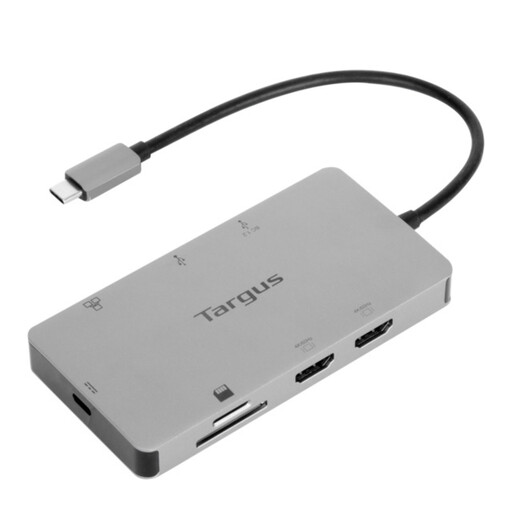
Targus USB-C Universal Dual HDMI 4K Dock, 100W Power Delivery Pass-Thru
Consider a dock if a laptop is regularly connected to the shared desk. The product name identifies dual HDMI 4K connections and 100W Power Delivery pass-through; those figures do not establish what a particular laptop and monitor combination will achieve. Check host video compatibility, accepted charging wattage, the required power adapter and package contents before relying on it for a one-cable setup.
View on Joybuy
 No image available
ASUS ProArt PA278CV IPS WQHD monitor
Consider an external monitor if the existing computer remains suitable but the desk needs a different screen arrangement. The product name specifies an IPS WQHD display. Before choosing a connection, match the computer’s video output to the monitor’s inputs and check whether the screen and stand fit the shared desk.
View on Joybuy
Frequently asked questions
Will any USB-C laptop work with a USB-C dock and monitor?
No: the connector shape alone does not confirm video output or a suitable charging arrangement. Check the exact laptop’s supported video mode, the dock’s host compatibility, the intended number of screens and the power requirements. Microsoft documents charging limitations for its Surface USB4 Dock under specific host-power conditions; check the documentation for the equipment you intend to pair.
Does a compact desktop save more desk space than a laptop?
It depends on how the shared desk is used: a compact desktop can reduce the computer chassis footprint, but it still needs a display and input devices. A laptop can leave the desk when work ends, although a separate screen and peripherals may still be part of its desk setup. Measure the complete arrangement rather than comparing computer sizes alone.
What should I check before adding an external monitor?
Check the exact computer’s display outputs against the monitor’s inputs and your intended resolution, refresh rate and number of screens. Include any dock, cable or adapter in that check. Apple’s Mac mini specifications illustrate why display support needs to be checked for the particular configuration and port combination, not inferred from the product-family name.
What matters when buying a used computer for a shared desk?
Check that its stated condition, charger and connections meet the work you plan to do, then test it promptly and keep the listing. Citizens Advice says faulty-goods rights can apply to second-hand purchases; the available remedy depends on the circumstances. Check the seller’s separate terms if you also want the option to return an item simply because you change your mind.


