Silence-first home researchers
If cooling-fan noise distracts you while you research recipes, write entries and update a spreadsheet, look for evidence about the exact model rather than assuming a thin laptop will be quiet.


For researching recipes, organising entries and working across documents, choose a laptop that fits your software and gives you enough screen space without adding unwanted fan noise. MacStoreUK describes the 15-inch M5 MacBook Air as fanless, while Trusted Reviews identifies a 13-inch Surface Laptop as fanless; if you rely on Windows software or peripherals, check the exact Surface configuration and compatibility before choosing it.
If cooling-fan noise distracts you while you research recipes, write entries and update a spreadsheet, look for evidence about the exact model rather than assuming a thin laptop will be quiet.
If you keep recipe websites, notes, images and an index open together, compare display size, memory and storage against the way you plan to work.
If your index depends on existing Windows applications or connected devices, check software compatibility and the ports on the precise laptop configuration before ordering.
For a recipe index in a quiet study, decide whether silence, working space or compatibility is your primary constraint, then compare the exact configurations that meet it.
| Concern | What to check | Who this matters to |
|---|---|---|
| Quiet operation | Check fanless claims or acoustic information for the exact model and generation. | If fan noise breaks my concentration while I catalogue recipes, quiet operation comes before other features. Around 50% of consumers put this need first. |
| Working space | Compare display size and resolution, memory and storage for the files and windows you expect to use. | Keeping sources, notes and index entries visible together matters more to me than having the smallest laptop; roughly 30% of consumers prioritise working space. |
| Software and peripherals | Check essential applications, device connections and, for a Windows-on-Arm model, software support. | I need my existing indexing tools and connected devices to keep working. For about 20% of consumers, compatibility is the primary concern. |
A slim chassis alone does not establish how a laptop will sound in a quiet study.
Check evidence for the exact model and generation. MacStoreUK describes the 15-inch M5 MacBook Air as fanless, and Trusted Reviews identifies a 13-inch Surface Laptop as fanless; do not transfer either claim to a different configuration.
Importing recipe photos or using an external drive, scanner or monitor can depend on connectors that differ between models. Apple lists two Thunderbolt 4 ports on the 13-inch M5 MacBook Air; Microsoft lists USB-A and USB-C connections for its 13-inch Surface Laptop.
List the connectors on your existing devices and compare them with the exact laptop before ordering.
An adapter, hub or card reader may be needed for devices without a matching connection.
If you use specialist indexing software or printer and scanner utilities, compatibility can affect whether your established workflow carries over to a Snapdragon-based Surface Laptop.
Check support information from each essential software or device publisher for the Surface configuration you intend to buy.
UK government guidance places electrical equipment within the WEEE framework, so disposal is worth planning when you replace a laptop.
Check the retailer’s take-back arrangements or local-authority recycling options, and erase personal data before handing over the old device.
MacBook Air is a macOS option for recipe organisers considering a compact workspace or a fanless 15-inch M5 model.
Surface Laptop is a Windows option to examine if a touchscreen and USB-A connection matter alongside quiet-study use.
The 14-inch IdeaPad Slim 5 Gen 10 AMD is a conventional Windows laptop to consider for study work.
These M5 MacBook Air configurations suit readers considering macOS for their recipe index. Choose between the 15-inch options and the more compact 13-inch option by workspace and storage needs, then check software and accessory fit.
 No image available
Consider this for a 15-inch recipe-index workspace if macOS fits your software; MacStoreUK describes the 15-inch M5 model as fanless.
This Silver configuration has 16GB memory and a 1TB SSD. Check the connections required by your existing accessories.
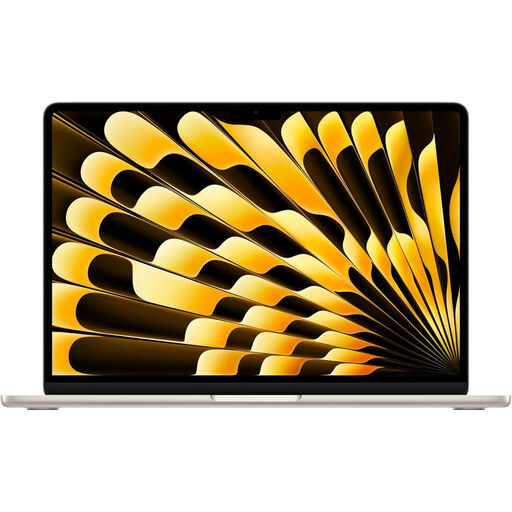 No image available
Consider this for a 15-inch recipe-index workspace if macOS fits your software; MacStoreUK describes the 15-inch M5 model as fanless.
This Starlight configuration has 16GB memory and a 512GB SSD. Check that its storage and accessory connections suit your files and devices.
 No image available
Consider this compact option for recipe research and notes if macOS fits your essential software.
This Starlight configuration has 16GB memory and a 1TB SSD. If quiet operation is decisive, confirm acoustic behaviour for this exact configuration and check its accessory connections.
Not necessarily for browser research, writing and organising entries. Start with the display, memory, storage and software requirements of your own workflow, especially if you use a specialist database or manage many image files.
Look for a fanless claim or acoustic information tied to the exact model you plan to buy. MacStoreUK describes the 15-inch M5 MacBook Air as fanless, and Trusted Reviews identifies a 13-inch Surface Laptop as fanless; neither finding establishes how every other configuration sounds.
Contact the seller and keep your order confirmation, product description and evidence of the fault. GOV.UK explains that the Consumer Rights Act 2015 covers faulty goods; a manufacturer’s warranty is separate from your rights against the selling trader.
Use an appropriate electrical-equipment recycling route and erase your personal data before handing the laptop over. UK government WEEE guidance describes retailer take-back responsibilities; check the retailer’s applicable arrangements or your local authority’s recycling options.