
24/7 Customer Support

Free returns

Same-day & Next-day Delivery

Quality Guaranteed

Unlock Your Welcome Offers: FREE Delivery | Up to 80% OFF | Free 30-day JoyPlus trial
Download the APP
Buying a laptop in the UK can be confusing. Processor names, RAM figures, SSD capacities and operating-system labels often appear more important than they are in everyday use. A low price may also hide compromises that become frustrating after a few months.
This guide explains the practical specifications worth checking before you buy laptops, from Windows 11 laptops and budget laptops to student laptops, business laptops and gaming laptops.
Processor families are not directly comparable by number alone. A modern entry-level chip may suit browsing and documents, while a higher-performance processor is more appropriate for editing, demanding software or gaming. Check the processor model, core count and intended workload rather than relying on a marketing label such as “powerful” or “next generation”.
For everyday use, 8GB RAM and an SSD can provide a practical starting point. If you regularly keep many browser tabs open, work with large files or use creative applications, consider laptops with 16GB RAM.
A 128GB drive may be sufficient for documents, web use and a small number of applications, but Windows, updates and personal media can consume space quickly. Laptops with SSD storage generally offer faster start-up and application loading than traditional hard drives, but SSD speed does not compensate for insufficient capacity.
For general study or home use, 256GB SSD storage offers more flexibility. A 512GB SSD is more suitable for work files, photos, applications and offline content. Gamers and creatives may need 1TB or more, particularly when storing large games or video projects.
Windows 11 Home in S Mode limits installation to apps from the Microsoft Store unless you switch out of S Mode. The change is free, but it is irreversible. Check this before buying if you need specialist software, third-party utilities or desktop applications.
Chromebook Plus laptops use ChromeOS rather than Windows or macOS. They work well with browser-based services, Google Workspace, Android apps and selected Linux tools, but they are not compatible with every traditional Windows or Mac desktop programme. Confirm software compatibility before ordering.
14-inch laptops and lightweight laptops are easier to carry between home, university and the office. A 15-inch laptop usually provides a larger working area and may include a numeric keypad, but it can be heavier. A 16-inch or 17-inch model is more suitable for gaming and desktop-style use, although it is less convenient for commuting.
For office documents and streaming, Full HD resolution is a sensible minimum on a 15.6-inch screen. A 16:10 WUXGA display, such as 1920 × 1200, provides additional vertical space for documents and web pages. IPS panels generally offer wider viewing angles than TN panels, while an anti-glare finish can reduce reflections near windows or under office lighting.
RAM affects how many applications can remain open smoothly. 8GB RAM suits browsing, video calls, office software and online learning. 16GB RAM provides more headroom for multitasking, development tools, photo editing and gaming. Check whether memory is upgradeable: some slim models use onboard RAM that cannot be expanded.
An SSD improves responsiveness, but capacity remains important. Look for 256GB, 512GB or 1TB SSD storage according to your files and applications.
Integrated graphics are suitable for office work, streaming and casual games. Gaming laptops with a dedicated NVIDIA GeForce RTX graphics processor are designed for more demanding games and creative workloads. A high refresh-rate display, such as 144Hz or 240Hz, can show smoother motion, but actual frame rates depend on the game, settings and graphics hardware.
Performance laptops also require effective cooling. Keep vents clear and use gaming models on a hard, stable surface. A powerful laptop may also weigh more and require its charger during intensive use.

Why This Fits Their Persona: A practical choice for students, families and home users handling documents, browsing, streaming and video calls. Its 15.6-inch Full HD screen and 1.58kg weight balance viewing space with portability.
The specification clearly lists Windows 11 Home in S Mode and 128GB SSD storage, so buyers can plan around the software restriction and limited capacity.
AMD Ryzen 3 7320U processor, 8GB DDR5 memory, Full HD anti-glare display and Wi-Fi 6.
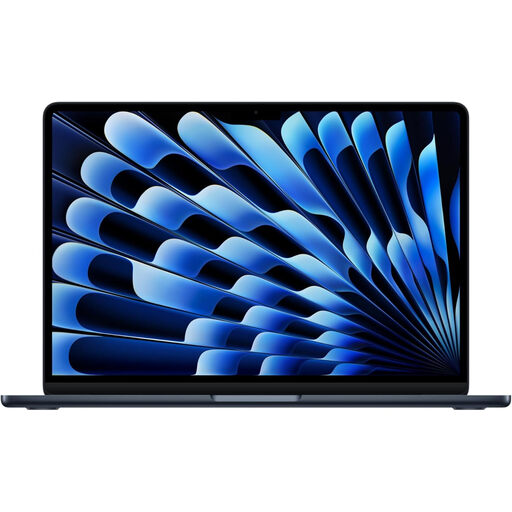
Why This Fits Their Persona: Its compact format suits professionals, students and frequent travellers who want a portable macOS laptop for productivity, communication and creative applications.
The 16GB unified memory and 512GB SSD provide more working capacity than entry-level configurations, while the 13-inch size keeps portability clear.
M5 chip, Liquid Retina display, 16GB unified memory, 512GB SSD and Thunderbolt 4 connectivity.
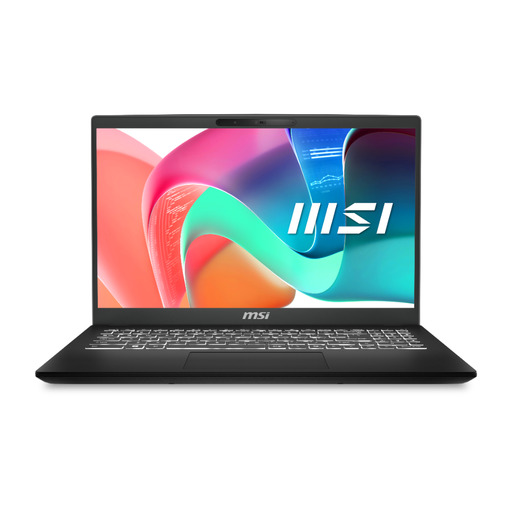
Why This Fits Their Persona: Designed around office software, video calls and commuting, with a 15.6-inch screen and a useful selection of ports for workplace accessories.
Its specification states 16GB RAM and 512GB SSD storage, avoiding the limited-memory and small-drive combination found on some entry-level business laptops.
Intel Core 5 processor, 16GB RAM, 512GB SSD, USB-C Power Delivery and built-in RJ-45 Ethernet.

Why This Fits Their Persona: A suitable specification for gamers and creative users who need dedicated graphics, fast storage and a high-refresh-rate screen rather than maximum portability.
The dedicated GeForce RTX 5050, 16GB RAM and 1TB SSD are specified individually, while the stated 2.30kg weight makes the portability trade-off clear.
RTX 5050 graphics with 8GB GDDR7 memory, 144Hz Full HD IPS display, 16GB DDR5 RAM and 1TB PCIe 4.0 SSD.
We have compiled a complete, real-time list of products that fully satisfy these strict selection criteria and UK safety regulations.
Yes. A 14-inch model can provide a practical balance between screen space and portability for lectures, library work and commuting. Check the weight, battery specification, keyboard layout and available ports before buying.
It is generally suitable for web browsing, documents, streaming and video calls. Choose 16GB RAM if you use many applications simultaneously, edit photos or videos, run development tools or want additional capacity for future software.
Electricity use depends on the charger rating, battery condition, brightness and workload. Lightweight productivity laptops typically use less power than gaming laptops with dedicated graphics. Using sleep settings, reducing unnecessary background apps and keeping the battery in good condition can help reduce routine energy use.