
24/7 Customer Support

Free returns

Same-day & Next-day Delivery

Quality Guaranteed

Unlock Your Welcome Offers: FREE Delivery | Up to 80% OFF | Free 30-day JoyPlus trial
Download the APP
Choosing among today’s laptops involves more than comparing processor names or looking for the lowest price. A model that seems suitable online may have limited memory, an inconvenient operating system or a display that does not match your working habits.
The key is to match the specification to your routine. A university student may prioritise portability and battery life, while a remote worker may need a comfortable keyboard, reliable video-call camera and sufficient ports. Families and home users may value straightforward setup and storage capacity, whereas creative users need stronger graphics and a colour-accurate screen.
A large storage figure does not automatically mean a faster laptop. SSD storage generally provides quicker start-up and file access than older hard-disk technology, but capacity still matters. A 128GB drive can become restrictive once you install applications, save photos and download system updates.
For general use, 256GB is a more practical starting point. Users storing large media libraries, design files or offline video should consider 512GB or 1TB SSD storage.
Most Windows 11 laptops use Intel or AMD processors, but newer Copilot+ PCs may use ARM-based Qualcomm chips. ARM laptops can offer efficient performance and long battery life, but some specialist software, older utilities, drivers and games may require a native ARM version or compatibility mode.
Check the software requirements before choosing an ARM Windows laptop, particularly if you use accounting packages, engineering tools, virtual machines or professional creative applications.
Manufacturers usually quote battery figures under specified test conditions. Actual results vary according to screen brightness, video calls, browser tabs, connected accessories and processor load. A laptop advertised with long battery life may deliver less during demanding use.
Look at battery capacity, charging type and the expected workload rather than relying on one headline figure. USB-C charging can also be useful when you already carry a compatible charger for other devices.
8GB RAM remains suitable for email, web browsing, documents, streaming and light online learning. However, users who regularly keep many browser tabs open, join video calls while editing documents or use creative applications should consider 16GB RAM.
Memory is sometimes soldered to the motherboard, meaning it cannot be upgraded later. Check this detail before buying, especially when comparing lightweight laptops. The ASUS Vivobook 14 Copilot+ PC, for example, has 16GB onboard LPDDR5X memory, so choosing the desired capacity at purchase is important.
Processor labels should be considered alongside the operating system and intended workload. Entry-level Intel and AMD chips can handle everyday use, while Core 5, Core i5, Ryzen 5 and Apple silicon models provide more headroom for multitasking.
Windows 11 offers broad software compatibility and is a practical choice for work, education and family use. ChromeOS is designed around browser-based services, Google Workspace and Android applications. It can be straightforward to maintain, but traditional Windows or macOS desktop software may not run natively.
macOS laptops such as the MacBook Air suit users already invested in Apple devices and applications. Confirm that your required software is available for macOS before switching platforms.
14-inch laptops often balance workspace and portability. A 15-inch or 15.6-inch model provides more room for spreadsheets and side-by-side documents, though it may take up more space on a small footprint. A 16-inch touchscreen 2-in-1 can be useful for presentations, drawing and tablet-style browsing, but its hinge and display may add weight.
Resolution also matters. Full HD is suitable for everyday productivity, while WUXGA and 2K screens offer additional vertical workspace. IPS panels generally provide wider viewing angles than TN panels. If you work near windows or under bright lighting, an anti-glare finish can reduce reflections.

Why This Fits Their Persona: A practical option for first-time buyers, families and students who need Windows 11 for browsing, documents, video calls and online learning.
It uses a 15.6-inch Full HD anti-glare display and SSD storage rather than relying on a small, low-resolution panel or slow mechanical drive.
AMD Ryzen 3 7320U, 8GB LPDDR5 RAM, 256GB NVMe SSD and a stated battery capacity of up to 10 hours.
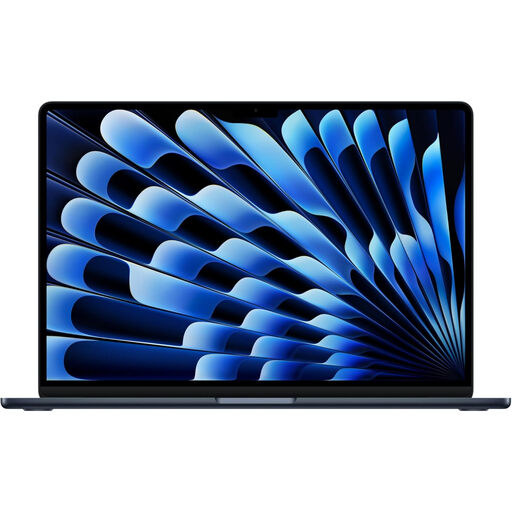
Why This Fits Their Persona: Suitable for professionals, students and mobile workers wanting a compact macOS laptop with higher memory and storage for sustained multitasking.
Its 24GB unified memory and 1TB SSD reduce the likelihood of early storage pressure or memory limitations, while the compact design supports commuting.
M5 chip, 13.6-inch Liquid Retina display, 24GB unified memory, 1TB SSD, Wi-Fi 7 and MagSafe 3 charging.

Why This Fits Their Persona: Designed for users who need a larger display, convertible modes and additional capability for creative work, presentations and demanding applications.
The 360-degree hinge is a functional feature rather than a cosmetic extra, giving laptop, tent, stand and tablet modes for different tasks.
16-inch 2K IPS touchscreen, Intel Core Ultra 5 226V, 16GB RAM, 512GB SSD and Intel Arc Graphics.

Why This Fits Their Persona: A compact choice for students and families using Google Workspace, browser applications, Android apps and online learning platforms.
ChromeOS automatic updates and built-in protection reduce routine maintenance, while 256GB PCIe SSD storage avoids relying solely on cloud space.
14-inch WUXGA IPS display, 8GB RAM, 256GB SSD, Wi-Fi 6 and a stated battery figure of up to 12 hours.
We have compiled a complete, real-time list of products that fully satisfy these strict selection criteria and UK safety regulations.
They can be, particularly for students who use many browser tabs, video conferencing, office applications and specialist software at the same time. 8GB RAM is adequate for lighter study, but 16GB gives more room for multitasking and may extend the useful life of the laptop.
A laptop may remain suitable for several years when its processor, memory, storage and operating system match the workload. Keeping vents clear, installing security updates and avoiding battery damage can help preserve usability. Lifespan also depends on whether memory and storage can be upgraded.