
24/7 Customer Support

Free returns

Same-day & Next-day Delivery

Quality Guaranteed

Unlock Your Welcome Offers: FREE Delivery | Up to 80% OFF | Free 30-day JoyPlus trial
Download the APP
Buying a laptop can become confusing quickly. Processor names, AI features, display types and storage capacities often sound impressive, but they do not always translate into a better choice for your actual routine. A student carrying a computer between lectures has different priorities from a video editor, home worker or business customer.
This guide explains the practical specifications to check, the common buying traps to avoid and our top recommendations for 2026 across several budgets and use cases.
A high-end processor may be useful for 3D rendering, software development or professional video production. For email, web browsing, Microsoft 365, streaming and online learning, however, an entry-level or mid-range chip may provide sufficient performance.
Consider your typical workload rather than choosing based on processor branding alone. Spending more on a powerful CPU can leave less budget for memory, storage or a better display.
RAM affects how many applications and browser tabs can remain active at once. SSD storage holds your operating system, applications and files. A laptop with a fast processor but only 8GB of RAM may feel restricted during heavier multitasking, while a large SSD does not compensate for limited memory.
For general Windows laptops, 8GB RAM is a practical starting point, while 16GB is more suitable for regular multitasking, creative applications and longer-term use. A 512GB SSD offers more flexibility than 128GB or 256GB if you store photos, coursework or downloaded media locally.
Weight is only part of portability. Check the charger size, screen dimensions, battery capacity and available ports. A 15-inch laptop may provide a more comfortable workspace but take up more room in a small rucksack than a lightweight 13- or 14-inch model.
Battery figures should also be treated as estimates. Actual use varies according to brightness, applications, Wi-Fi activity and power settings.
For documents, video calls and everyday browsing, processors such as the AMD Ryzen 3, Intel Core 5 and similar mainstream chips can be appropriate. Moving to Ryzen 5, Core Ultra or Apple silicon makes more sense when you regularly edit media, work with large files or run demanding software.
Gaming and creative laptops require extra attention to graphics. A dedicated GPU, such as an NVIDIA GeForce RTX model, can assist with compatible games, 3D software and GPU-accelerated editing. Integrated graphics are generally more appropriate for office work, study and casual entertainment.
Choose 16GB RAM if your budget allows and you expect to keep multiple applications open. Some thin laptops have onboard memory that cannot be upgraded, so confirm this before ordering.
For storage:
SSD storage also enables faster booting and application loading than older mechanical hard drives.
A Full HD resolution of 1920 × 1080 is suitable for most 15-inch laptops. A 16:10 display, such as 1920 × 1200, provides additional vertical space for documents and web pages. OLED and Liquid Retina XDR screens can provide strong contrast and detailed visuals, but they may increase the purchase price.
Check whether you need:
Copilot+ PCs can provide dedicated AI acceleration and Windows features, but ARM-based Windows laptops may have compatibility differences with some specialist software, older games and peripherals. Check application requirements before purchasing.
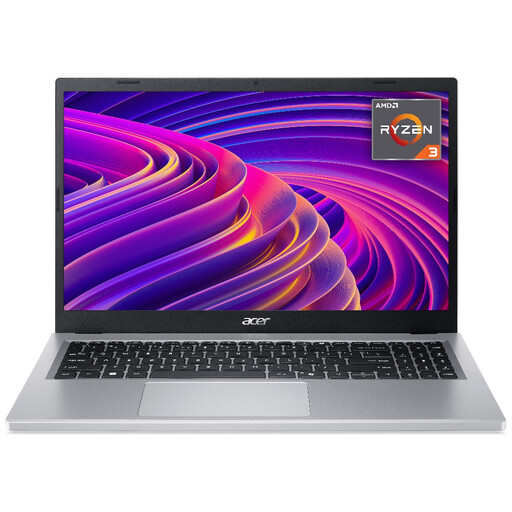
Why This Fits Their Persona: A practical choice for UK students, home users and shoppers seeking budget laptops for documents, browsing, streaming and online learning. It combines a Full HD IPS display with a 1.6kg chassis.
Its 8GB RAM and 256GB NVMe SSD provide a clearer baseline than models with very restricted storage. The stated battery estimate should still be checked against your usage.
15.6-inch 1920 × 1080 IPS display, 8GB LPDDR5 RAM, 256GB SSD and Wi-Fi 6.
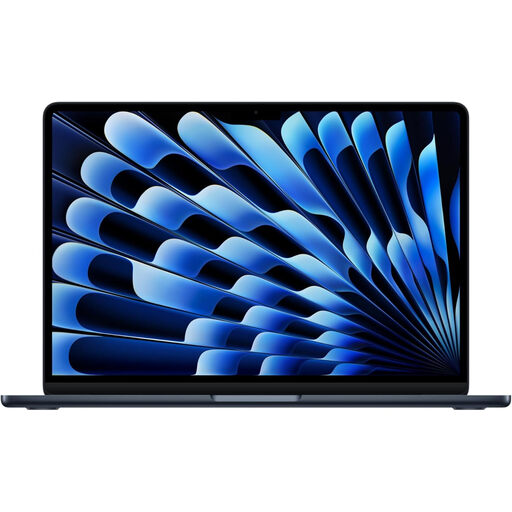
Why This Fits Their Persona: Suitable for students and professionals who value a compact design, macOS and straightforward everyday portability for commuting, study and office work.
The 16GB unified memory and 512GB SSD avoid the limitations of very low-memory configurations. Confirm that required university or workplace software supports macOS.
M5 chip, 13-inch Liquid Retina display, 16GB unified memory, 512GB SSD and Thunderbolt 4 connectivity.

Why This Fits Their Persona: Designed around demanding creative workloads, including editing, design, rendering and other applications that can use dedicated graphics performance.
The specification clearly identifies 64GB RAM, 2TB SSD storage and a dedicated GPU, rather than relying only on vague AI or performance terminology.
Ryzen AI 9 HX 370, RTX 5080 Laptop GPU with 16GB GDDR7, 64GB RAM, 2TB SSD and 4K 120Hz OLED touchscreen.
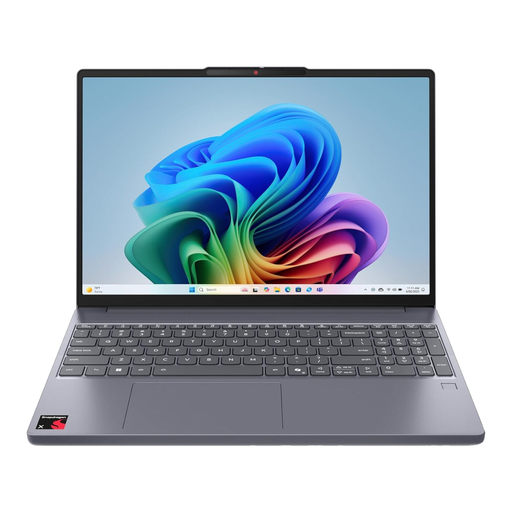
Why This Fits Their Persona: A 15.3-inch Windows option for commuters and home workers who want a larger OLED screen, 16GB memory and a portable 1.79kg design.
Its 16GB LPDDR5X memory avoids an entry-level multitasking configuration. As an ARM Windows device, software compatibility should be confirmed before purchase.
Snapdragon X platform, 16GB LPDDR5X RAM, 15.3-inch OLED display and 256GB PCIe Gen4 SSD.
The range also includes 15-inch laptops such as the ASUS Vivobook 15 with 24GB RAM and 1TB SSD, the HP 15-fd0064na with an Intel Core i5 processor and the MSI Modern 15 with 8GB RAM and 512GB SSD. These specifications may suit office documents, video meetings and home administration.
For a larger Apple configuration, the 16.2-inch Apple MacBook Pro with M5 Max, 36GB unified memory and 2TB SSD is specified for demanding professional workflows. Its Liquid Retina XDR display, Thunderbolt 5 ports and SDXC card slot may appeal to creative users who need macOS and substantial local storage.
We have compiled a complete, real-time list of products that fully satisfy these strict selection criteria and UK safety regulations.
Yes. SSD storage generally provides faster booting and application loading than mechanical hard drives. It is now a practical feature to prioritise, although capacity still matters. A 128GB SSD may fill quickly after installing applications and updates.
A laptop’s useful service period depends on construction, battery wear, software demands and whether its memory or storage can be upgraded. For longer ownership, consider 16GB RAM, at least a 512GB SSD where affordable, a current operating system and a warranty suitable for your needs.
Not necessarily. They can provide dedicated hardware for compatible AI features and may offer strong efficiency. However, ARM-based models can have application and peripheral compatibility considerations. Check your required business, education, creative or gaming software before ordering.