
24/7 Customer Support

Free returns

Same-day & Next-day Delivery

Quality Guaranteed

Unlock Your Welcome Offers: FREE Delivery | Up to 80% OFF | Free 30-day JoyPlus trial
Download the APP
Buying a laptop can quickly become confusing. Processor names, AI features, display technologies and memory figures all compete for attention, while important practical details are often buried in the specification sheet.
For UK shoppers comparing laptops for study, work, home use, creative applications or gaming, three common traps deserve particular attention:
The right choice depends on how you use the machine, how often you carry it and which compromises you are willing to accept.
For everyday browsing, documents, streaming and video calls, entry-level Intel or AMD processors can be suitable. Intel Core i3, Intel N-series and AMD Ryzen 3 laptops are generally aimed at lighter workloads, while Intel Core i5 laptops and AMD Ryzen 5 laptops offer more scope for multitasking.
For demanding creative software, 3D work and gaming, look beyond the processor name. Dedicated graphics, cooling and sustained power limits can have a greater practical effect than a small difference in CPU speed.
Memory is equally important:
Check whether the RAM is upgradable. Some slim laptops have onboard memory, meaning the installed capacity cannot be expanded later.
Windows 11 laptops remain the simplest choice for broad software compatibility. Copilot+ PCs add a neural processing unit, or NPU, for compatible AI features. Snapdragon laptops can offer an efficient, quiet design, but confirm that specialist applications, older software and accessories support Windows on ARM before committing.
An SSD is preferable to an older mechanical hard drive for faster start-up and application loading. However, capacity matters more than many buyers expect.
Cloud storage and external drives can help, but they add cost and require reliable internet access or additional hardware.
A Full HD display is adequate for everyday work. Higher-resolution screens can provide sharper text and more workspace, but they may consume more power and increase the price.
Choose based on the task:
Also check for a UK keyboard layout, webcam privacy features, USB-C charging, HDMI and the wireless standard. Wi-Fi 6 and Wi-Fi 7 describe network capability, not guaranteed broadband speed.

Why This Fits Their Persona: A straightforward option for browsing, streaming, basic coursework and home administration, with a 15.6-inch Full HD screen and 1.58kg chassis for occasional travel.
Its specification clearly positions it for everyday use, helping buyers avoid paying for gaming-class graphics they will not use.
AMD Ryzen 3 7320U, 8GB DDR5 memory, 128GB SSD, Wi-Fi 6 and a physical camera privacy shutter.

Why This Fits Their Persona: The 360-degree hinge suits users moving between desk work, presentations, reading and entertainment at home or on campus.
It combines 16GB RAM and a 512GB PCIe Gen4 SSD, avoiding the common low-memory, low-storage compromise in flexible laptops.
16-inch 2K IPS touchscreen, Intel Core Ultra 5 226V, integrated NPU, Wi-Fi 7 and four usage modes.
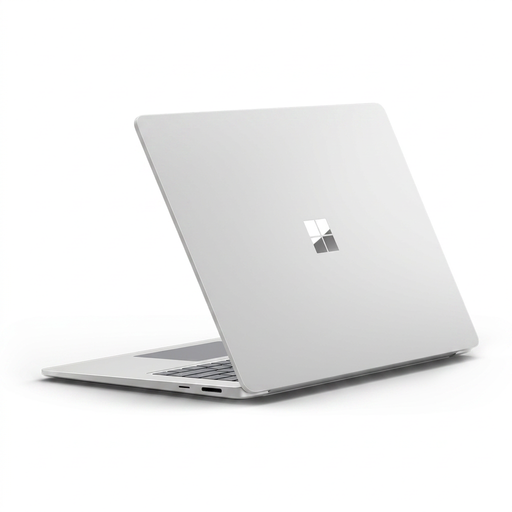
Why This Fits Their Persona: Designed for users who want a premium-feeling Windows laptop for mobile productivity, video calls and a spacious touchscreen workspace.
The Snapdragon X Elite platform is clearly specified, so buyers can check ARM software support instead of assuming all Windows applications behave identically.
16GB LPDDR5x RAM, 15-inch 3:2 PixelSense touchscreen, 120Hz dynamic refresh rate and Wi-Fi 7.

Why This Fits Their Persona: Aimed at creators and demanding users working with video, 3D, design or GPU-accelerated applications who need substantial local resources.
The specification lists 64GB memory, a 2TB SSD and dedicated graphics, making its heavy-workload positioning clear rather than relying on processor branding alone.
AMD Ryzen AI 9 HX 370, NVIDIA GeForce RTX 5080 with 16GB GDDR7, 4K OLED touchscreen and 2TB SSD.
We have compiled a complete, real-time list of products that fully satisfy these strict selection criteria and UK safety regulations.
Yes, provided the specification matches the course. For documents, research, browser tabs and video calls, 8GB RAM may be adequate, while 16GB RAM gives more flexibility. Students using engineering, design or media software should check the application’s processor and graphics requirements before ordering.
Lifespan depends on workload, care, battery use and software demands. A laptop with 16GB RAM, a 512GB SSD and a current mid-range processor offers more room for changing applications than a basic 4GB or 128GB model. Keep Windows and manufacturer drivers updated, avoid blocking ventilation and use an appropriate charger.
Consumption varies significantly. Lightweight laptops generally use less power during browsing and office work than gaming laptops with dedicated graphics. High-performance models may draw considerably more power when gaming or rendering, so compare battery capacity, charger wattage and your actual usage pattern rather than relying only on advertised battery figures.