
24/7 Customer Support

Free returns

Same-day & Next-day Delivery

Quality Guaranteed

Unlock Your Welcome Offers: FREE Delivery | Up to 80% OFF | Free 30-day JoyPlus trial
Download the APP
By Joybuy Product Recommendation Officer
Buying a laptop can look straightforward until you compare processor names, RAM figures, storage types, display specifications and operating-system restrictions. A low headline price may conceal limited storage, soldered memory or a screen that is unsuitable for long study and office sessions.
This guide helps UK students, home users, remote workers, professionals, creators and gamers compare laptops and desktop alternatives using practical specifications rather than promotional language.
RAM affects how many applications a computer can handle at once. Storage holds Windows, programmes and personal files. A laptop with 8GB RAM and a 128GB SSD may feel responsive for browsing and documents, but available storage can become limited after Windows updates, applications and media files are added.
For general study and office work, 8GB RAM is a sensible starting point. Users working with large spreadsheets, photo libraries or creative software may prefer 16GB or more. A 512GB SSD gives considerably more working space than 128GB without requiring an external drive immediately.
Some budget laptops use Windows 11 Home in S Mode. This configuration restricts installations to compatible Microsoft Store apps until the user switches out of S Mode. The change is free on supported devices but is irreversible, so check this before buying if you need desktop software, specialist university applications or utilities downloaded from a manufacturer’s website.
Windows 11 Home and Windows 11 Pro also have different feature sets. Business users should check whether they require organisation-management or security features before choosing a model.
A 120Hz or 240Hz panel can display motion more frequently than a 60Hz screen, but the benefit depends on the computer producing suitable frame rates. Gaming laptops with a dedicated graphics processor are designed for more demanding visual workloads, while integrated graphics are generally more appropriate for everyday applications, streaming and less demanding games.
Also check the panel type, resolution, brightness and surface finish. A Full HD anti-glare display may be more practical for commuting or university work than a high-resolution glossy panel that reflects windows and overhead lighting.
The processor influences application performance, multitasking and battery demands. Entry-level chips suit email, web browsing and document editing. Mid-range processors, such as Intel Core i5 or AMD Ryzen 5 models, provide more flexibility for simultaneous office, communication and media tasks.
For 3D work, modern games, video production and GPU-accelerated applications, look for a dedicated graphics processor. The amount of graphics memory is also relevant when working with high-resolution textures, large video projects or demanding creative software.
A laptop with 8GB RAM can suit basic productivity, but check whether the memory is upgradeable. Some thin devices use soldered RAM, meaning the original capacity cannot be expanded later. Heavy users should consider 16GB, 32GB or 64GB RAM, depending on their software and workload.
Desktop PCs often provide more straightforward upgrade paths than laptops. This can make them practical for users who expect to add memory, storage or a graphics card later.
An SSD generally provides quicker system start-up and application loading than a traditional hard disk drive. NVMe SSDs are common in current laptops and desktops, although actual performance also depends on the computer’s processor and cooling system.
For travel around the UK, weight, charger size and battery capacity matter. A 15.6-inch laptop offers more screen space and often includes a numeric keypad, but smaller 13- or 14-inch devices are easier to carry. Battery-life figures are manufacturer estimates and can vary with brightness, Wi-Fi use, applications and power settings.

Why This Fits Their Persona: Its 15.6-inch Full HD display, 1.58kg weight and numeric keypad suit students, household administration and everyday entertainment.
It specifies 8GB DDR5 memory and a 128GB SSD, making the key capacity limits visible before purchase. Windows 11 Home in S Mode should still be considered if you need non-Store software.
Full HD anti-glare screen, Wi-Fi 6, physical camera shutter and stated battery life of up to 10 hours.

Why This Fits Their Persona: Designers, video editors and creators gain a high-resolution touchscreen, substantial memory and dedicated graphics in a portable 1.95kg format.
The specification lists 64GB RAM, 2TB SSD storage and an RTX 5080 Laptop GPU, rather than presenting display quality alone as a measure of performance.
4K OLED touchscreen with 120Hz refresh rate, Wi-Fi 7 and HDMI 2.1 connectivity.
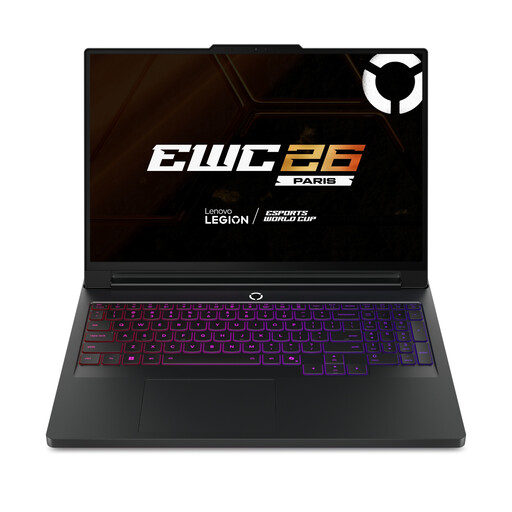
Why This Fits Their Persona: Gamers and creators who need mobile performance can use its high-spec processor, dedicated graphics and 240Hz OLED display for demanding workloads.
The 64GB RAM, 2TB SSD and RTX 5090 specification indicates capacity for demanding applications, while the listed vapour-chamber cooling addresses sustained-load requirements.
WQXGA 2560×1600 OLED display, 240Hz refresh rate and two internal M.2 NVMe slots.

Why This Fits Their Persona: Remote workers and mobile users can switch between laptop, stand, tent and tablet modes for meetings, reading and presentations.
Its 16GB RAM and 512GB SSD provide more headroom than entry-level configurations, while the 360-degree hinge gives the touchscreen a practical purpose.
2K IPS touchscreen, Wi-Fi 7, 5MP IR camera and 16GB LPDDR5x memory.
A laptop is not automatically the most suitable format. A desktop PC can provide stronger upgrade potential and easier cooling for a fixed workstation. A mini PC such as the SOYO Y5Pro takes less desk space and can connect to two HDMI displays, although its older processor platform should be matched to basic tasks.
An all-in-one PC integrates the computer behind the monitor, reducing cable clutter. The MSI Pro AP222T includes a 21.5-inch Full HD touchscreen, Windows 11 Pro and a 128GB SSD, but its 4GB RAM is more suited to general-purpose use than intensive multitasking.
We have compiled a complete, real-time list of products that fully satisfy these strict selection criteria and UK safety regulations.
For essays, web research, video calls and standard office applications, 8GB RAM can be suitable. Students using design, engineering, data-analysis or video-editing software should consider 16GB or more, particularly if the memory cannot be upgraded.
An SSD has no spinning platters and generally offers quick start-up and application loading. However, lifespan depends on usage, heat, battery condition, software support and physical handling. Regular backups remain important regardless of storage type.
Laptops usually consume less electricity because they use lower-power components and have built-in displays and batteries. A desktop PC may use more power, especially during gaming, but can offer easier upgrades that delay full replacement. Compare the computer’s power requirements with how many hours you expect to use it each week.